Sélectionner une organisation
Tableau Agent does not work and gives error: Something went wrong. Try again.
Date de publication: Oct 30, 2025
Description
The user is experiencing issues with the Tableau Agent in Tableau Cloud (Web). Despite enabling all AI features in the settings, the agent does not work with the data sources, including both the sample Super Store and their own published data.
Steps:
- Enable Tableau Agent
- See the error trying to use it typing anything to the box.
Something went wrong. Try again.
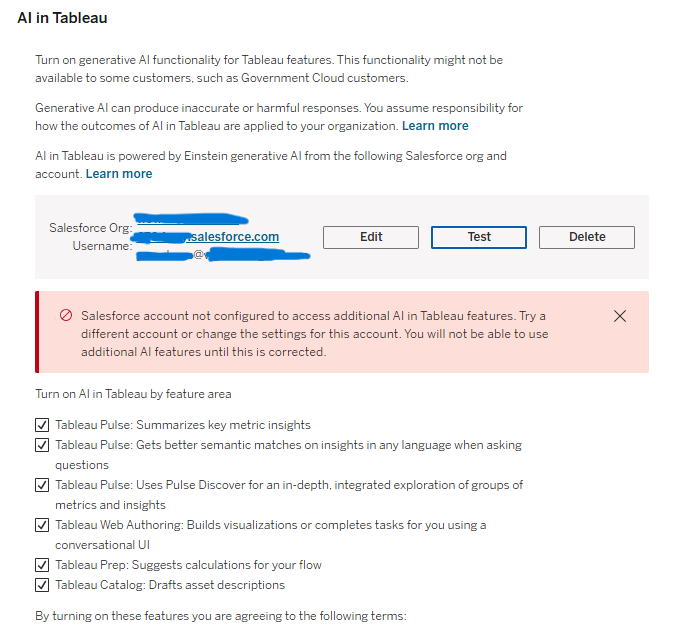
3. Navigate to AI in Tableau under Settings on Tableau Cloud. Click on Test button under Settings, see a new error:
Salesforce account not configured to access additional AI in Tableau features. Try a different account or change the settings for this account. You will not be able to use additional AI features until this is corrected.
Résolution
- Set up Salesforce Org with Einstein Generative AI as shown in the Tableau Help to Set up Einstein generative AI in Salesforce.
- Test once more to ensure the Salesforce Org is properly linked with Tableau AI in the Settings page in Tableau Cloud.
Ressources supplémentaires
Numéro d’article de la base de connaissances
004754151
Cet article a-t-il résolu votre problème ?
Dites-nous ce que nous pouvons améliorer !
