조직 선택
Salesforce Platform: Fetch Related Records Between Objects Connected by a Junction Object Using Lightning Flows (No Code)
게시 일자: Aug 28, 2026
상세 설명
No-code solution to fetch records between two related objects connected through a Junction Object with the help of Salesforce Lightning Flows.
솔루션
This article explains how to use a no-code Autolaunched Flow in Salesforce to fetch records between two objects that don't have a direct 1:1 or 1:n relationship, but are instead connected indirectly through a Junction Object.
Why This Matters
In many business process scenarios, you have to fetch records between multiple objects, and sometimes those objects are not directly related — they don't have a direct 1:1 or 1:n relationship. To relate data in cases of Many-to-Many relationships, Salesforce uses a Junction Object. However, fetching the related parent object record using the Junction Object can be a conundrum. This article shows how to use Lightning Flows to fetch indirectly related parent records efficiently, using an Autolaunched Flow to build a reusable piece of logic.
A common business scenario is fetching related Opportunity Line Item records related to an Opportunity under an Account. In this scenario, the Opportunity object acts as a Junction Object between Account and Opportunity Line Item.
Step 1: Create an Autolaunched Flow
- Go to Setup, type Flows in the Quick Find box
- Click New Flow
- Select Start From Scratch, click Next
- Select Autolaunched Flow type, and click Create
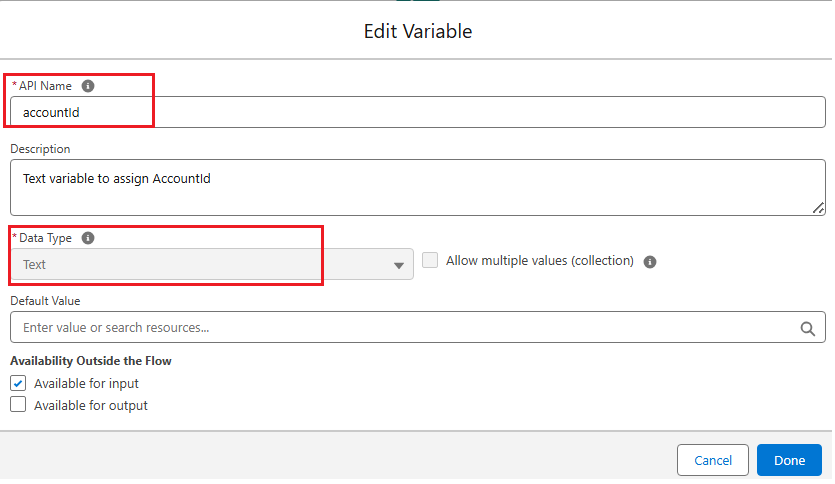
Step 2: Create a Variable to Hold the Account Id
Create a Variable resource. Provide a relevant API Name, Description, and Data Type as Text or any Data Type depending on your business use case.
Step 3: Get the Related Opportunity Records
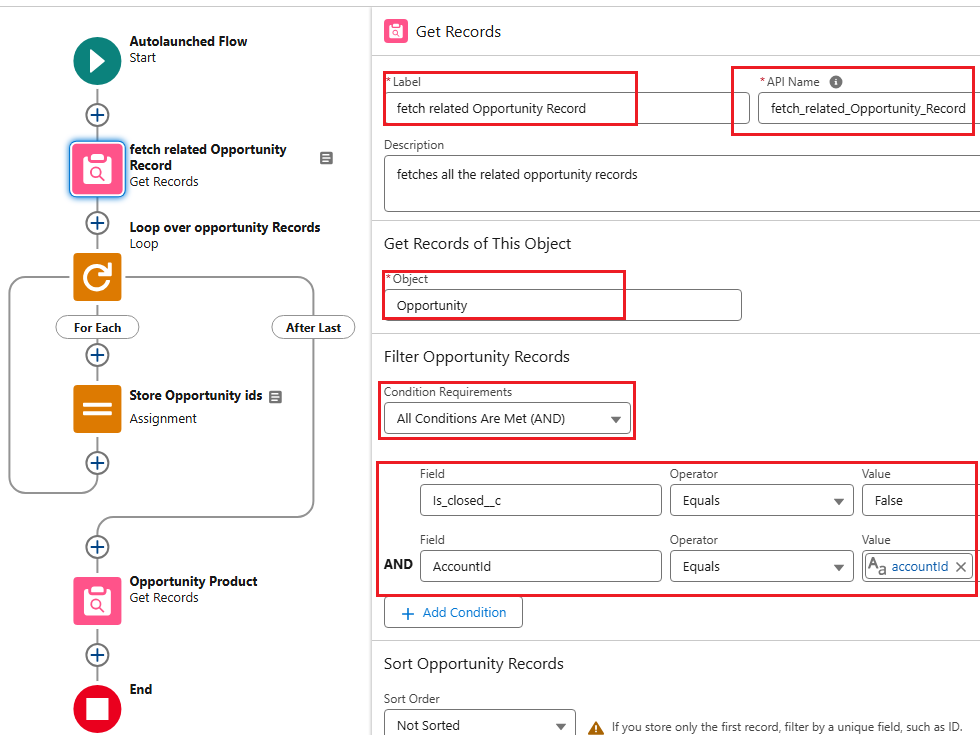
Fetch all the related Opportunity records under an Account using the Get Records element. Use filters to declare which field values under Opportunity are relevant to the current context of the process.
- Create a Get Records element and provide a relevant Label, API Name, Object, and Condition Requirements as shown in the screenshot below
Step 4: Create a Collection Variable for Opportunity Ids
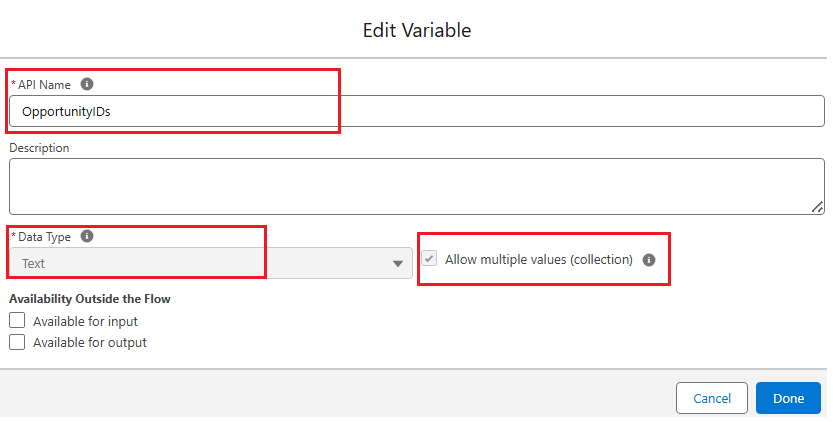
Create a Variable resource with Data Type Text (or any type depending on your use case) and check the Allow multiple values (collection) checkbox.
Note: Be sure to check the collection checkbox, since the Flow then treats the variable as a list/array instead of a simple variable.
Step 5: Loop Through the Retrieved Opportunity Records
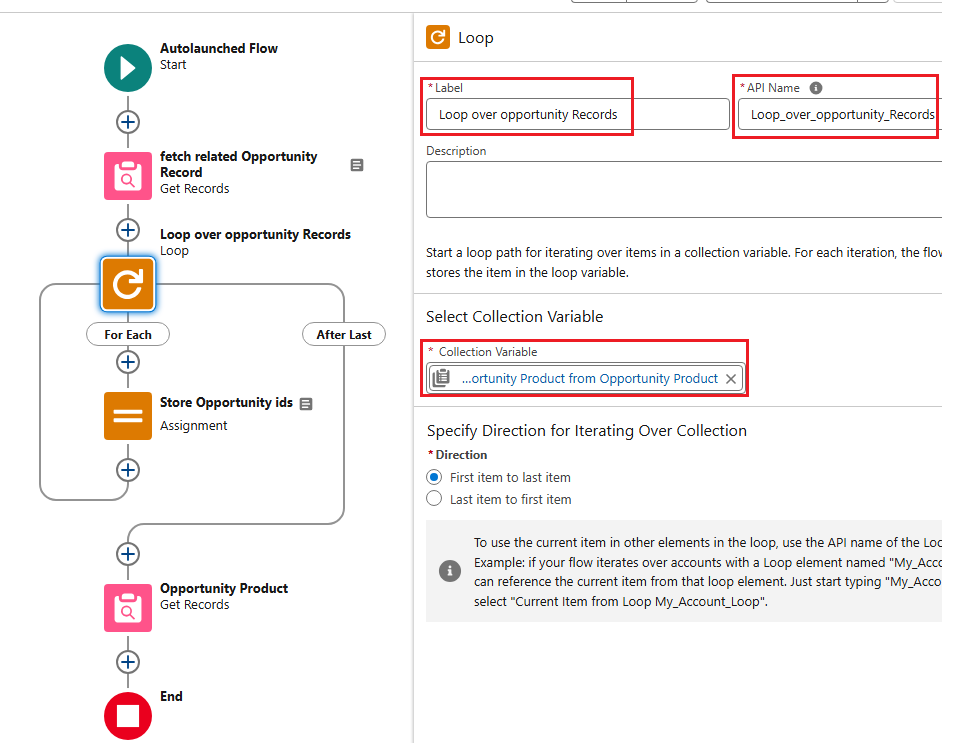
Loop over the records retrieved from the previous Get Records element.
- Create a Loop element and provide a relevant Label, API Name, and Collection Variable as shown in the screenshot below
Step 6: Add Each Opportunity Id to the Collection
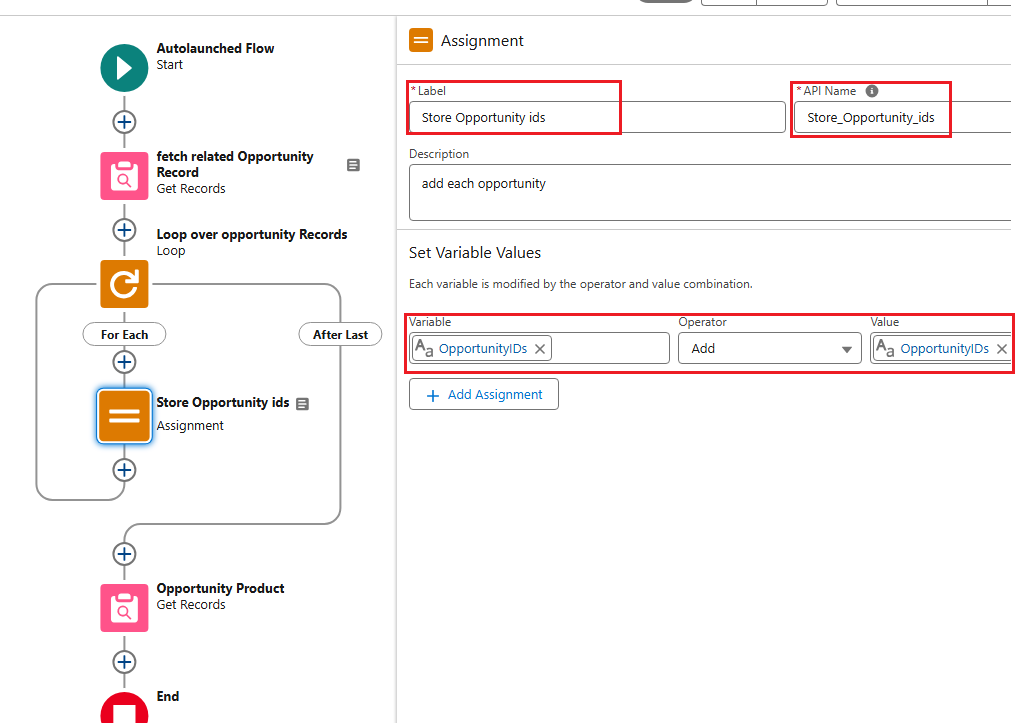
Use an Assignment element inside the loop to store each Opportunity Id in the collection variable using the "+" (Add) operator. This step appends the related Opportunity Id of an Account into the list.
- Create an Assignment element and provide a relevant Label, API Name, and Set Variable Values as shown in the screenshot below
Step 7: Fetch Opportunity Line Items Using the Id List
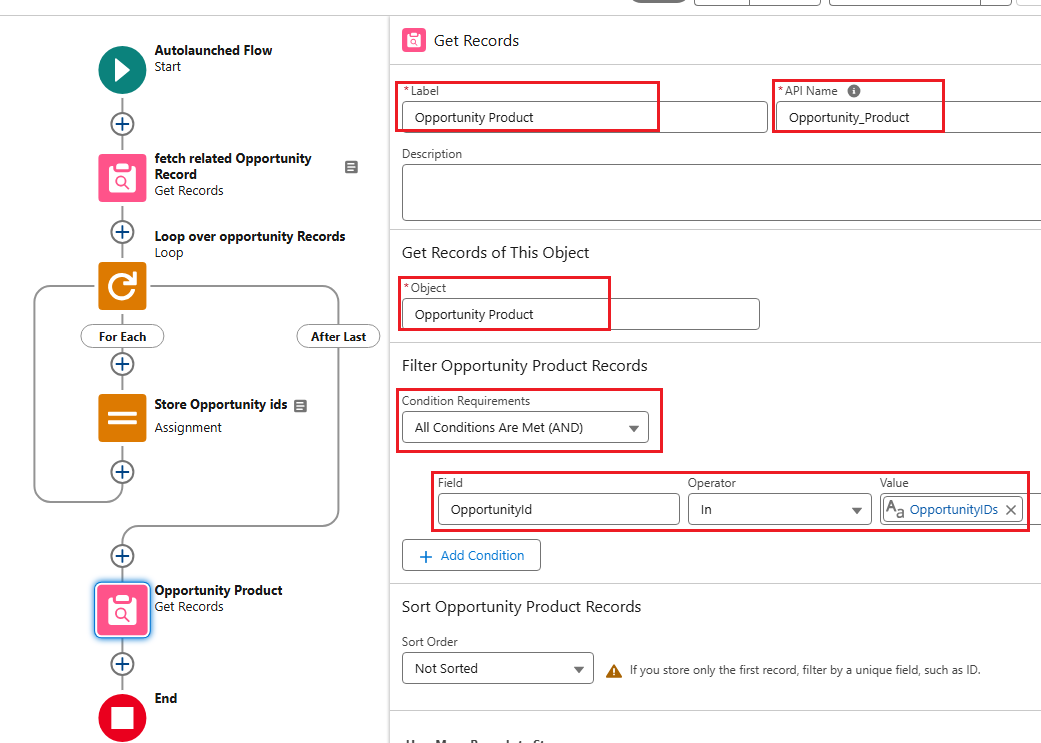
Use a Get Records element to fetch the related Opportunity Line Item records based on the Opportunity Ids in the collection variable, using the IN operator. This ensures you only fetch Opportunity Line Items related to the Opportunities under the Account.
- Create a Get Records element and provide a relevant Label, API Name, Object, and Condition Requirements as shown in the screenshot below
Result
By having this logic in your Salesforce Lightning Flows, you can retrieve records of objects that are related indirectly through a Junction Object.
___________________________________________________________________________________________
Written by: Meghesh Shenoy | Forum Ambassador
Meghesh Shenoy is a Salesforce developer, a Salesforce Forum & Mulesoft Ambassador. He is a Mulesoft and Salesforce Certified Developer, carrying the knowledge of building automation solutions using Salesforce and Mulesoft. Meghesh is passionate about sharing knowledge and experience and also helping others sharpen and grow their Mulesoft & Salesforce skills together.
Submissions reflect only the opinions of the user who made available the Submission and not the opinions of Salesforce, regardless of whether the user is affiliated with Salesforce, and may contain or constitute products, services, information, data, content and other materials made available by or on behalf of third parties ("Third Party Materials). Salesforce neither controls nor endorses, nor is Salesforce responsible for, any Third Party Materials, including their accuracy, validity, timeliness, completeness, reliability, integrity, quality, legality, usefulness or safety, or any applicable intellectual property rights. Any Submissions made available through any message board or forum in response to posted questions, or that otherwise purports to answer any questions, including any questions about Salesforce or Programs, are made available for your general knowledge only and should never be relied upon as answers to your specific questions (even if an answer is marked as a "best" answer or with any similar qualifications). You should always contact Salesforce support for answers to your specific questions. Salesforce has no control over Submissions, and is not responsible for any use or misuse (including any distribution) by any third party of Submissions.
If you have questions, tap into the wisdom of our entire Trailblazer Community here: https://trailhead.salesforce.com/trailblazer-community/feed
Knowledge 기사 번호
004810935
이 기사를 통해 문제를 해결했습니까?
개선을 위한 의견을 보내주세요.
