Select An Org
Error "VaaS returned 900: Client network failure" Prevents Tableau Cloud MFA Login from Private Network
Publish Date: Oct 2, 2025
Description
When users log in to Tableau Cloud using multi-factor authentication (MFA) from a private network, they encounter a login issue after using the Salesforce Authenticator App.
During the failed login sequence, users observe a brief, transient redirection to a registration page with the message:
Redirecting to verification method registration page. Your account requires an additional MFA verification method.
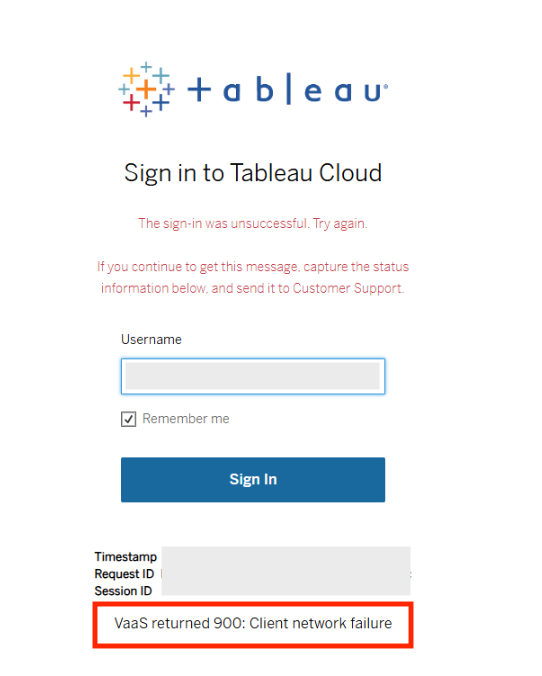
This redirection immediately fails, resulting in the final error screen displaying:
VaaS returned 900: Client network failure.
This prevents access to Tableau Cloud via MFA from the restricted network.
Cause:
The issue could be caused by the client's network (e.g., firewall, proxy server) blocking outbound connections to the specific endpoints required for Salesforce MFA with Tableau authentication.
Resolution
To resolve this issue, ensure that your network (e.g., firewall, proxy server) allows outbound connections to the required endpoints for Salesforce MFA with Tableau authentication.
1. Allow Required Endpoints
The following domains and specific URLs must be accessible from the client's network:
-
General Endpoints for Tableau with Salesforce MFA:
- *.salesforce.com
- id.tableau.com
- identity.idp.tableau.com
- Specific Endpoints for *.salesforce.com (ensure these are allowed):
For a comprehensive list of Tableau service addresses and ports, refer to the Tableau documentation: Required Addresses, Proxies, and Ports
2. Temporary Workaround: Configure MFA from an Open Network
If allowing the above URLs does not immediately resolve the issue, or if network changes cannot be made quickly, try the following workaround:
- Temporarily connect to Tableau Cloud from an open network (a network without the current restrictions) to complete the initial Multi-Factor Authentication (MFA) setup and registration for the affected user account.
- Once the MFA setup is successfully completed on the open network, attempt to log in to Tableau Cloud from the original private network environment.
Additional Resources
Required Addresses, Proxies, and Ports
This error can be caused by a Tableau Cloud service disruption in addition to client-side network issues. If the problem persists after following the resolution steps, please check the service status on the Salesforce Trust site.
Trust | Salesforce Status: https://status.salesforce.com/
Knowledge Article Number
004811055
Did this article solve your issue?
Let us know so we can improve!
