Seleziona un'organizzazione
Set Up AWS Direct Connect (DX) for Hyperforce
Data pubblicazione: Aug 24, 2026
Descrizione
AWS Direct Connect (DX) is a dedicated private network connection between your corporate infrastructure and AWS, which hosts Hyperforce. Unlike standard internet routing, AWS DX provides a consistent, low-latency, high-throughput private link directly into the AWS network — bypassing the public internet entirely. This is especially important for organizations with strict data residency, compliance, or security requirements that mandate all Salesforce traffic (including email) must travel over private circuits rather than public paths. This solution applies only to orgs on Hyperforce on AWS, not Hyperforce on GCP.
If you need a direct connectivity solution from your corporate network to Hyperforce for regulatory, security, or other reasons, we recommend AWS Direct Connect (DX). DX is an AWS service that provides direct connectivity between your on-premise infrastructure and your Hyperforce resources on AWS. It can be configured to provide access to Hyperforce via Public VIF. Access via Private VIF isn’t supported.
Note: Salesforce Private Connect can’t be used to secure on-prem corporate-user UI access to Hyperforce. Salesforce Private Connect is used to secure Salesforce API connections to and from non-Salesforce AWS environments. The AWS blog that describes using DX with Private Connect expressly states that “this architecture…does not pertain to the access of the Salesforce UI.”
Depending on your speed and usage needs, you can choose between hosted or dedicated DX connections. Dedicated connections are offered at high speeds of 1, 10, and 100 Gbps and ordered directly from AWS.
Hosted connections can be deployed in more speed variants to better match your bandwidth needs and potentially save costs. You can get hosted connections from a variety of partners. If you’re currently a Salesforce Express Connect (SEC) customer, ask your existing SEC provider if they’re also a DX delivery partner.
These instructions are for your networking and security teams who manage the networking and security settings for connecting to Hyperforce. They assume that you have a working knowledge of networking concepts, and that you know your Hyperforce region.
Risoluzione
Connect to Hyperforce with AWS Direct Connect (DX)
First, choose between a hosted or dedicated connection. To use a hosted connection, work with an AWS DX delivery partner.
Select an AWS DX location in or near your Hyperforce region that is served by your connection provider. Work with the provider to create the AWS DX connection between your infrastructure and Hyperforce.
Recommendations
- To increase security of data in transit, use MacSEC encryption on the connection.
- To improve failover times, implement Bidirectional Forwarding Detection (BFD).
- To make sure that users access Hyperforce only through the DX connection, advertise your public IP address space only to DX, not the public internet. Then, add those IP prefixes to the trusted IP ranges for your organization.
- To restrict the DX connection to Hyperforce IPs, rather than all AWS Public IPs, allowlist the IPs mentioned in the section Manage Hyperforce IPs.
- To avoid conflicts in routing information from your DX connection and ISP connection, set the routing policies in your on-premises to prefer the DX connection.
These recommendations are covered in greater detail in the AWS/Salesforce joint blog, How to Access Salesforce Hyperforce Securely and Reliably with AWS Direct Connect.
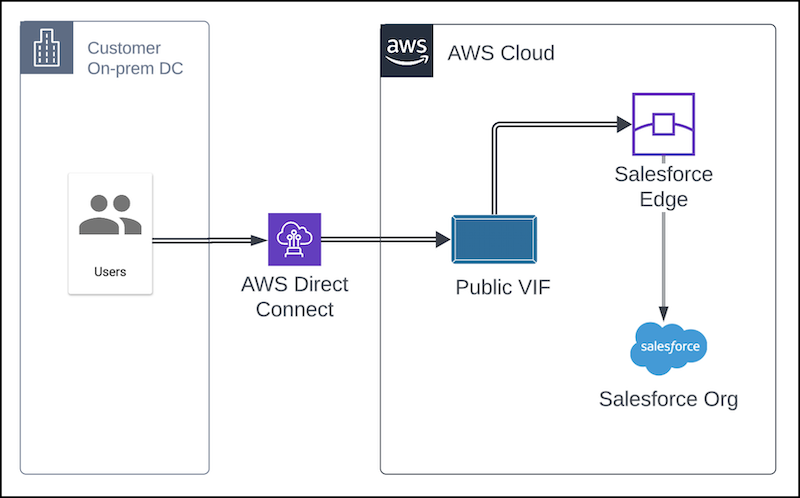
Manage Hyperforce IPs
You may need to configure DX to manage two sets of Salesforce IPs: Hyperforce Public IPs and Email IPs used with Mail Transfer Agent (MTA).
Allow Hyperforce Public IPs
DX users who choose to use allowlists must allow the complete set of Hyperforce public IP ranges, not just those for your country. The Hyperforce Public IPs are available for download in the JSON format at:
https://ip-ranges.salesforce.com/ip-ranges.json
Included Services
The JSON list includes IPs for inbound connections to Hyperforce from external sources, including some for Salesforce Edge, as well as IPs for outbound connections from Hyperforce to the customer’s network. These addresses are for products built on the Salesforce platform including Sales, Service, Industries, and Tableau Clouds, and for the MuleSoft Anypoint Platform.
Excluded Services
The JSON list excludes IP addresses for these services: Email, Marketing Cloud, Commerce Cloud, and Slack.
As Hyperforce evolves, Salesforce adds and modifies IP addresses in the JSON file at least 30 days before using the IPs. See Hyperforce IPs to Allow - Sales, Service, Industries, and Tableau Clouds for additional information on subscribing to change notifications and maintaining your router with the latest IPs.
Configure Salesforce Edge for DX
Salesforce Edge is a content delivery network (CDN) that delivers an enhanced network experience, including improved performance, and security such as advanced application security protections. With Edge and AWS DX, your traffic is routed through DX to your target AWS region, then to the nearest available Edge Point of Presence (PoP), and then to your Salesforce organization.
Minimize Latency
- Configure DX to connect to the nearest AWS region to your Hyperforce instance.
- Configure your on-premises DNS servers to connect to the nearest AWS region to your Hyperforce instance.
Each DX circuit establishes connectivity to a single AWS region. If you have Salesforce orgs in multiple regions, consider setting up multiple DX circuits.
If you have compliance requirements such as regional data residency or internal security policies, contact your Customer Success Manager to discuss your specific needs.
Short-term Edge IP Ranges
As of July 21, 2026, Salesforce relocated all Edge IPs into the Hyperforce Public IP ranges list at https://ip-ranges.salesforce.com/ip-ranges.json. If you previously allowlisted the short-term AWS IP ranges for Hyperforce Edge, you can now retire 141.163.216.224/28 and 141.163.214.224/28 . These IP ranges no longer need to be polled, allowed or filtered.
Manage Email IPs
If you plan to route email traffic through the AWS DX circuit, see Route Email Through AWS DX. You must allowlist additional IPs for email.
Test the AWS DX Connection
After you complete setting up AWS DX and provisioning access for Hyperforce and Edge IP addresses, make sure to run performance tests to verify that the AWS DX network path is working properly. Read more in Regular Performance Testing.
Maintain Salesforce Express Connect
Even for Hyperforce customers, a small set of functionality is served only through our non-Hyperforce infrastructure, such as password hints from login.salesforce.com and third-party integrations with *.force.com. If you need these features to be delivered through direct connectivity, you’ll need to maintain a Salesforce Express Connect (SEC) connection until the features are available* on Hyperforce-AWS.
Support
Contact your Customer Success Manager for questions about compliance or data residency.
Contact Salesforce Support for questions about setting up Edge.
Contact AWS or your DX service provider for questions about configuring DX.
* Forward-looking statements apply.
Revision History
| Date Revised | Revisions |
| August 5, 2026 | Revised the Short-term AWS Ip Ranges section. Directly listing the 2 ranges that can be safely retired. Removed link to archived article. |
| July 22, 2026 | Removed the Short-term AWS IP Ranges for Hyperforce Edge table and replaced the content in the Allow Short-term Edge IP ranges section. |
| April 1, 2026 | Fixed a typo in the URL embedded in the text https://ip-ranges.salesforce.com/ip-ranges.json under Allow Short-Term Edge IP ranges. |
| October 22, 2025 | Updated the section on allowing Hyperforce Public IPs. The JSON file now includes IP addresses for both inbound and outbound connections. |
| July 10, 2025 | Clarified the short-term nature of AWS IPs. Removed ap-south-2 region from short-term IP table, because it was not an AWS range, it is already part of Hyperforce Public IPs. Added a note that Private Connect is not for direct connectivity through the UI. Added advice to test the DX connection. |
| May 27, 2025 | Initial Publication |
Risorse aggiuntive
Salesforce Edge Network
Regular Performance Testing
Hyperforce IPs to Allow - Sales, Service, Industries, and Tableau Clouds
How to Access Salesforce Hyperforce Securely and Reliably with AWS Direct Connect
Route Email Through AWS Direct Connect (DX) for Hyperforce
Numero articolo Knowledge
004867761
Questo articolo ha risolto il problema?
Facci sapere, così possiamo migliorare!
