Sélectionner une organisation
Failing to create a new keystore with valid passwords in Secrets Manager
Date de publication: May 23, 2025
Résolution
SYMPTOM
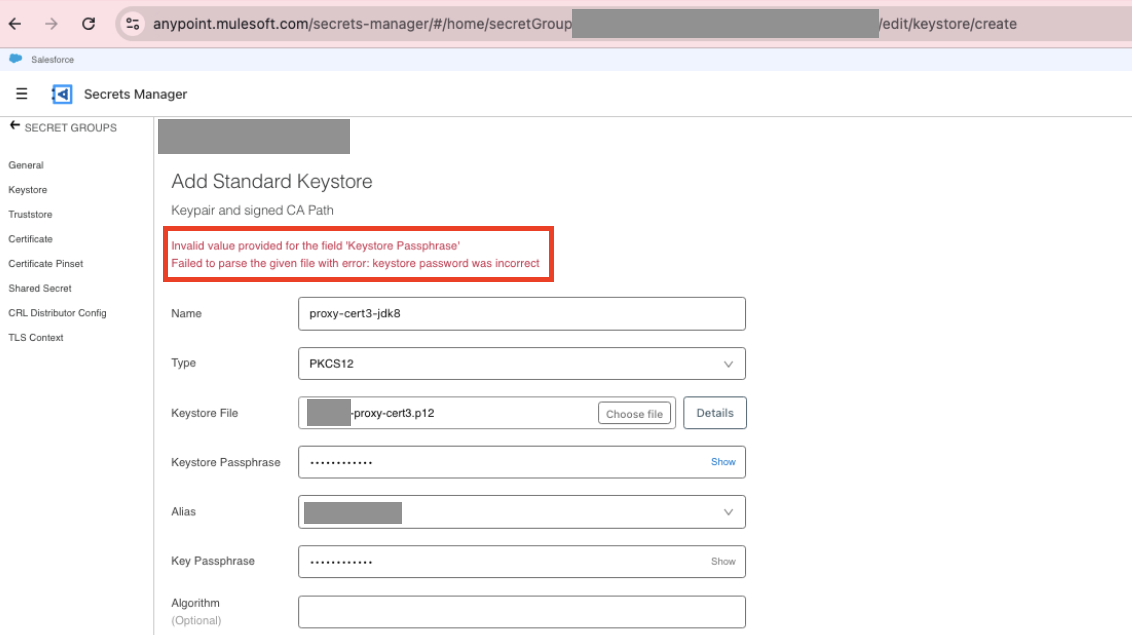
When creating a keystore in the Secrets Manager, the below error gets thrown. This issue occurs when the keystore is generated using JDK 8 keytool.
Error Message:"Invalid value provided for the filed "Keystore Passphrase. Failed to parse the given file with error: keystore password was incorrect."
CAUSE
Certain keystore formats or encryption algorithms used in older JDKs (i.e JDK8) may not be fully compatible with the Secrets Manager's expected format or security requirements.
SOLUTION
Please use the below command to create a self-signed cert if JDK8 keytool needs to be used.
keytool \
-genkeypair \
-alias server \
-keyalg RSA \
-keysize 3072 \
-validity 365 \
-storetype PKCS12 \
-keystore mule123.p12 \
-storepass mule123 \
-keypass mule123 \
-J-Dkeystore.pkcs12.keyProtectionAlgorithm=PBEWithHmacSHA256AndAES_256 \
-J-Dkeystore.pkcs12.certProtectionAlgorithm=PBEWithHmacSHA256AndAES_256 \
-dname "CN=max, OU=MuleSoft, O=MuleSoft Inc, L=San Francisco, S=CA, C=01"
Alternatively, you can use either OpenSSL or the keytool from JDK 17 to avoid encountering this error.
Numéro d’article de la base de connaissances
004867799
Cet article a-t-il résolu votre problème ?
Dites-nous ce que nous pouvons améliorer !
