Valitse organisaatio
Automatically Assign Topics to Knowledge Articles in Experience Cloud
Julkaisupäivä: Jun 1, 2026
Kuvaus
Transport all your hard work of organizing Salesforce Knowledge in your Experience Cloud site, and boost SEO for your Knowledge articles, by mapping topics to data categories. All articles published with a specific data category are tagged with the topics you specify. Articles added to the data category in the future are also tagged. All articles with assigned topics are included in search results.
Ratkaisu
Required Editions
| Available in: Salesforce Classic and Lightning Experience |
| Available in: Essentials, Enterprise, Performance, Unlimited, and Developer Editions |
| User Permissions Needed | |
|---|---|
| To access Experience Workspaces: |
Manage Experiences OR Create and Set Up Experiences AND Is a member of the site |
| To set up automatic topic assignments: |
Edit Topics AND View Data Categories |
To use automatic topic assignments, enable Experience Workspaces in Digital Experience Settings.
- Open Experience Workspaces.
- Access automatic topic assignments by clicking .
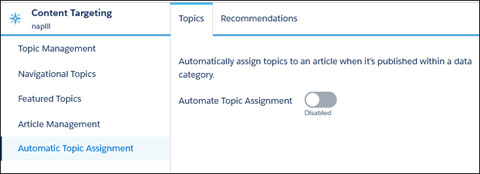
- Enable Automate Topic Assignment.
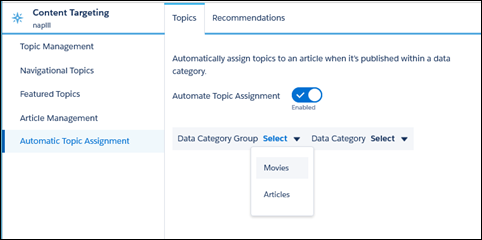
- Select a data category group and a data category.
- Add the topics that you want to assign to the articles under that data category.
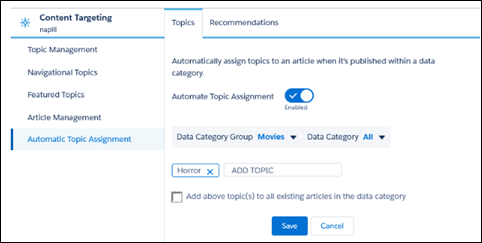
- Select the option to add the topics to existing articles in the data category. The topics are then assigned to all articles in all data categories under the data category group. If you don’t select this option, the topics are added only to new articles added to the data category, and the existing articles remain unchanged.
- Click Save.
Important Considerations
Take these items into consideration as you set up your topic assignment rules:
- Topic assignments are site-specific. If you use the same article in two different sites, set up automatic assignments in both sites.
- If a translation of a topic is available in Salesforce, the translated article is tagged with the corresponding translated topic. If there is no translated topic in the system, localized articles are tagged with the base language topic.
- You cannot automatically remove topics from articles. You must manually remove topics.
- If you merge two topics, you must set up new rules.
- If you automatically add a topic to a data category, the topic is added to all articles in the data categories above it in the hierarchy. Topics are not automatically added down a hierarchy to child data categories.
- To automatically assign topics to a newly added data category, remove all existing data categories and then publish the article. Next, add all data categories at once and republish the article.
Knowledge-artikkelin numero
004867974
Ratkaisiko tämä artikkeli ongelmasi?
Anna palautetta, jotta voimme kehittyä!
