組織を選択
Experience Site: Clicking on Printable View from the list view redirects to "URL No Longer Exists" page
公開日: May 21, 2026
説明
In a Salesforce Experience Site (also known as a Community or Digital Experience site), clicking the Printable View option from a list view may redirect the user to a page displaying "URL No Longer Exists" or a similar access error page.
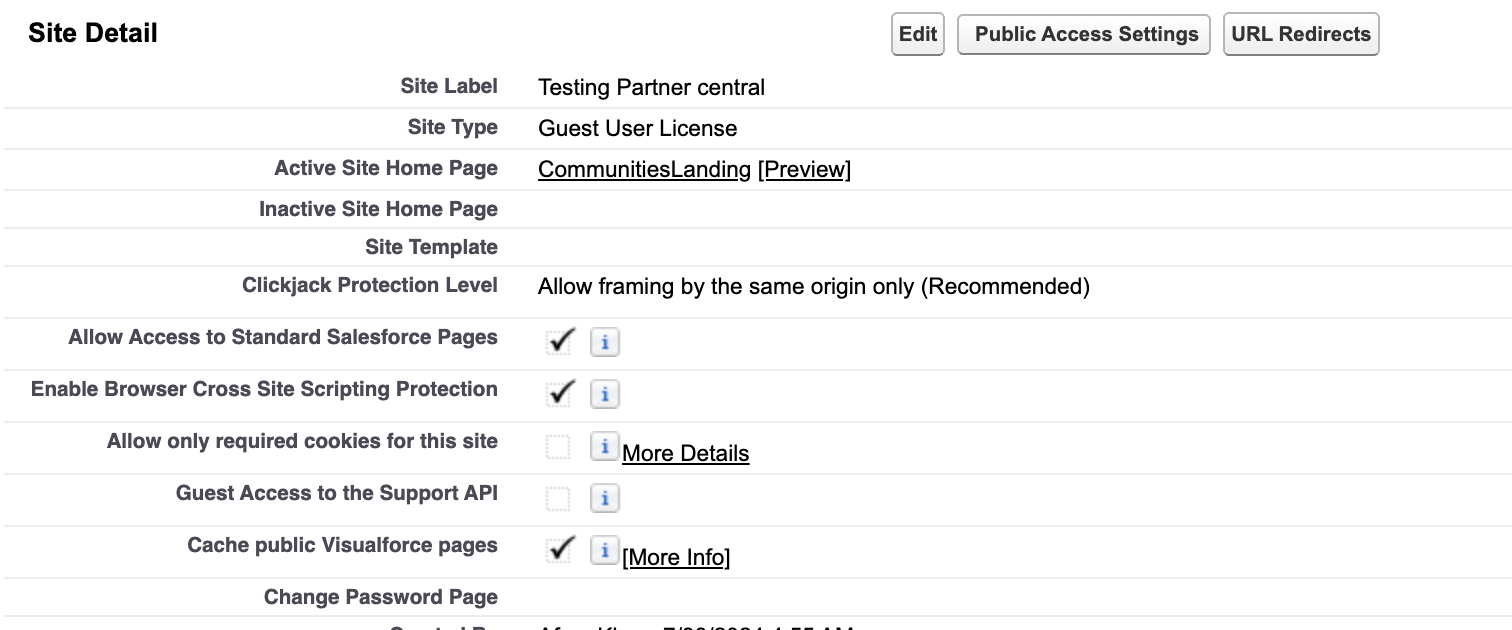
Please ensure that the "Allow Access to Standard Salesforce Pages" checkbox is enabled in the site settings.
-
When enabled, authenticated users in the site can access standard Salesforce pages based on their access controls.
-
When disabled, even authenticated users who have access rights will be blocked from accessing standard Salesforce pages.
This setting is typically disabled for sites that serve only Visualforce pages to add an extra layer of access control. However, for functionality like Printable View, enabling this setting is required.
解決策
Steps To Enable -->
- From Setup, in the Quick Find box, enter Sites, and then select Sites.
- Click the name of the site you want to view.
- Now Click on Edit and check the checkbox "Allow Access to Standard Salesforce Pages" and Hit save.
ナレッジ記事番号
004980127
この記事で問題は解決されましたか?
ご意見をお待ちしております。
