組織を選択
Salesforce Platform: JWT Certificate Visibility on JWKS Endpoint
公開日: Apr 1, 2026
説明
Automatically expose the Named Credentials JWT’s public key with External Credential in the keys endpoint
JWT (JSON Web Token):-
Salesforce JWT (JSON Web Token) OAuth 2.0 Bearer Flow enables secure, server-to-server integration without user interaction by using a digital certificate to sign a token. It replaces username/password authentication for high-security, automated, or backend-to-backend communication, requiring a Connected App, RSA SHA256 signing, and specific claims (iss, sub, aud, exp).
JWKS (JSON Web Key Set)
Salesforce utilizes JSON Web Key Sets (JWKS) for secure token-based authentication, specifically for scenarios like validating external JSON Web Tokens (JWTs), configuring OAuth 2.0 flows, and managing public keys for server-to-server integrations
解決策
Below steps are required to expose the JWKS and it is not supported with new Named credentials.
1. Create test org and Switch to the Lightning UI if you haven't done so. External Credentials are available only in Lightning.
2. Create a certificate on the Certificate and Key Management
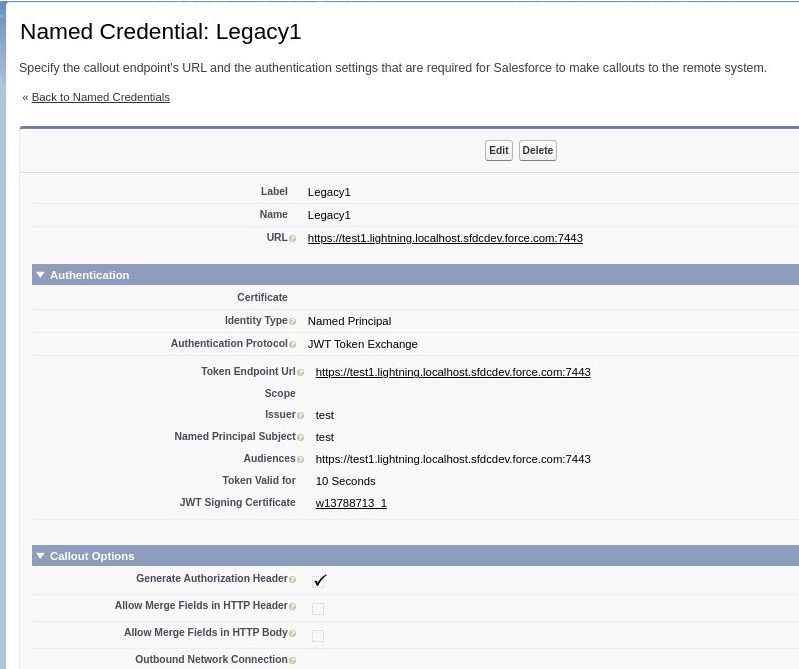
Label: Legacy1
Identity Type: [Named Principal]
Authentication Protocol : [JWT Token Exchange]
JWT Signing Certificate: <the created certificates>
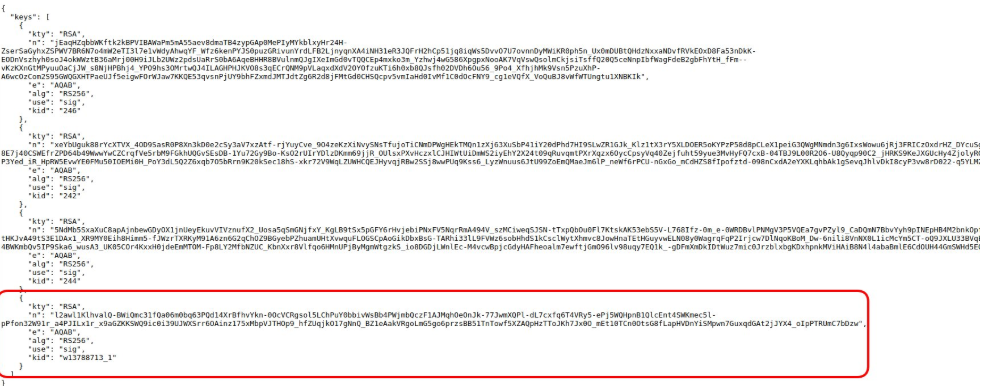
4. Open https://<mydomain>/id/keys. You'll see the certificate used for the named credential with Legacy type.
This is expected behaviour

ナレッジ記事番号
004980324
この記事で問題は解決されましたか?
ご意見をお待ちしております。
