Valitse organisaatio
Marketing Cloud Next - Preference Page and Subscription in Consent tab
Julkaisupäivä: Jul 15, 2026
Kuvaus
The users are seeing "Something Went Wrong" error message when trying to access the Preference and Subscription Page from the consent tab.
Ratkaisu
Please check if the right domain name is is in the allow list or not
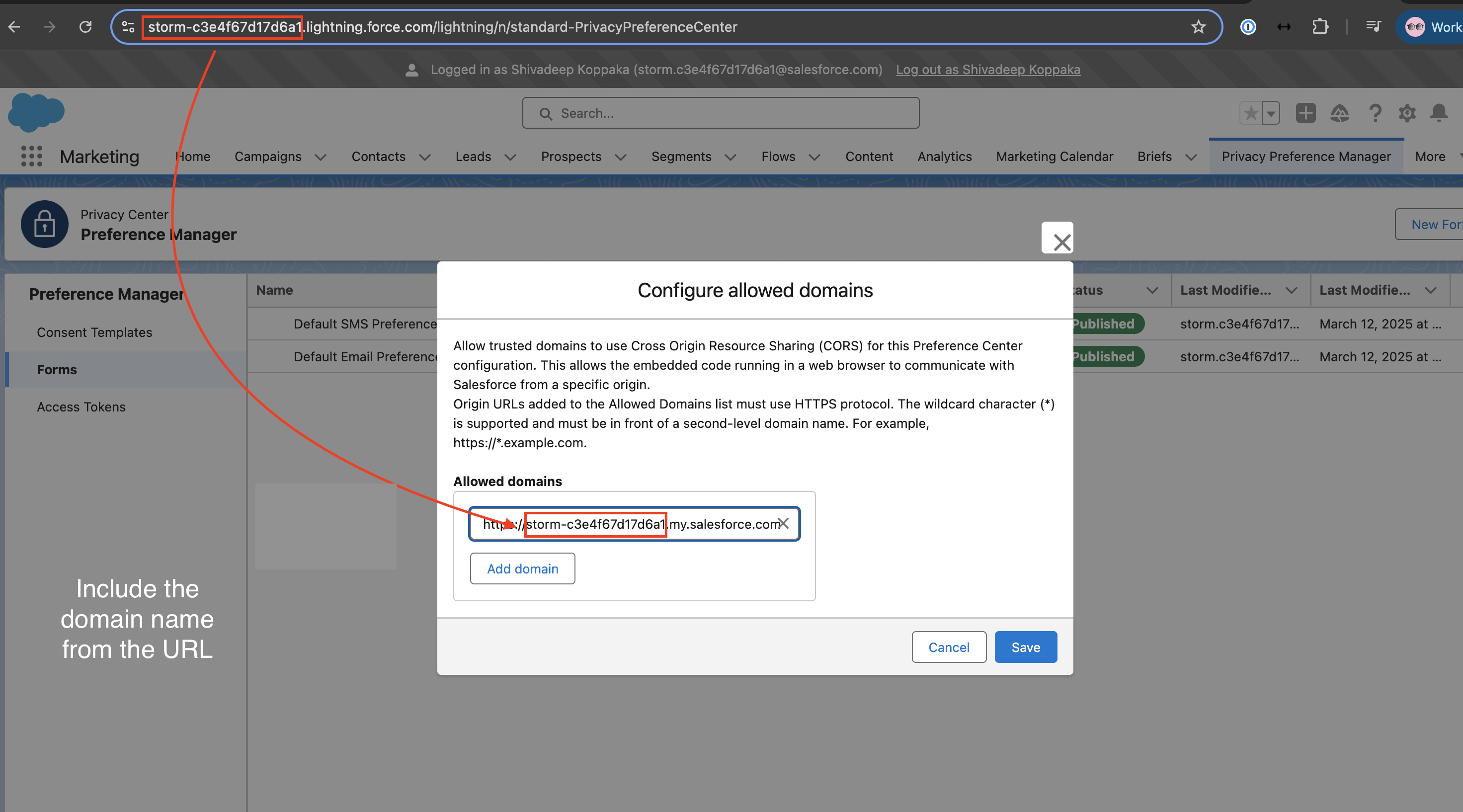
1. Open the following link: https://DOMAIN_NAME.lightning.force.com/lightning/n/standard-PrivacyPreferenceCenter
2. Under both the Default Email Preference Form and the Default SMS Preference Form, click the dropdown menu and select 'Configure Allowed Domains.'
3. Remove all currently configured allowed domains and click Save.
4. Click the dropdown arrow again and select 'Add Domain.' Enter the domain: https://DOMAIN_NAME.my.salesforce.com and click Save.
5. Once done, open this link to check if you're able to preview the Preference Manager: https://DOMAIN_NAME.lightning.force.com/lightning/n/standard-Consent
Knowledge-artikkelin numero
005094084
Ratkaisiko tämä artikkeli ongelmasi?
Anna palautetta, jotta voimme kehittyä!
