Sélectionner une organisation
Cannot Edit Virtual Connection Due to Reauthentication Prompt When Using Tableau’s Azure Data Lake Storage Gen2 Connector
Date de publication: Jul 8, 2025
Description
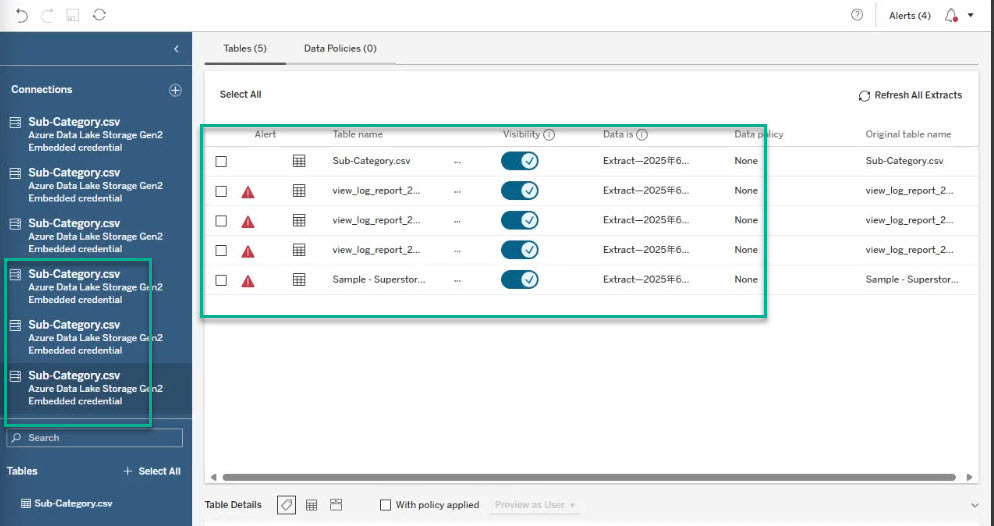
When using Tableau’s Azure Data Lake Storage Gen2 connector, missing or changed source data triggers reauthentication. This situation prevents editing Virtual Connections.
Cause
- The virtual connection validates each connection upon opening.
- If one or more source files are missing or have changed, Tableau requires reauthentication.
- File re-selection is necessary for each connection before accessing the editable interface.
Résolution
Follow these steps for each connection within the virtual connection:
- Sign in to Azure Data Lake Storage Gen2.
- Select an existing file if the original is unavailable.
After temporarily reassigning all required files, the full virtual connection editor will become accessible. From there, remove or modify any unwanted connections as needed.
Ressources supplémentaires
Numéro d’article de la base de connaissances
005101367
Cet article a-t-il résolu votre problème ?
Dites-nous ce que nous pouvons améliorer !
