Seleccionar una organización
Add Measure Names At The Top Of The Hierarchy In Tableau Desktop
Fecha de publicación: Sep 9, 2025
Tarea
To create a view where a user can drill up from a dimension in a hierarchy to a summary aggregated by Measure Names. For example, drilling up from the Category dimension to a view summarized only by Measure Names.
Note: By design, Measure Names cannot be added to a hierarchy.
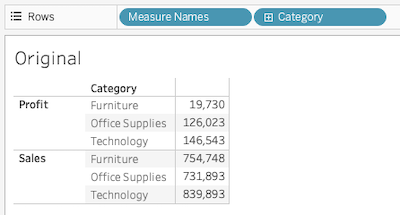
Pasos
Follow along in the sample packaged workbook found in the Attachments section to review the steps below.
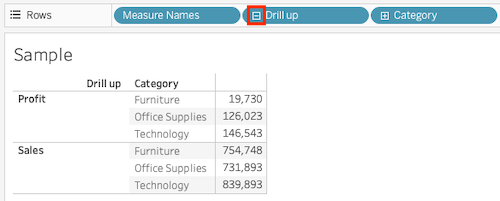
1.Create a calculated field with the following formula and name it Drill up.
""2.Drag and drop the Drill up field to the top of the target hierarchy in the Data pane.
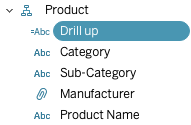
3.Add the Drill up field after Measure Names in Rows. Then, by drilling up from Category to Drill up, you can display the summary for each Measure Name.
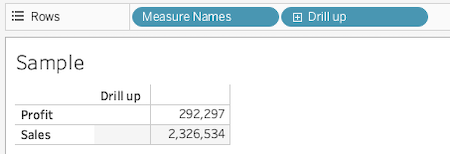
Note: If you do not want to display the Drill up field name in the header, consider adding a space at the beginning of the Drill up field name like " Drill up".
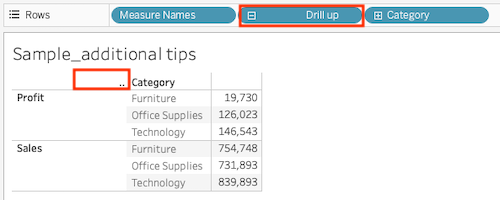
For further details, please refer to the attached workbook sample.twbx.
Recursos adicionales
Número del artículo de conocimiento
005131285
¿Resolvió este artículo su problema?
¡Háganos saber cómo podemos mejorar!
