Vælg en organisation
Platform SOAP API login() Retirement & new Security Requirements
Udgivelsesdato: Oct 19, 2026
Beskrivelse
Updated - October 9, 2026
Original Publication Date - August 25, 2025
If you received the email titled “ACTION REQUIRED: Update Unsupported Platform SOAP API login(),” this article walks you through identifying which integrations triggered the email.
In addition to the upcoming SOAP API login() retirement, several security enhancements will roll out that may affect your SOAP integrations. Review this article for details on these changes and preparation steps.
Upcoming Changes Summarized:
|
Upcoming Change for SOAP API login() |
Planned Date |
What’s Changing? |
Recommended Actions |
|
Dec 1, 2026 |
SOAP login() succeeds only if the user has Use Any API Auth user permission assigned. Without it, the request fails. Already default in new orgs; enforced in all orgs/environments on this date. Release Update: Assign Use Any API Auth Permission for SOAP login(). |
Assign the Use Any API Auth via permission set/profile to every user accessing the SOAP login() operation. | |
|
Security token required with a broad IP range |
December 15, 2026 (sandboxes) / January 31, 2027 (production): |
If the org or profile has a broad login IP range - larger than /8 IPv4 (16,777,216 addresses) or /29 IPv6 (299 addresses), SOAP login() needs a security token (or mTLS). Username+password alone fails (TOKEN_REQUIRED / 1502). Release Update: SOAP API login() Security Remediation (Oct 2026 test-run). |
Preferred: migrate to ECA + OAuth. Interim: append the security token to the password, or narrow the IP range so it is no longer broad. Test via the Release Update. |
|
Disabled if unused for 6 months |
December 15, 2026 (sandboxes) / January 31, 2027 (production): |
SOAP login() has been turned off in production orgs (and their sandboxes) with no SOAP login() in the last 6 months. New orgs: off if never used. One call anywhere in the org keeps it on. Rare jobs (annual, DR, seasonal) can look inactive and then fail. |
Check Login History / API Total Usage for SOAP login(). Ask owners/ISVs about rare jobs. Migrate those integrations to ECA + OAuth (or keep a live SOAP login() if you must retain the method until Summer ’27). |
|
Summer ’27 |
SOAP login() is removed in versions 31.0–64.0. Calls fail (endpoint deactivated). Already unavailable in 65.0+. Disabled by default in orgs created Winter ’26+. Release Update: SOAP API login() Call in SOAP API Versions 31.0 Through 64.0 Is Being Retired. |
Migrate all SOAP login() clients to external client apps + OAuth 2.0 before the Summer ’27 upgrade. Enable the retirement test run to simulate disablement. |
What is the status of SOAP API login()?
Full retirement (API 31.0–64.0): Salesforce is retiring SOAP API login() in API versions 31.0 through 64.0, effective with the Summer ’27 release. Once your org is upgraded to Summer '27, calls to login() using these API versions will no longer be supported and will stop working. To continue to authenticate your external applications, we recommend migrating to external client apps and OAuth. See this release note.
-
SOAP API login() in API versions 31.0 through 64.0 is currently supported.
-
SOAP API login() isn’t available in API versions 65.0 and later. See this release note.
-
SOAP API login() is disabled by default in orgs created from Winter ‘26 onward. An admin must enable SOAP API login() in these orgs before it can be used. See this release note and documentation.
Use Any API Auth required: An additional admin control is in place to secure the use of SOAP API login(). If SOAP API login() is enabled in an org, users must have the Use Any API Auth user permission assigned in order to successfully authenticate. See this release note and documentation. Lack of the Use Any API Auth user permission will result in the SOAP API login() request being rejected with an INSUFFICIENT_ACCESS error response.
Starting December 15, 2026 in sandboxes and January 31, 2027 in production:
- SOAP API login() from a broad login IP range requires an API security token. A broad range exceeds /8 IPv4 (16,777,216 addresses) or /29 IPv6 (299 addresses) and can be set at the org (Network Access) or on a user profile (Login IP Ranges). Without a token (or mTLS, see Uploading a mutual authentication certificate), the login fails. Login History records result code 1502 / TOKEN_REQUIRED.
- SOAP API login() is disabled in orgs with no SOAP login() activity in the trailing 6 months. This is a one-time check during the rollout, not an ongoing sliding window. A single call by any user in the prior 6-months keeps SOAP login() on for the org. After disablement, SOAP login() fails. Check rarely run jobs (annual, seasonal, disaster-recovery) before the date, and migrate to External Client Apps and OAuth.
Why are we retiring SOAP API login()?
To help customers protect their Salesforce accounts in the current threat landscape, Salesforce is adopting a secure-by-default posture for authenticating external applications. SOAP API login() does not provide that posture and is being retired. This requires applications that use SOAP API login() to migrate to external client applications and OAuth.
Løsning
What does this SOAP API login() retirement impact?
This retirement impacts any code, package, application, or integration that authenticates with a Salesforce org using SOAP API login().
In scope:
-
SOAP API login() calls to /services/Soap/c/<v>/ (Enterprise WSDL) and /services/Soap/u/<v>/ (Partner WSDL) where <v> is API version 31.0–64.0
Not in scope:
-
The Setup /soap/wsdl.jsp page (used to download WSDLs)
-
Managed-package WSDL version query parameters, such as ver_<package>=<n>
Which Salesforce features are impacted by SOAP API login() retirement?
These Salesforce features use SOAP API login(). The products teams are aware of the SOAP API login() retirement.
-
Salesforce Connect Cross-Org Adapter (see this release note for details).
-
CRMA Connector will be migrated off SOAP API login() prior to the retirement.
These features will also be impacted in new orgs where SOAP API login() is disabled by default. Ensure that SOAP API login() is enabled per the instructions in this release note and documentation.
What happens if I don’t take action?
If you don’t upgrade the components and applications that use SOAP API login() by the Summer '27 retirement date, they won’t authenticate with your Salesforce org and all subsequent API calls made by those components and applications to your org will fail.
Before Summer ’27, the December 15, 2026 (sandbox) / January 31, 2027 (production) additional security requirements can also stop SOAP login(): logins from a broad IP range without a security token fail, and a one-time check disables SOAP login() in orgs with no SOAP login() activity in the trailing 6 months.
What actions do I need to take?
-
Identify the components and applications that use SOAP API login() to authenticate with your org.
-
Contact the developers and vendors to determine if the components and applications use SOAP API login().
-
Use Login History to identify applications that make SOAP API login() calls. Check which usernames logged in and contact those users to identify the application.
-
Use the API Total Usage EventLogFile to identify applications that authenticate using SOAP API login() from API calls that these applications make. Although Login History is the primary identification path, the API Total Usage EventLogFile can provide additional information to help identify applications.
-
If you custom developed the component or application, upgrade it to use external client apps and OAuth to authenticate.
- For server-to-server or headless integration, use either the OAuth 2.0 JWT bearer flow or the OAuth 2.0 client credentials flow.
- For browser-based or user-driven integration, use the OAuth 2.0 web server flow.
- If the component or application is from a third-party vendor, contact the vendor to upgrade to the version that supports external client apps and OAuth.
- Assign Use Any API Auth to any user that requires SOAP login() to authenticate while the operation is in service. Leverage tools such as Setup with Agentforce to quickly identify active, API Enabled users that lack the Use Any API Auth permission assignment.
- Before December 15, 2026 (sandboxes) / January 31, 2027 (production):
-
If you use SOAP login() from a broad IP range without a security token, either migrate to External Client Apps and OAuth (see External Client Apps overview), append the user’s security token to the password (see Reset My Security Token ), or tighten the IP range so it is no longer broad (see Salesforce Network Access and Profile-Based IP Restrictions).
- If your org has had no SOAP login() activity in the trailing 6 months, confirm there are no rarely run integrations that still need SOAP login(). If there are, migrate them to External Client Apps and OAuth before the one-time check. After disablement, those SOAP login() calls fail.
-
Use Login History to identify applications making SOAP API login() calls
To identify SOAP API login() calls made by applications, in Setup, go to the Login History page. You can review the entries online or download them to a CSV file.
Look for entries with:
-
LoginType “Other Apex API” or “Partner Product”, and
-
Login Subtype “SOAP API”, and
-
API Type “SOAP Enterprise,” “SOAP Partner,” or “SOAP Tooling”
These entries represent SOAP API login() calls by applications that need to be migrated. Contact the user listed in the Username field to identify the application.
The Application field shows “N/A” to indicate that the SOAP client isn’t bound to a connected app or external client app. This entry is intentional for the integrations targeted by this retirement. Data is not missing data.
Use the API Total Usage EventLogFile to identify applications that authenticated using SOAP API login() from API calls
In addition to using Login History, you can identify applications that use SOAP API login() to authenticate from the API calls they make by reviewing API events in the API Total Usage EventLogFile that report SOAP, REST, Bulk, ApexREST, and ApexSOAP API activity.
All users have access to the past 24 hours of the API Total Usage EventLogFile. If you have purchased and activated Event Monitoring, you have access to the past 30 days. You can increase this retention period up to 1 year in Event Monitoring Settings or by using EventSettings Metadata API.
To review the API events, download them to CSV files using one of these methods.
-
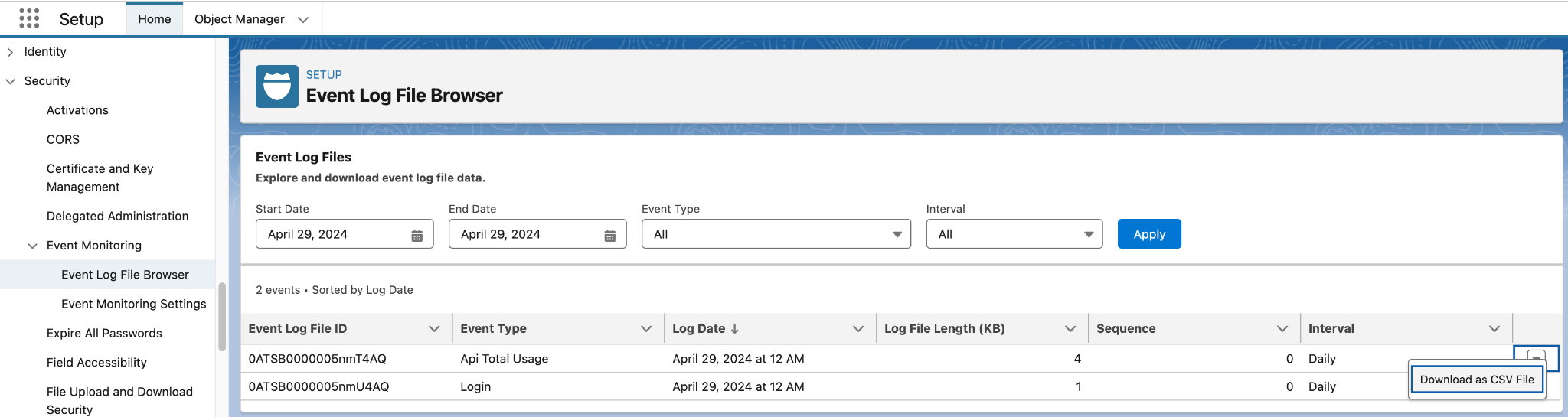
In Setup, go to Security → Event Monitoring → Event Log File Browser. Use the Event Log File Browser to locate the API Total Usage EventLogFiles. Download the individual log files as CSV files to view the API events.
-
Automatically download the API Total Usage EventLogFiles on a daily basis by using this tool. This is a Python script that retrieves the past 24 hours of data in the log files and downloads the events into CSV files. The Python script uses Salesforce CLI for authentication and data retrieval.
-
Manually use a client, such as Salesforce CLI, to run a SOQL query against the API Total Usage EventLogFile object.
sf data query -q "SELECT Id, LogFile, EventType, CreatedDate FROM EventLogFile WHERE EventType IN ('ApiTotalUsage')" -o <your-username>For each result, perform a REST API request to the endpoints in the query result to retrieve the event log data in that event log file.
/services/data/v65.0/sobjects/EventLogFile/0AT3i000005vXpWGAU/LogFilePaste the response body into an application to inspect the event log data as a CSV file.
The API events in the log files indicate authentication calls to SOAP API login(). These calls correspond to the SOAP API login() calls listed on the Login History page in Setup. Look for these entries.
-
API_FAMILY field: SOAP
-
API_RESOURCE field: login
-
USER_NAME field: user that the application authenticated
-
CLIENT_NAME field: optional header that client applications populate to identify themselves
Review all the API Total Usage events that have an empty CONNECTED_APP_ID field, which indicates that the application used either SOAP API login() or a Session to authenticate. Contact that user to identify the application and whether the application uses SOAP API login().
|
CONNECTED_APP_ID |
API call authenticated using …. |
|
Empty |
SOAP API login() or Session |
|
Populated |
Connected App Id (0H4 prefix) or External Client App (0xI prefix) |
Contact that user to identify the application and then investigate whether the application uses SOAP API login().
Can I test the enforcement of SOAP API login() retirement in my org?
Yes. First use a sandbox to test integrations that have been migrated. In Setup, under Release Updates, find the SOAP API login() Retirement release update card. Select View Update. Select Enable Test Run. This feature blocks all SOAP API login() calls to the org, returning the same response as when the retirement is officially enforced. To re-enable SOAP API login(), select Disable Test Run.
Enabling a test run in production blocks all SOAP API login() calls for the duration of the test, which fails any integrations that have not yet been migrated.
Where can I learn about external client applications?
Use this trail to learn how to use external client apps to build integrations.
If you have questions, refer to Salesforce Help or contact your Salesforce account team. To view current and past retirements, see Salesforce Product & Feature Retirements.
For more information about Salesforce’s approach to retiring products and features, read our Product & Feature Retirement Philosophy.
FAQ
Question: I received an email titled “ACTION REQUIRED: Update Unsupported Platform SOAP API login(),” but SOAP API login() is disabled in my org. Why did I receive this email?
Answer: The email is sent to orgs where use of SOAP API login() was detected within the period specified in the email. If the org disabled SOAP API login() during or after that period, SOAP API login() calls detected during the period prior to SOAP API login() being disabled will trigger the email.
Yderligere ressourcer
Vidensartikelnummer
005132110
Løste denne artikel dit problem?
Giv os besked, så vi kan forbedre os!
