Vælg en organisation
HTTP Connector - High Latencies in HTTP Responses During Heavy Request Loads with HTTP Request Cookies Enabled
Udgivelsesdato: Aug 25, 2025
Beskrivelse
High latencies in HTTP responses may occur in Mule applications during periods of high traffic when HTTP request cookies are enabled. This behavior can lead to significant delays in API calls, degraded application performance, and increased CPU utilization.
The "Enable Cookies" checkbox is located under the HTTP Request Configuration > Settings tab. When enabled, cookies received in HTTP responses are stored and sent in subsequent HTTP requests.
Refer to the HTTP Request Configuration documentation to know more about this parameter.
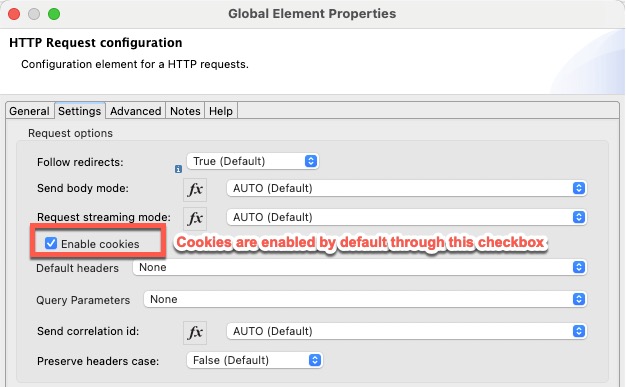
Cause
When an http:request-config element has cookies enabled, a single CookieManager is created for each instance of the request-config. If multiple http:request elements in a Mule application reference the same configuration, they all share the same CookieManager instance.
Mule uses the default Java CookieManager, which relies on a java.net.InMemoryCookieStore as its CookieStore. This implementation may result in thread lock when the same CookieStore is reused multiple times, causing high latencies in the application.
Løsning
To mitigate this issue, consider the following:
- Evaluate whether enabling cookies is necessary for your use case. If not, disable the "Enable Cookies" option in the HTTP Request configuration.
- If cookies must be enabled, ensure that each
http:requestelement uses a distincthttp:request-configto avoid sharing the sameCookieManagerinstance. This can also be achieved by implementing Dynamic configuration as explained in the following article: Cookie manager is shared among all the http requests in a mule application if they have same http configuration.
Yderligere ressourcer
The "Enable Cookies" option is enabled by default in the HTTP Request configuration, which may not be useful in most cases. If keeping this option disabled by default seems more appropriate, please consider upvoting the related Idea to request an update to this feature.
Update the Http Request Connector to turn off "enableCookies" as default
Vidensartikelnummer
005132594
Løste denne artikel dit problem?
Giv os besked, så vi kan forbedre os!
