組織を選択
Error During Salesforce Lead Conversion When Linking to a Contact Without an Account
公開日: Sep 9, 2026
説明
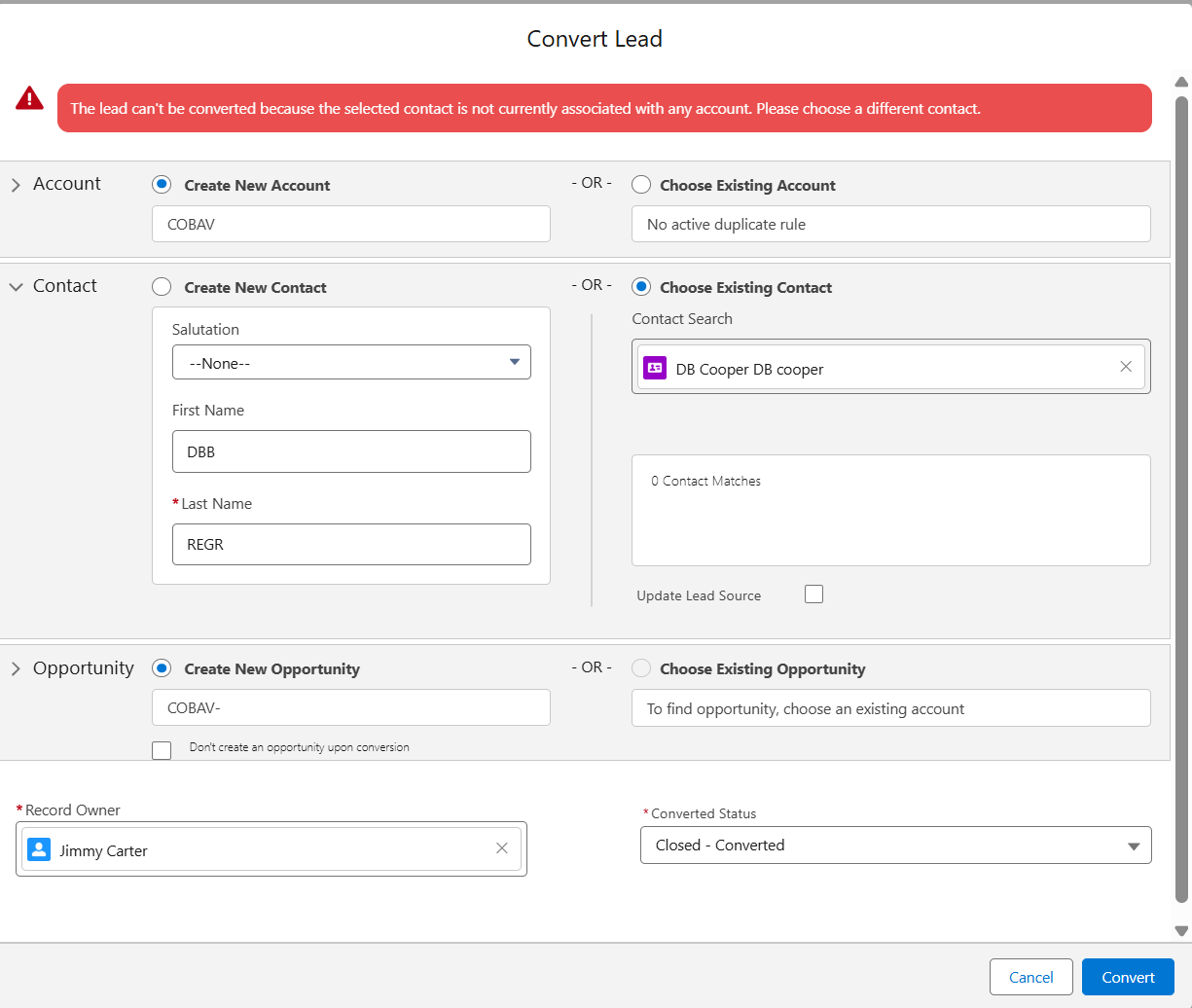
During the lead conversion process, if a Lead is converted into an existing Contact that is a private Contact (not associated with any Account), the following error is displayed:
Error:
"The lead can't be converted because the selected contact is not currently associated with any account. Please choose a different contact."
This behavior is consistent across Salesforce orgs. Private Contacts come with certain limitations, and one such limitation is their incompatibility with Lead conversion.
解決策
This article explains why Salesforce blocks Lead conversion when linking to a Contact that has no Account, and what's required instead.
Why This Error Occurs
This is expected system behavior. During Lead conversion, Salesforce requires that:
-
You either create a new Account, or link the Lead to an existing Account.
-
If you link the Lead to an existing Contact (for de-duplication purposes), the Contact must already be associated with an Account.
Private Contacts (Contacts without an Account) cannot be selected during Lead conversion. Attempting to do so will always result in the above error.
その他のリソース
Note: Salesforce documentation does not currently document this specific limitation explicitly. The reference article below covers the general Lead conversion process.
ナレッジ記事番号
005133032
この記事で問題は解決されましたか?
ご意見をお待ちしております。
