Velg en organisasjon
Marketing Cloud Personalization | How to Find Your Dataset Name
Publiseringsdato: Sep 27, 2025
Beskrivelse
When you contact support regarding Marketing Cloud Personalization, the Dataset Name is often required for an efficient investigation. This article explains the steps to locate your Dataset Name.
Løsning
You can find the Dataset Name using the following steps:
- Log in to Marketing Cloud Personalization.
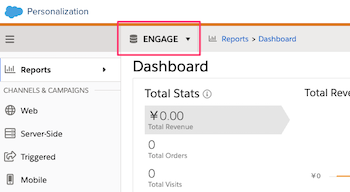
- Look at the gray navigation bar at the top of the screen.
- On the left side, to the right of the hamburger menu icon (☰), the name of the currently selected dataset is displayed. Please provide this name in your support case.
Additional Information
If you have access to multiple datasets, you can click the dataset name to see a list of available datasets and switch between them from this menu.
Knowledge-artikkelnummer
005133041
Hjalp denne artikkelen med å løse problemet ditt?
La oss få vite det slik at vi kan forbedre!
