Vælg en organisation
Limitations of Online Regex Checkers in MuleSoft
Udgivelsesdato: Aug 28, 2025
Beskrivelse
When a string fails a regex validation in RAML, it might seem correct according to an online regex checker. This discrepancy is often due to how these online tools handle special characters, particularly the newline (\n). While some online checkers might automatically escape the newline character to \\n before processing, the Java regex utility used by the Mule runtime correctly interprets \n as a line break. If your regex pattern doesn't account for line breaks, the validation will fail in Mulesoft even if it passes online.
This behavior is an expected characteristic of the regex engine used within the Mulesoft ecosystem, which is aligned with the Java SDK and PCRE (Perl Compatible Regular Expressions) standards.
Løsning
To ensure your regex patterns behave as expected within a Mule application, use one of the following methods for testing and validation:
-
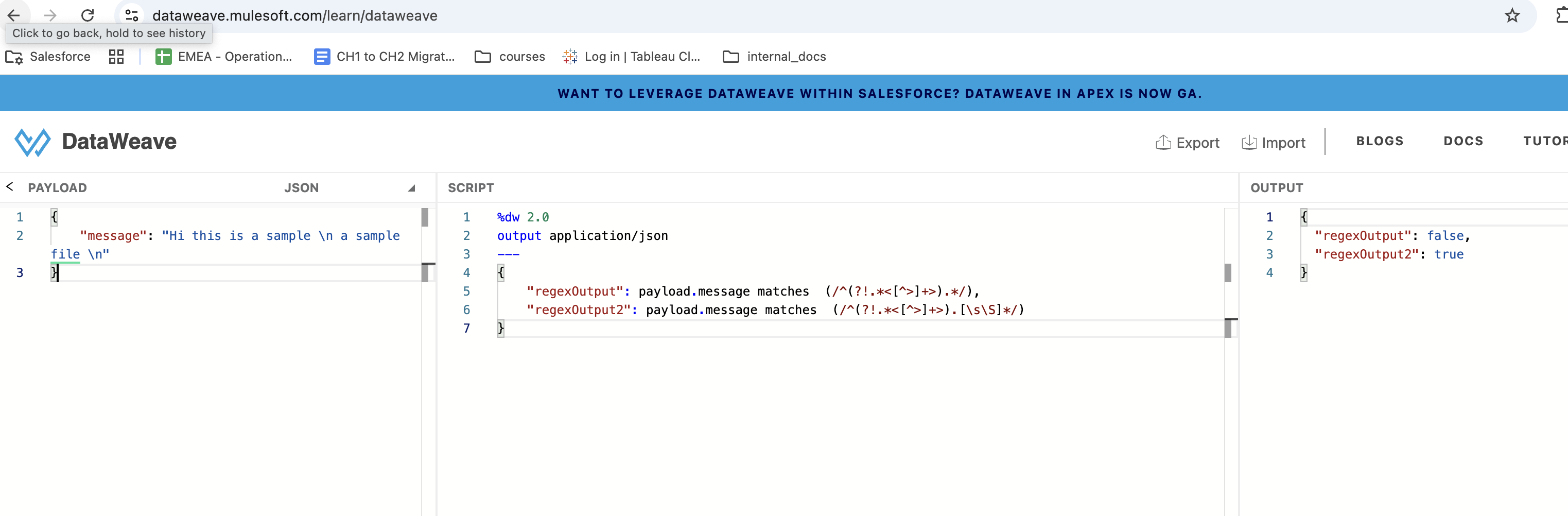
Use an Updated Regex: If your input string contains a newline, update your regex to allow for it. For example, using
[\s\S]*is a common way to match any character, including newlines. -
Escape the Input: If you can't modify the regex, you can escape the newline characters in the input string. Change
\nto\\n. This will cause the newline to be treated as a literal two-character sequence, which the original regex may then be able to validate successfully. -
Test in Mulesoft-Specific Environments: The most reliable way to validate a regex for Mulesoft is to test it in an environment that uses the same regex engine. We recommend using the DataWeave Playground or creating a simple standalone Java program. Below is a sample code snippet that you can use to replicate the behavior and confirm the expected outcome.
/*sample Code*/

import java.util.regex.Matcher;
import java.util.regex.Pattern;

public class Main
{
    public static void main(String[] args) {
        Pattern pattern = Pattern.compile("^(?!.*<[^>]+>).*");
        Matcher matcher = pattern.matcher("This is \n \n");
        boolean matched = matcher.matches();
        if(matched) {
            System.out.println("Match found");
        } else {
            System.out.println("Match not found");
        }
    }
}
Vidensartikelnummer
005134965
Løste denne artikel dit problem?
Giv os besked, så vi kan forbedre os!
