Sélectionner une organisation
Create a report that displays only empty fields
Date de publication: Feb 3, 2026
Description
This article explains how to track records with blank fields to ensure data completeness. In Reports and Dashboards, it can be difficult to filter only those records missing values while still showing key identifiers like the Contact Name. Using the right filters makes it easier to spot gaps and improve data quality.
Résolution
To identify records with missing field values, you first need to select the appropriate object and fields based on your business use case.
In this example, we are focusing on Contacts and creating a Report to find records where Mailing State, City, or Country is blank. By applying filters for these fields and adjusting the filter logic, you can display all Contacts with incomplete mailing information and ensure data quality.
Step 1: Create a new Report
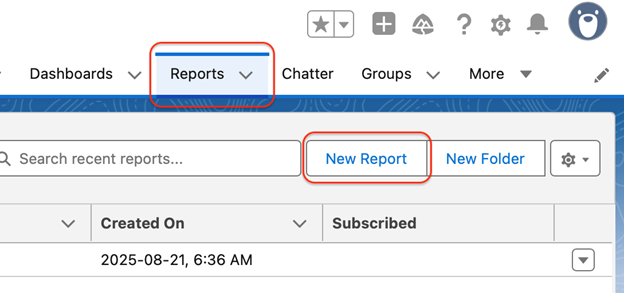
a. Navigate to the Reports tab, and click New Report button
b. Select the Contacts & Accounts report type
c. Click Start Report to open the Report Builder
Step 2: Add key Columns
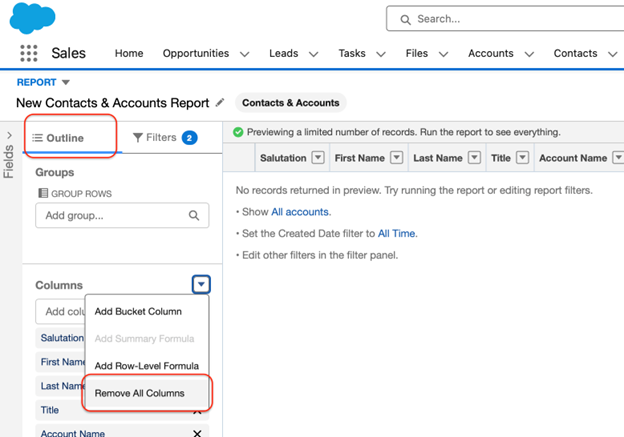
a. In the Outline panel, go to the Columns section and select Remove All Columns
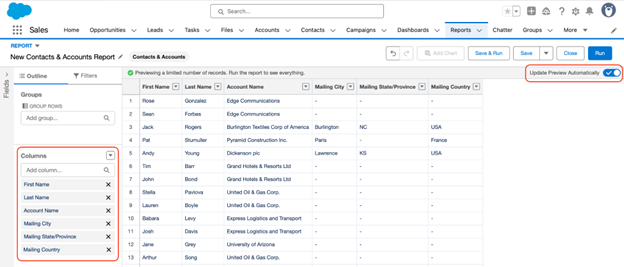
b. Manually add these fields: First Name, Last Name, and Account Name
c. Add the mailing related fields: Mailing City, Mailing State/Province, and Mailing Country
d. Turn on Update Preview Automatically to see changes in your report instantly
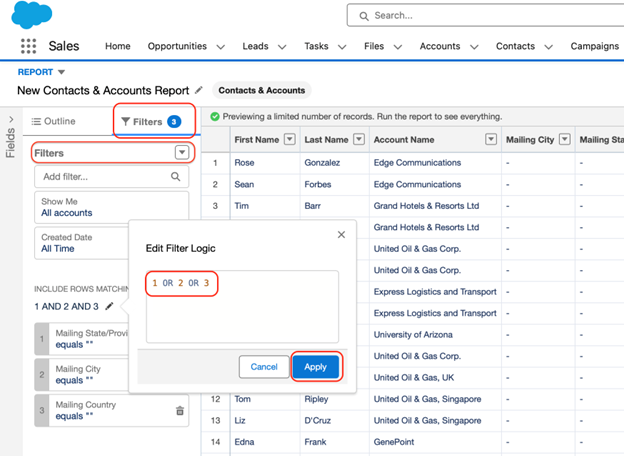
Step 3: Add Filters for Blank Fields
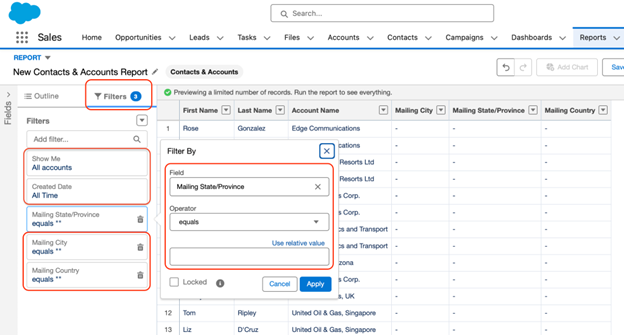
a. Open the Filters Panel
b. Update default filters:
-
- Show Me → All Accounts
- Created Date → All Time
c. From Add filter, select Mailing State/Province
d. Set Operator to Equals and leave Value Blank
e. Repeat the same steps for Mailing City and Mailing Country
Step 4: Update Filter Logic
a. In the Filters Panel, click the dropdown arrow and select Add Filter Logic
b. By default, Salesforce applies AND logic all conditions must be met
c. Update the logic to 1 OR 2 OR 3 and click Apply
Note: This ensures the Report displays records missing any one of the fields
Step 5: Save and Run the Report
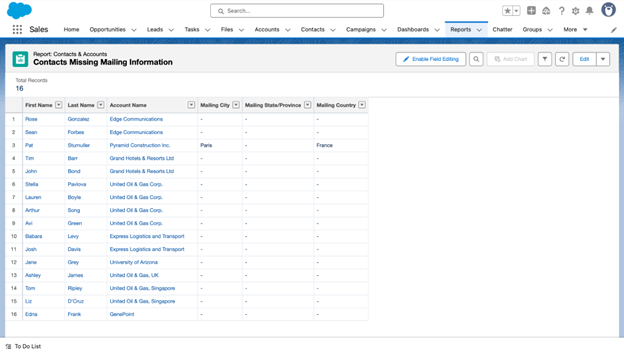
a. Click Save & Run to apply the changes
b. Save the Report with a clear name, such as Contacts Missing Mailing Information
Note: It is optional to add the Report to a Folder or Dashboard, but it is considered best practise for easier access and ongoing monitoring
___________________________________________________________________________
Written by: Smitha Thomas | Forum Ambassador
Smitha is a Salesforce Consultant and Trailhead Forum Ambassador who is passionate about supporting Trailblazers and contributing to the community. She is continually inspired by the rapid evolution of the Salesforce ecosystem and enjoys exploring its powerful automation features and Agentforce capabilities.
Submissions reflect only the opinions of the user who made available the Submission and not the opinions of Salesforce, regardless of whether the user is affiliated with Salesforce, and may contain or constitute products, services, information, data, content and other materials made available by or on behalf of third parties ("Third Party Materials). Salesforce neither controls nor endorses, nor is Salesforce responsible for, any Third Party Materials, including their accuracy, validity, timeliness, completeness, reliability, integrity, quality, legality, usefulness or safety, or any applicable intellectual property rights. Any Submissions made available through any message board or forum in response to posted questions, or that otherwise purports to answer any questions, including any questions about Salesforce or Programs, are made available for your general knowledge only and should never be relied upon as answers to your specific questions (even if an answer is marked as a “best” answer or with any similar qualifications). You should always contact Salesforce support for answers to your specific questions. Salesforce has no control over Submissions, and is not responsible for any use or misuse (including any distribution) by any third party of Submissions.
If you have questions, tap into the wisdom of our entire Trailblazer Community here: https://trailhead.salesforce.com/trailblazer-community/feed
Numéro d’article de la base de connaissances
005135163
Cet article a-t-il résolu votre problème ?
Dites-nous ce que nous pouvons améliorer !
