Sélectionner une organisation
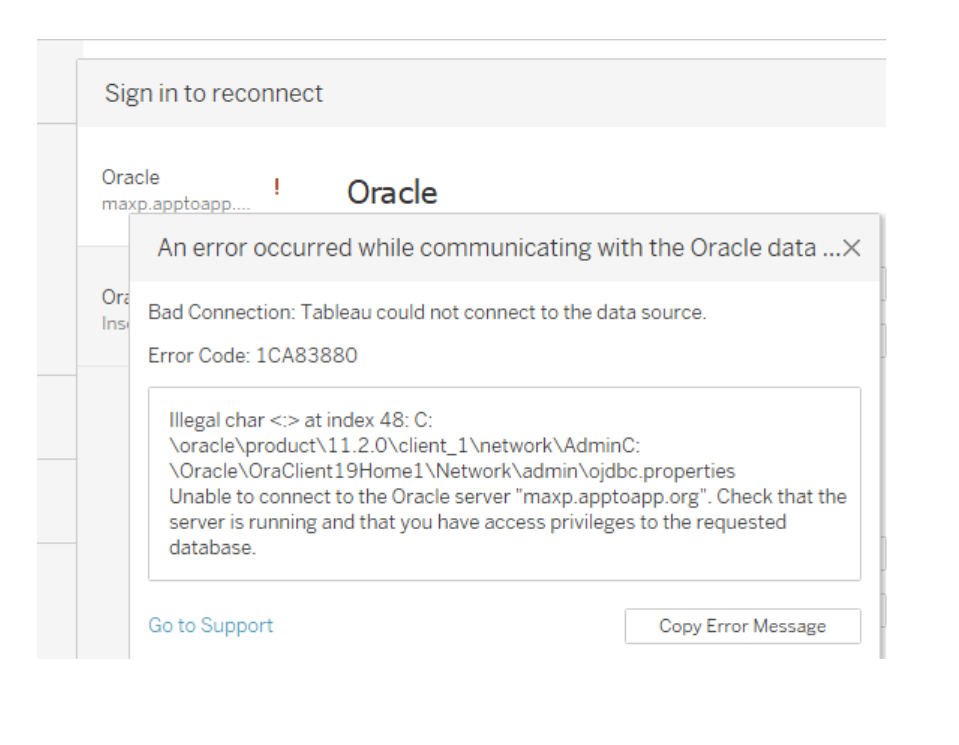
Tableau - Bad Connection: Tableau couldn't connect to Oracle Datasource. Error Code: 1CA83880
Date de publication: Oct 23, 2025
Description
Issue where Tableau could not connect to the Oracle data source from Tableau Desktop. The error message indicated a 'Bad Connection' with Error Code: 1CA83880, caused by an illegal character in the TNS_ADMIN path.
The error occurred due to a misconfigured TNS_ADMIN environment variable on the system. Specifically, two Oracle paths were concatenated without a proper separator, forming an invalid file path:
C:\oracle\product\11.2.0\client_1\network\AdminC:\Oracle\OraClient19Home1\Network\admin\ojdbc.properties
This caused Tableau’s Oracle JDBC driver to interpret the path as containing illegal characters, resulting in a failed connection attempt.
Résolution
To resolve the issue, the TNS_ADMIN environment variable was corrected using the following steps:
-
Open Environment Variables:
-
Press
Win + R, typesysdm.cpl, and press Enter. -
Go to the Advanced tab and click Environment Variables…
-
-
Locate the
TNS_ADMINVariable:-
Under User Variables or System Variables, find and select
TNS_ADMIN.
-
-
Edit the Variable:
-
Remove the concatenated or incorrect path.
-
Ensure the value is set to a single valid Oracle network admin path, for example:
-
-
Save and Apply:
-
Click OK on all dialog boxes to save changes.
-
Restart Tableau Desktop and attempt the Oracle connection again.
-
After applying the correct path, Tableau should successfully establish a connection to the Oracle data source.
Ressources supplémentaires
- The
TNS_ADMINenvironment variable should point to the directory containing thetnsnames.orafile. -
Avoid concatenating multiple Oracle paths in a single environment variable value unless explicitly supported and separated properly.
-
If multiple Oracle clients are installed, ensure Tableau is using the correct one and that
PATHandTNS_ADMINvariables are configured accordingly. -
Common files inside the
TNS_ADMINdirectory- tnsnames.ora - Defines network aliases (TNS names) for databases — e.g. how to translate
PROD_DB (Oracle service)into host, port, and service name. - sqlnet.ora Configures network behavior, encryption, and authentication settings.
- tnsnames.ora - Defines network aliases (TNS names) for databases — e.g. how to translate
- Always restart Tableau Desktop and Command Prompt windows after making changes to environment variables to ensure the updated values are loaded.
Numéro d’article de la base de connaissances
005167028
Cet article a-t-il résolu votre problème ?
Dites-nous ce que nous pouvons améliorer !
