Sélectionner une organisation
Unable to Save Flow with Apex Action in Immediate Path After Winter 26 release
Date de publication: Sep 12, 2025
Description
If an apex action is being added to the immediate path of flow and unable to save and getting following error message. Please follow this article for resolution
A record-triggered flow’s Run Immediately path can’t execute transaction-controlled actions. Remove this element from the flow, or move it to a scheduled path.
You must place this action in an asynchronous path. Add an asynchronous path in the Start element.
Résolution
- Open the Flow
- Open the Apex Action Element
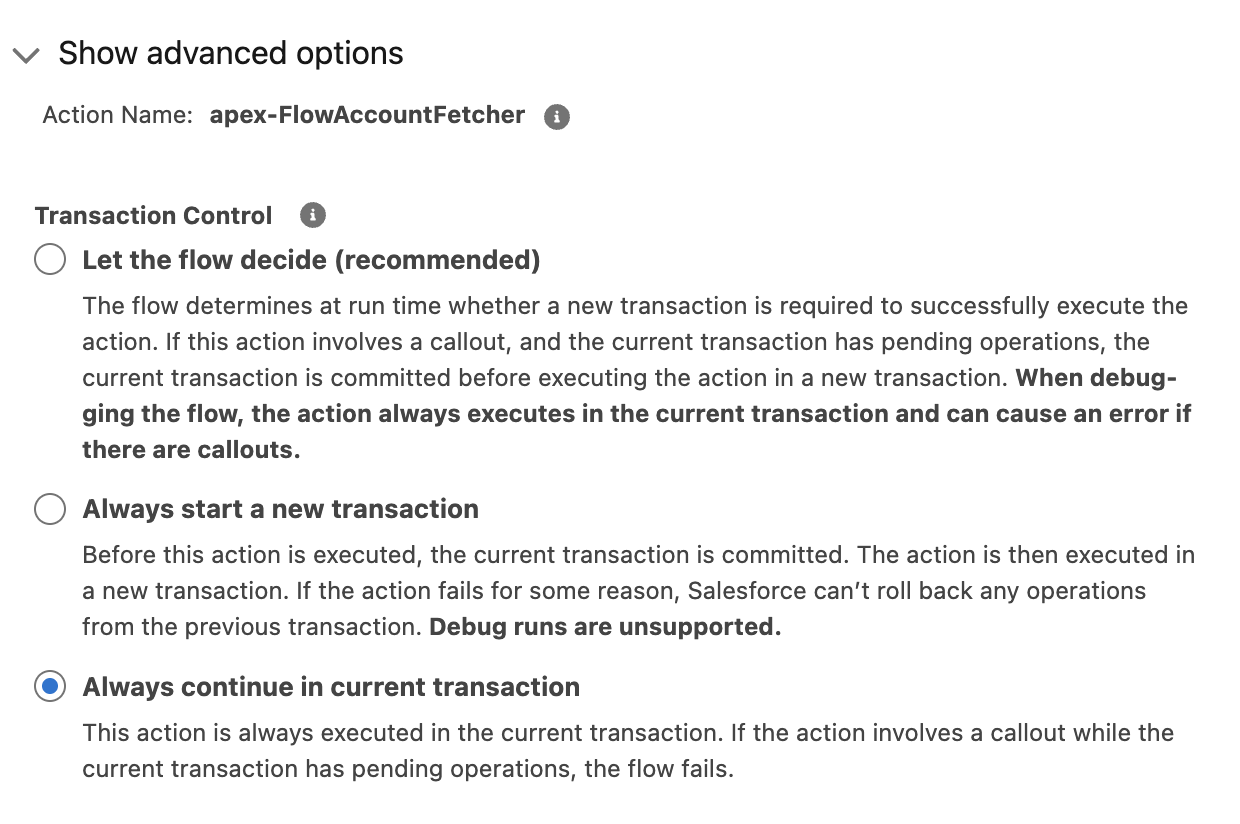
- Click on "Show advanced options"
- Under "Transaction Control" make sure to Select "Always continue in current transaction".If anything of the other two is selected error will throw up
Ressources supplémentaires
Always continue in current transaction:
This action is always executed in the current transaction. If the action involves a callout while the current transaction has pending operations, the flow fails.
Numéro d’article de la base de connaissances
005167102
Cet article a-t-il résolu votre problème ?
Dites-nous ce que nous pouvons améliorer !
