Organisation auswählen
Salesforce Field Service Create Service Document Action in a Salesforce Field Service Flow Throws "Something Went Wrong" Error
Veröffentlichungsdatum: May 18, 2026
Beschreibung
Users who use the "Create Service Document" action within a Salesforce Field Service flow encounter the following error when attempting to generate a service document:
"Something went wrong. Ask your admin for help and let them know the error ID is 450744842-827773 (601898392)."
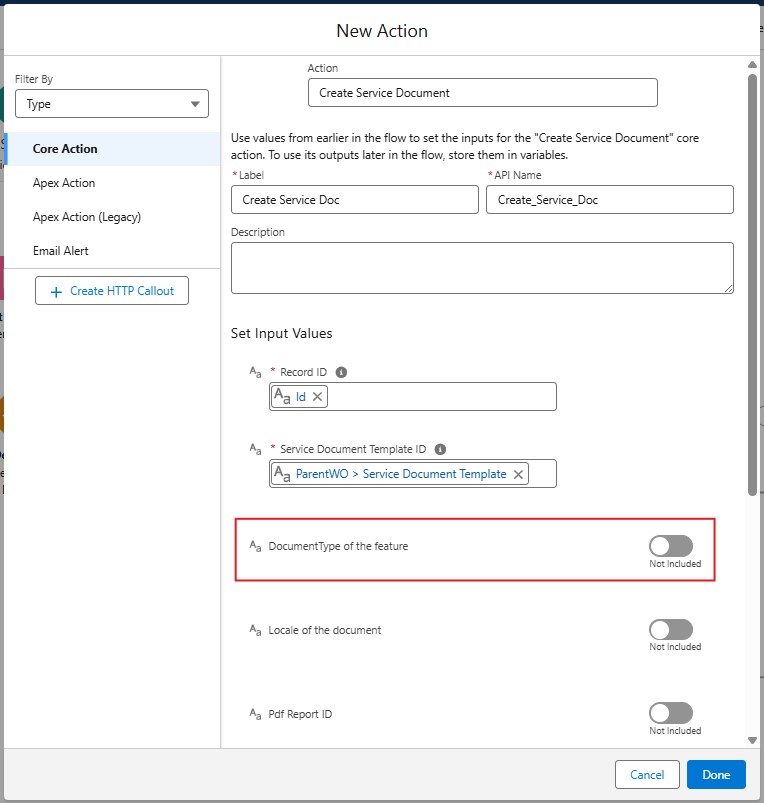
This error occurs because the 'documentType' input field in the 'Create Service Document' flow action is set to a value that conflicts with the document generation process. The 'documentType' field is optional — the default value is already set to 'ServiceDocument' — and having this feature input explicitly enabled causes the error.
Example scenario: A Salesforce Field Service administrator configures a flow that includes the 'Create Service Document' action to automatically generate work order completion documents. When the flow runs, the "Something went wrong" error appears, blocking document generation. This is typically caused by the optional 'documentType' input being enabled unnecessarily in the flow action configuration.
Lösung
This error occurs because the 'documentType' input field in the 'Create Service Document' flow action is set to a value that causes a conflict during document generation. Since this field is optional and its default value ('ServiceDocument') is already correct, disabling the input resolves the issue.
To fix this:
To fix this:
- In Flow Builder, open the flow that contains the 'Create Service Document' action.
- Click on the 'Create Service Document' action element to open its properties panel.
- Under Set Input Values, locate the documentType field.
- Remove or uncheck its value so it is left blank or disabled (unchecked).
- Save the flow.
- Re-activate the flow by clicking Activate.
- Test the flow again to confirm the "Something went wrong" error is resolved and the service document is generated successfully.
Note: The 'documentType' parameter defaults to 'ServiceDocument'. Explicitly setting this optional field is not required and can cause conflicts. Leaving it disabled allows the Salesforce Field Service document generation process to use the correct default value automatically.
Zusätzliche Ressourcen
See Also:
- Create a Service Report in Salesforce Field Service
- Flow Builder: Invoke Actions
- Salesforce Field Service Setup Guide
Nummer des Knowledge-Artikels
005167190
Konnten Sie Ihr Problem mithilfe dieses Artikels lösen?
Geben Sie uns Feedback, damit wir uns verbessern können.
