Organisation auswählen
MuleSoft Product Download Files
Veröffentlichungsdatum: Sep 25, 2025
Aufgabe
Starting September 27, 2025, all MuleSoft product downloads will be available on Salesforce Help for a more seamless experience.
Schritte
Steps to Access MuleSoft Downloads
👉 Before you begin: Make sure you have a Trailblazer ID (TBID) linked to the MuleSoft credentials you previously used to access the MuleSoft Help Center. This is required to download files.
Here’s how to access your downloads:
- Go to Salesforce Help and log in with your MuleSoft credentials.
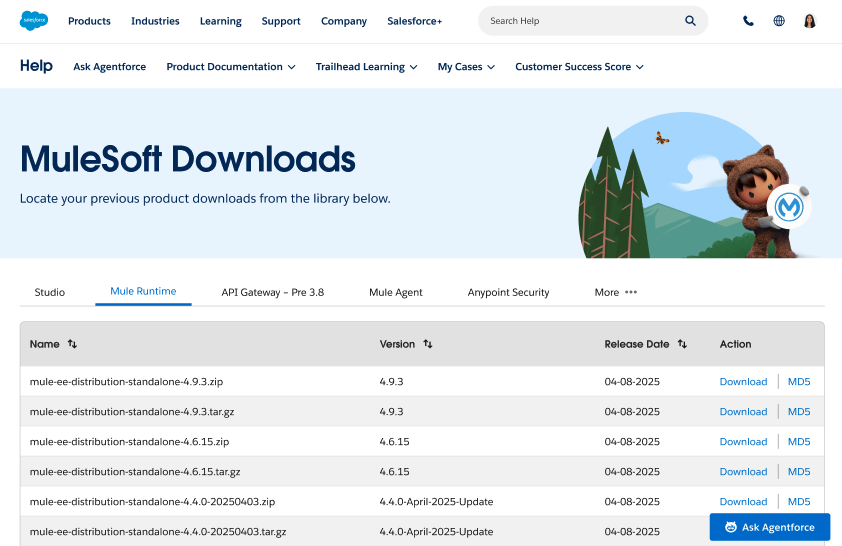
- Navigate to the MuleSoft Product Downloads page (tip: bookmark it for quick access).
- Select the Download action next to the desired file.
-
- Note: Only users logged in with a Trailblazer ID linked to MuleSoft credentials will be able to download.
- Download your files!
Hit a Snag? We've Got Your Back!
If you run into any turbulence, no worries! Just reach out to Salesforce Support directly through Salesforce Help. Our team is standing by to help.
Nummer des Knowledge-Artikels
005167229
Konnten Sie Ihr Problem mithilfe dieses Artikels lösen?
Geben Sie uns Feedback, damit wir uns verbessern können.
