Velg en organisasjon
MuleSoft Product Download Files
Publiseringsdato: Sep 25, 2025
Oppgave
Starting September 27, 2025, all MuleSoft product downloads will be available on Salesforce Help for a more seamless experience.
Trinn
Steps to Access MuleSoft Downloads
👉 Before you begin: Make sure you have a Trailblazer ID (TBID) linked to the MuleSoft credentials you previously used to access the MuleSoft Help Center. This is required to download files.
Here’s how to access your downloads:
- Go to Salesforce Help and log in with your MuleSoft credentials.
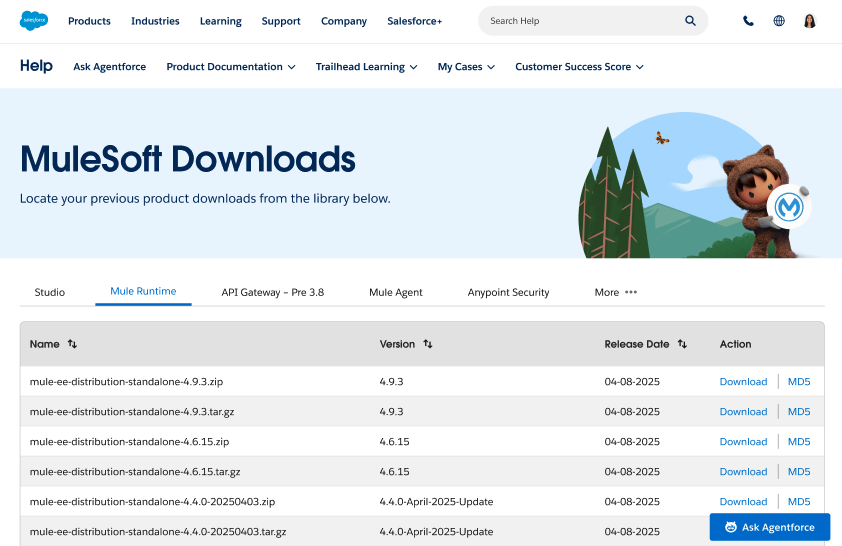
- Navigate to the MuleSoft Product Downloads page (tip: bookmark it for quick access).
- Select the Download action next to the desired file.
-
- Note: Only users logged in with a Trailblazer ID linked to MuleSoft credentials will be able to download.
- Download your files!
Hit a Snag? We've Got Your Back!
If you run into any turbulence, no worries! Just reach out to Salesforce Support directly through Salesforce Help. Our team is standing by to help.
Knowledge-artikkelnummer
005167229
Hjalp denne artikkelen med å løse problemet ditt?
La oss få vite det slik at vi kan forbedre!
