Select An Org
Understanding and Resolving Member Point Balance and Aggregation Records Discrepancies
Publish Date: Sep 24, 2025
Description
Point Balance Storage and Aggregation
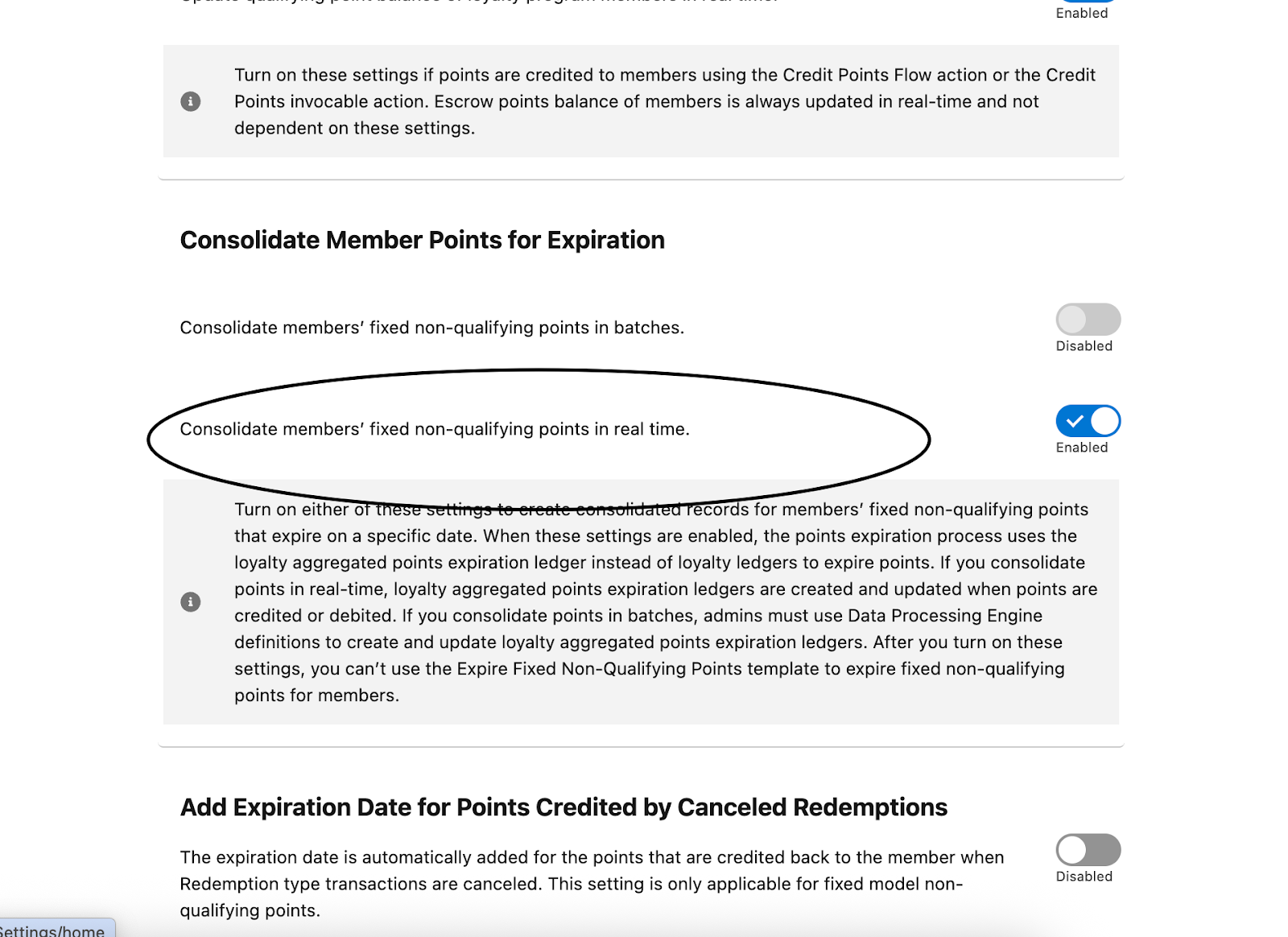
Points balance information is primarily stored in the LoyaltyMemberCurrency entity. To expire points efficiently using aggregated ledgers, either the preference "Consolidate members’ fixed non-qualifying points in real time" or “Consolidate members’ fixed non-qualifying points in batches” can be enabled. Aggregate ledgers are only created for Non-Qualifying Fixed currencies.
Resolution
Common Causes for Point Balance Mismatches:
Multiple investigations have revealed that customers frequently experience mismatches between their point balance and the aggregated ledger balance. The potential causes for this could be:
-
Currency Type Changes:
A critical issue arises when a currency's type is altered, specifically from a Non-Qualifying Point (NQP) Activity or Qualifying currency to a fixed NQP currency. This change has significant implications for how ledger entries are recorded and how point balances are reconciled with aggregation tables.
Initial State: NQP Activity or Qualifying Currency
When a currency is initially designated as an NQP Activity or Qualifying currency, the ledgers created using this currency do not have an Expiry Date stamped on them. This is a key distinction that affects how these entries are processed, particularly in relation to aggregation. Even if the 'aggregate pref'(realtime/batch) is enabled, entries made with these currency types will not be pushed into the aggregation table.
Transition: Changing to a Fixed NQP Currency
The problem arises when this same currency is subsequently updated to a fixed NQP currency. The fundamental change here is that NQP fixed currency ledgers do have an expiry date stamped on them. This alteration in currency type triggers a change in behavior: records associated with this currency will now be created in the aggregation table.
The Resulting Data Mismatch
This shift creates a significant potential for data inconsistency and mismatch. Since previous ledger entries (created when the currency was NQP Activity or Qualifying) did not enter the aggregation table, and new entries (after the currency became fixed NQP) now do, there will be a discrepancy. This discrepancy manifests as a mismatch between the points balance shown in individual ledger records and the aggregated records in the aggregation table. Users or systems relying on the aggregation table for a holistic view of point balances will find incomplete or inaccurate data, as older transactions related to that currency are effectively "missing" from the aggregated view. This can lead to confusion, incorrect reporting, and potential operational issues in OOTB processes that rely on accurate, aggregated point balances.
-
Delayed DPE Execution after Enabling the Aggregate Preference:
Points can be aggregated in two ways:
Batch Mode:
Customers must regularly run the "Aggregate Fixed Non-Qualifying Points in Expiration Ledgers" Data Processing Engine (DPE) job to consolidate ledger points into the aggregation table.
Real-time Mode:
Aggregation occurs instantaneously with every credit, debit, or cancellation operation. If real-time mode is enabled, customers do not need to run any DPE job.
Important Consideration for Switching to Real-time Mode:
If a loyalty program is already running and the "Consolidate members’ fixed non-qualifying points in real time" preference is enabled, existing member points will not be consolidated in the aggregation table. This can lead to discrepancies in subsequent point processing.
To prevent this, customers must immediately run the “Aggregate Fixed Non-Qualifying Points in Expiration Ledgers” DPE job after enabling the real-time preference. This crucial step ensures that existing data is consolidated and points remain synchronized.
Note: System downtime is recommended when running the above DPE job to sync points, as new transactions may occur after enabling the aggregation preference and before the DPE job run is completed.
-
Incorrect DPE Run:
Customers sometimes run the incorrect DPE job for aggregation ledgers. To ensure points are consolidated in the aggregation table, customers must run the "Aggregate Fixed Non-Qualifying Points in Expiration Ledgers" DPE job.
Additionally, to ensure that points expire correctly, when Aggregate pref is on,
customers must run “Expire Fixed Non-Qualifying Points Using Aggregated Expiration Ledgers”
-
Manual Operations on Ledger/Currency/AggregateLedgers
- Any kind of manual operations, apex scripts, triggers, custom DPE jobs to create/update member currency, loyalty ledger, aggregation ledgers could result in points not being counted in the aggregation table or leading to discrepancies in point totals.
- Many times, Ledgers were manually added or imported without utilizing the Out-of-the-Box (OOTB) Loyalty processes, bypassing critical system validations and causing points mismatches.
-
DPE failures
Errors in Aggregate DPE job or expiry DPE job runs can lead to issues such as the failure to update member currency or loyalty aggregation objects. While the immediate impact of these failures might not be apparent, they can have long-term consequences. Therefore, it's crucial to identify and resolve these errors, or at the very least, understand their root causes even if they are unavoidable.
Detecting Mismatches:
Follow these points sequentially and identify any mismatches.
-
For the affected member:
-
Step 1: Get member's current point balance information
SELECT Id, LoyaltyProgramCurrency.Name, PointsBalance, TotalPointsRedeemed, TotalEscrowPointsAccrued, TotalPointsExpired
FROM LoyaltyMemberCurrency WHERE LoyaltyMemberId = <ID> AND LoyaltyProgramCurrencyId = <ID>
-
Step 2: Get aggregate point expiration ledgers for the member
SELECT LoyaltyProgramCurrencyId, ExpirationDate, ExpirationPoints, LoyaltyProgramMemberId, PointsStatus, RedeemedPoints FROM LoyaltyAggrPointExprLedger WHERE LoyaltyProgramCurrencyId = <ID> AND LoyaltyProgramMemberId = <ID>
-
Step 3: Get Loyalty Ledgers for the member
For Credit ledgers:
SELECT ExpiryDate, sum(Points) FROM LoyaltyLedger WHERE LoyaltyProgramCurrencyId = <ID> AND LoyaltyProgramMemberId = <ID> AND EventType = 'Credit' group by ExpiryDate
For debit ledgers:
SELECT sum(Points) FROM LoyaltyLedger WHERE LoyaltyProgramCurrencyId = <ID> AND LoyaltyProgramMemberId = <ID> AND EventType = ‘Debit’
-
Step 4: Validate credit points with ExpirationPoints
Validate sum of credit points in each expiry date of Step3 with “ExpirationPoints” of the same expiry date of Step2 and flag any mismatches.
-
Step 5: Validate debit points with RedeemedPoints
Validate sum of debit points coming from Step3 with sum of “RedeemedPoints” of all the rows of Step2 and flag any mismatches.
-
Step 6: Validate total point balance
-
Get the sum of ExpirationPoints and sum of RedeemedPoints from step 2
-
Compute TotalRemainingPoints = Sum(ExpirationPoints) - Sum(RedeemedPoints)
-
Validate whether TotalRemainingPoints = PointsBalance + TotalEscrowPointsAccrued + TotalPointsExpired (from step 1)
Correcting Mismatches:
If discrepancies are found in the aforementioned steps, users are likely to encounter issues with point redemption or cancellations. Faulty point balances, aggregation tables, or expiration points each require careful diagnosis and distinct solutions.
We can follow the below steps incase aggregation table goes wrong:
DISCLAIMER: Below steps assume that we have correct ledgers in the system and expiration of points are also not faulty. Be very careful before applying these fixes and always perform the steps in the sandbox environment first.
-
For the affected member and currency, delete all aggregation table records for the affected member and currency.
To determine how many records will be deleted, use the following query:
SELECT ExpirationDate, ExpirationPoints, Id, LoyaltyProgramCurrencyId, PointsStatus FROM LoyaltyAggrPointExprLedger WHERE LoyaltyProgramMemberId = <ID> AND LoyaltyProgramCurrencyId = <ID> -
Clear the “LastPointsAggregationDate” field on LoyaltyMemberCurrency for the affected member and currency.
-
Re-run the DPE job once: Aggregate Fixed Non-Qualifying Points in Expiration Ledgers.
-
Perform the same detection steps mentioned previously to validate that everything is correct.
.
If a customer runs the Aggregation Expiry DPE job after a points mismatch, the point balance may become negative.
DISCLAIMER:
The following steps assume that the ledgers in the system are correct. Apply these fixes with care and always test them in a sandbox environment first.
To solve this issue and to fix the points balance in LoyaltyMemberCurrency, follow these steps:
-
Update the total points accrued.
Total Points Accrued is the sum of points in the credit ledgers of a particular member and particular currency when the credit date for escrow points is not specified. -
Update the total points redeemed.
Total Points Redeemed is the sum of points in the debit ledgers. -
If escrow currencies are involved, update the total escrow points accrued.
Total Escrow Points Accrued is the sum of points in the credit ledgers when the credit date for escrow points is specified. -
If escrow currencies are involved, update the total escrow rollover points.
Total Escrow Rollover Points is the sum of points in the credit ledgers when the credit date for escrow points is earlier than today. -
Reset the value of TotalPointsExpired to 0 and LastExpirationProcessRunDate to null.
-
Execute the Expire Fixed Non-Qualifying Points Using Aggregated Expiration Ledgers DPE job again.
Apex Script
This script identifies discrepancies in point balances in the aggregation table and ledgers across all non-qualifying currencies. It requires a set of loyalty member IDs to be passed to the validateLedgers function.
Apex file
public class LoyaltyLedgerValidator {
public void validateLedgers(Set<Id> memberIds) {
// Process each member
for (Id memberId : memberIds) {
validateMemberLedgers(memberId);
}
}
private void validateMemberLedgers(Id memberId) {
// Get member's current balance
List<LoyaltyMemberCurrency> memberCurrencies = [
SELECT LoyaltyProgramCurrencyId, PointsBalance, TotalPointsRedeemed, totalEscrowPointsAccrued,
TotalPointsExpired
FROM LoyaltyMemberCurrency
WHERE LoyaltyMemberId = :memberId and LoyaltyProgramCurrency.CurrencyType = 'NonQualifying'
];
If(memberCurrencies.size() > 0) {
for(LoyaltyMemberCurrency memberCurrency: memberCurrencies) {
Boolean isMismatch = false;
// Get all ledgers for the member
List<LoyaltyLedger> ledgers = [
SELECT Id, Points, ExpiryDate , EventType
FROM LoyaltyLedger
WHERE LoyaltyProgramMemberId = :memberId AND LoyaltyProgramCurrencyId = :memberCurrency.LoyaltyProgramCurrencyId
];
// Get aggregate ledgers for the member
List<LoyaltyAggrPointExprLedger> aggrLedgers = [
SELECT Id, ExpirationPoints, RedeemedPoints, ExpirationDate
FROM LoyaltyAggrPointExprLedger
WHERE LoyaltyProgramMemberId = :memberId AND LoyaltyProgramCurrencyId = :memberCurrency.LoyaltyProgramCurrencyId
];
// Aggregate credit ledgers by expiration date
Map<Date, Decimal> creditByExpDate = new Map<Date, Decimal>();
Decimal totalDebitPoints = 0;
for (LoyaltyLedger ledger : ledgers) {
if (ledger.EventType == 'Credit') {
creditByExpDate.put(ledger.ExpiryDate,
(creditByExpDate.get(ledger.ExpiryDate) ?? 0) + ledger.Points);
} else if (ledger.EventType == 'Debit') {
totalDebitPoints += ledger.Points;
}
}
// Compare credit points with aggregate ledgers
for (LoyaltyAggrPointExprLedger aggrLedger : aggrLedgers) {
Decimal creditPoints = creditByExpDate.get(aggrLedger.ExpirationDate) ?? 0;
// Validate expiration points
if (creditPoints != aggrLedger.ExpirationPoints) {
System.debug('FAILURE: Mismatch in expiration points for date ' + aggrLedger.ExpirationDate + ' for member: ' + memberId + ' for currency: ' + memberCurrency.LoyaltyProgramCurrencyId);
isMismatch = true;
}
}
// Validate total redeemed points
Decimal totalRedeemedPoints = 0;
for (LoyaltyAggrPointExprLedger aggrLedger : aggrLedgers) {
totalRedeemedPoints += aggrLedger.RedeemedPoints;
}
if (totalDebitPoints != totalRedeemedPoints) {
System.debug('FAILURE: Mismatch in total redeemed points. Ledgers: ' + totalDebitPoints + ', Aggregate: ' + totalRedeemedPoints + ' for member: ' + memberId + ' for currency: ' + memberCurrency.LoyaltyProgramCurrencyId);
isMismatch = true;
}
// Validate member balance
Decimal totalRemainingPoints = 0;
for (LoyaltyAggrPointExprLedger aggrLedger : aggrLedgers) {
totalRemainingPoints += (aggrLedger.ExpirationPoints - aggrLedger.RedeemedPoints);
}
if (totalRemainingPoints != (memberCurrency.PointsBalance + memberCurrency.totalEscrowpointsaccrued + memberCurrency.totalpointsexpired)) {
System.debug('FAILURE: Mismatch in member balance. Aggregate: ' + totalRemainingPoints + ', Member: ' + (memberCurrency.PointsBalance + memberCurrency.totalEscrowpointsaccrued + memberCurrency.totalpointsexpired) + ' for member: ' + memberId + ' for currency: ' + memberCurrency.LoyaltyProgramCurrencyId);
isMismatch = true;
}
if (!isMismatch) {
System.debug('SUCCESS : No mismatch in member point balance, aggregation and ledgers for member ' + memberId + ' for currency: ' + memberCurrency.LoyaltyProgramCurrencyId);
}
}
}
}
How to call?
Set<Id> membersId = new Set<Id>();
membersId.add('0lMSG0000000nLh2AI');
LoyaltyLedgerValidator validator = new LoyaltyLedgerValidator();
validator.validateLedgers(membersId);
Results
After running the above apex, look for SUCCESS or FAILURE keywords in debug logs. We will get the appropriate error messages in this case.
Knowledge Article Number
005224326
Did this article solve your issue?
Let us know so we can improve!
