Vælg en organisation
Unable to Connect to SharePoint OneDrive from Tableau Desktop Due to Certificate Validation Error (ERR_CERT_AUTHORITY_INVALID)
Udgivelsesdato: Sep 25, 2025
Beskrivelse
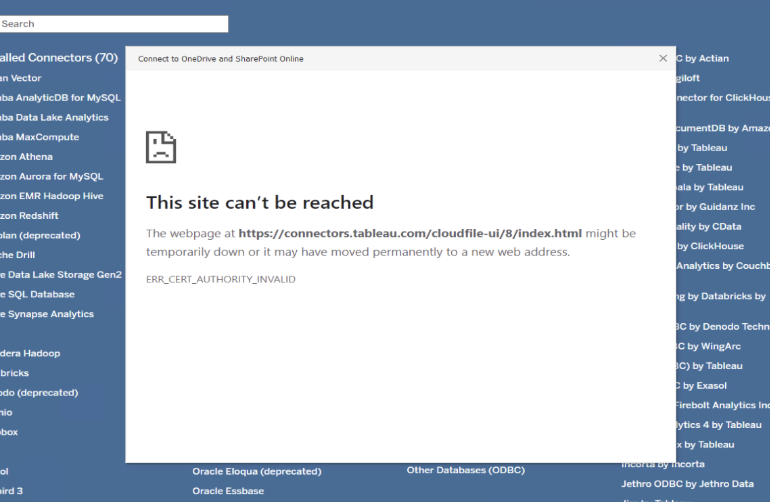
When attempting to connect Tableau Desktop to OneDrive experience the following error during authentication:
"This site can't be reached
The webpage at https://connectors.tableau.com/cloudfile-ui/8/index.html might be temporarily down or it
may have moved permanently to a new web address.

ERR_CERT_AUTHORITY_INVALID"
-
Connection to OneDrive works fine via web browser but fails in Tableau Desktop.
-
The embedded web view used by Tableau Desktop for OAuth authentication cannot validate the SSL certificate for
connectors.tableau.com. -
Logs indicate an OAuth refresh token failure alongside certificate validation issues.
-
The problem typically occurs in corporate environments with strict network security, proxy servers, or SSL inspection tools that intercept and resign SSL certificates.
Løsning
Step 1: Verify SSL Certificate Trust
-
Open https://connectors.tableau.com/cloudfile-ui/8/index.html in a browser on the affected machine.
-
If the browser shows no certificate warnings, export the SSL certificate chain from the browser.
-
Import the missing root or intermediate certificates into the Windows certificate store under Local Machine > Trusted Root Certification Authorities.
Step 2: Check for Network SSL Interception
-
Confirm with your network/security team whether SSL interception or proxy SSL scanning is enabled.
-
Obtain the proxy’s root CA certificate and import it into the Local Machine Trusted Root Certification Authorities store on the affected machine.
Step 3: Re-authenticate OneDrive OAuth Tokens in Tableau Desktop
-
Open Tableau Desktop and edit the OneDrive connection (Data > Edit Connection).
-
Complete the OAuth sign-in flow again to refresh OAuth tokens.
-
If necessary, remove and re-add the OneDrive data source in Tableau Desktop.
Step 4: Update Tableau Desktop
-
Upgrade Tableau Desktop to the latest version to benefit from updated embedded browser components and improved authentication flows.
Step 5: Additional Checks
-
Ensure system date, time, and timezone are accurate.
-
Check for custom hosts file entries that might redirect or block
connectors.tableau.com.
Yderligere ressourcer
-
{"ts":"2025-09-22T18:25:08.008","pid":3696,"tid":"3f98","sev":"warn","req":"-","sess":"-","site":"-","user":"-","k":"oauth-validator-unable-to-validate","e":{"excp-error-code":"0x75BB54D7","excp-source":"NeedsClassification","excp-status-code":"UNKNOWN"},"v":{"dbclass":"onedrivesharepoint","stack":"disabled"}} {"ts":"2025-09-22T18:25:08.008","pid":3696,"tid":"3f98","sev":"warn","req":"-","sess":"-","site":"-","user":"-","k":"excp","e":{"excp-error-code":"0x7B50743C","excp-source":"Client","excp-status-code":"UNAUTHENTICATED"},"v":{"class":"","connectivity_stage":"ConnectivityStage::Unknown","dse-type":"BadOAuthCredentials","excp-msg":"Tableau needs an unexpired OAuth refresh token to connect to the data. Authorize refresh tokens or ask the datasource owner for help.\n","excp-type":"ConnectivityException","is-bad-request":false,"is-capability-probe-failure":false,"is-local-configuration-error":false,"is-remote-configuration-error":false,"msg":"ConnectivityException::Init","server_version":"","sql_state":""}}
The error is due to Tableau Desktop's embedded web view not trusting the SSL certificate chain, which can differ from the full browser trust chain. -
This KB is applicable especially in corporate environments with SSL inspection or strict network security policies.
-
If the issue persists after importing certificates, network traces (e.g., Wireshark) may be needed to diagnose SSL handshake failures.
-
If Tableau Desktop is behind a proxy, configure proxy settings within Tableau appropriately.
Vidensartikelnummer
005224362
Løste denne artikel dit problem?
Giv os besked, så vi kan forbedre os!
