Seleziona un'organizzazione
Why Mandatory Data Mappings Are the Key to Identity Resolution in Salesforce Data 360
Data pubblicazione: Dec 4, 2025
Operazione
The Challenge of Fragmented Customer Data
Every organization today manages customer data across multiple systems—CRM, marketing platforms, e-commerce, support tools, loyalty apps, and more. The challenge is that this data often arrives in siloed formats: phone numbers entered differently across systems, addresses stored inconsistently, or customer identifiers missing altogether.
In Salesforce Data 360, solving this fragmentation depends on one critical step: mandatory data model mappings. These mappings determine how raw ingested data (Data Lake Objects, DLOs) aligns to Salesforce’s standardized schema (Data Model Objects, DMOs).
- Done correctly, they unlock powerful identity resolution—the process that unifies multiple records into a single, trusted customer profile.
- Done poorly, they lead to duplicate identities, missed matches, and unreliable insights.
Fasi
Understanding Mandatory Mappings in Data 360
What Are Mandatory Mappings?
Mandatory mappings are the foundational links between your system data and Salesforce’s standard object model. They define how identifiers, names, contact information, and addresses are structured so Data 360 can recognize when two records belong to the same person.
Without these mappings, Data 360 cannot perform identity stitching, leaving your customer view incomplete.
Mapping Relationships Explained
When creating mappings, you’ll encounter different relationship types:
- 1:1 (One-to-One): A single DLO field maps directly to a single DMO field.
- Example: An Individual ID in your source system maps to the Individual object in Data 360.
- 1:N (One-to-Many): A single DLO field maps into multiple DMO fields.
- Example: One Individual can be tied to multiple addresses.
- N:1 (Many-to-One): Multiple DLO fields map into a single DMO field.
- Example: Mobile Phone and Home Phone may both map into the Contact Point Phone object.
- N:N (Many-to-Many): Multiple DLOs connect to multiple DMOs.
- Example: Contact Point Social can map across multiple systems and IDs.
Visual Guide
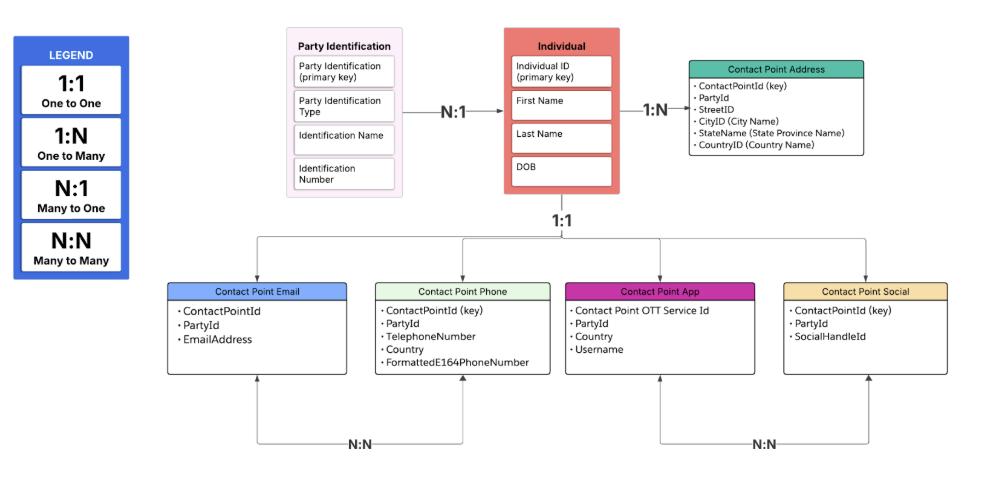
The diagram below shows how Party Identification, Individual, and Contact Point objects work together through mandatory mappings:
Detailed Required Mappings for Data 360
Below are the required objects, fields, and relationship types as defined by Salesforce’s documentation. These are mandatory for enabling identity resolution and saving mappings. Salesforce
|
Data Model Object (DMO) |
Required Field(s) / Primary Key |
What Maps To It (from DLOs or Source Data) |
Relationship Type |
|
Profile / Other Category DMOs |
Primary Key / Unique Identifier |
Must map a field from the DLO that is unique per record (e.g. Customer ID, External ID) to this Primary Key in the DMO. Without it, mapping cannot be saved. Salesforce |
1:1 (One source field → One DMO key) |
|
Individual |
Individual ID (PK), First Name, Last Name |
Source system’s unique individual identifier; name fields from DLO (e.g. employee records, customer records) mapped to First/Last Name. |
1:1 typically from individual record to Individual DMO; but individual may have multiple contact points (1:N) |
|
Contact Point Email |
Contact Point Email ID (PK), Email Address |
The source email field mapped to Email Address. The PK should be unique per contact point email. |
1:1 (one source email to one DMO email record) |
|
Contact Point Phone |
Contact Point Phone ID (PK), Formatted E164 Phone Number |
Source phone field(s) mapped; multiple phone types may exist (mobile, home, work) but one standardized value in E.164 mapped. |
Many:1 if multiple phone fields mapped into one standardized DMO field; or N:N if separate phone records from multiple sources map to multiple phone entries. |
|
Contact Point Address |
Address Line 1, City, State/Province, Postal Code, Country |
Source address components from DLO mapped to address DMO fields. Corresponding fields must be fully mapped to satisfy requirements. |
1:N — an individual may have multiple addresses (home, work, etc.); each address maps to one address DMO record. |
|
Party Identification |
Party Identification ID (PK), Identification Type, Identification Number |
The source’s ID systems (e.g. national ID, customer number, social security, etc.) mapped to the Party Identification fields. |
N:1 or 1:Many depending on whether one individual has multiple identifications, and whether those identifications map across multiple individuals/records. If multiple identifications per party, then it’s 1:N (one party has many identifications). |
|
Contact Point Social / App |
Contact Point Social ID / Contact Point App ID (PK) |
If your business uses social IDs or app-based identifiers, those DLO fields must map here. |
N:N often — multiple social IDs per individual, multiple systems to bring them in. |
How These Required Mappings Appear in Practice (with Relationship Types)
Using your diagram plus the Salesforce required mappings, here is a more fully mapped-out view:
-
Individual ↔ Party Identification:
-
One Individual may have many Party Identifications (1:N) — e.g. multiple ID types (passport, driver’s license, customer ID).
-
Conversely, each Party Identification record maps to exactly one Individual (N:1).
-
-
Individual ↔ Contact Point Email / Phone / Address / Social/App:
-
Individual to Email: 1:N — each individual may have one or multiple emails.
-
Individual to Phone: 1:N — multiple phone numbers per individual.
-
Individual to Address: 1:N — multiple addresses (home, work, billing, etc.).
-
Individual to Social/App: 1:N or N:N depending on whether multiple social/app IDs are associated, possibly across multiple sources.
-
-
Party Identification ↔ Individual: N:1 as noted above.
-
Contact Point objects (Email, Phone, Address, Social/App) often include a Party reference so you can trace back which Party/Person they belong to.
-
Additionally, some mappings may be Many:Many (N:N) in scenarios where multiple DLOs or multiple external systems feed into the same Contact Point or Social/App object type. For example, two systems both provide a phone number for the same person — you need to manage deduplication or merges.
Why These Specific Mappings & Relationship Types Are Required
Based on Salesforce’s Data Mapping Requirements article:
- The Primary Key field in Profile / Other category DMOs is mandatory. Without it, you can’t save the mapping. Salesforce
- All required identity-related fields must be mapped (IDs, name, contact points). If any required identity field is missing, identity resolution may not function properly. Salesforce
- Mapping must respect field semantics: e.g. mapping phone → phone, email → email. You can’t map the wrong type.
Expanded Example: Mapping Workflow
Here’s a step-by-step example combining what we know now, showing exactly what fields get mapped, and their relationship types.
-
Source DLO: CRM_Customer
-
Fields: Customer_ID, First_Name, Last_Name, Home_Phone, Work_Email, Address_Line1, City, Postal_Code, Country, Social_ID
-
-
Map to DMOs:
|
Source Field |
Target DMO |
Target Field |
Relationship Type |
|
Customer_ID |
Individual |
Individual ID (PK) |
1:1 |
|
First_Name |
Individual |
First Name |
1:1 |
|
Last_Name |
Individual |
Last Name |
1:1 |
|
Work_Email |
Contact Point Email |
Email Address |
1:1 or 1:N (if you have multiple emails) |
|
Home_Phone |
Contact Point Phone |
Formatted E.164 Phone Number |
1:N |
|
Address_Line1, City, Postal_Code, Country |
Contact Point Address |
Address components |
1:N |
|
Social_ID |
Contact Point Social/App |
Social ID |
N:N if multiple sources or types |
-
Party Identification mapping:
-
If source has Passport_Number or National_ID fields, map to Party Identification ID, Identification Number, Identification Type.
-
Relationship: individual has 1 many identifications → 1:N.
-
Implications If Required Mappings Are Missing or Incorrect
- Mapping definitions can’t be saved if primary key in DMOs isn’t mapped. (You’ll get errors/warnings in Data 360.) Salesforce
- Identity resolution will miss or fail to match records if key fields (IDs, emails, phone, address) are not mapped.
- Downstream features relying on identity — deduplication, personalization, segmentation — degrade in performance.
- Source data may not join correctly, leading to orphans (records without party) or mismatched Parties.
Risorse aggiuntive
Best Practices
- Map unique IDs first.
- Normalize emails, phone numbers, and addresses.
- Test mappings early with sample data.
- Review relationships regularly.
What’s Next
Summary: What to Check / Validate
- Ensure every DMO that requires a Primary Key field has a mapping from your DLO.
- Check that name fields, email, phone, addresses are mapped and normalized.
- Review relationship types: are you mapping multiple fields into single DMO? Are you setting up multiple contact points per individual?
- Use the diagram to cross-reference: Party Identification, Individual, Contact Point objects.
Numero articolo Knowledge
005224378
Questo articolo ha risolto il problema?
Facci sapere, così possiamo migliorare!
