Organisation auswählen
How to update Case Owner as the Agent who accepted Omni-Channel initiated Messaging Session
Veröffentlichungsdatum: Oct 14, 2025
Beschreibung
This solution uses a Record-Triggered Flow on the Agent Work object to update the Case Owner to the Agent who accepts an Omni-Channel messaging session when the record Status is Opened and the Work Item ID starts with 500, ensuring Cases are automatically assigned to the handling Agent.
Lösung
- To set the context, let's assume we have a customer who has implemented Omni-Channel Flow to create a Case, They have configured appropriate Routing Configurations to route the Messaging Sessions to the correct Agent, who eventually accepts the same and has conversation with the customer for issue resolution accordingly.
- The customer would now like to update the ownership of the Case created via the Omni-Channel Flow with the Agent who has accepted the Messaging Session.
- To solve this requirement, we will be implementing a Record -Triggered Flow on the Agent Work object. Agent Work is the object in Salesforce that has a record created whenever an Agent accepts the Messaging Session. This object tracks the Agent's interaction and represents the work assignment that's routed to an Agent.
Record-Triggered Flow:
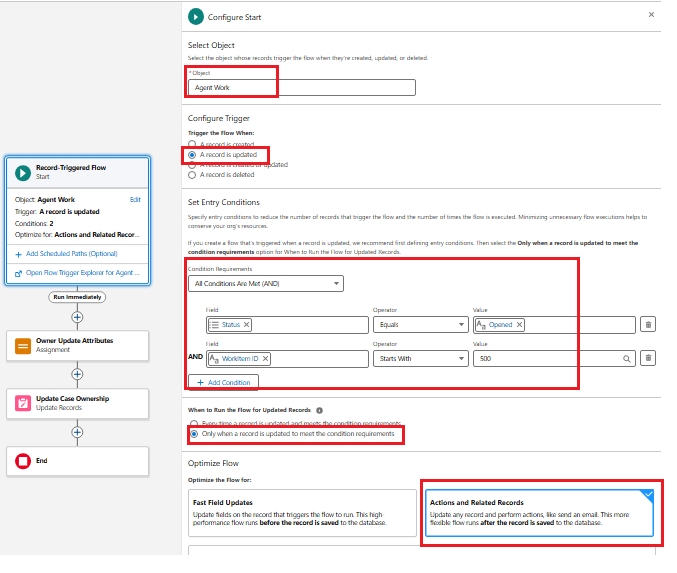
Step 1: Object selection and Flow criteria element
- Navigate to Set up | Flows and Click New Flow
- Select Record -Triggered Flow as the Flow Type. This opens a pop-up where we have to select Agent Work as the object, since this is the object that represents the work assignment routed to Agent via Omni-Channel
- In Configure Trigger select A record is updated, as Agent is accepting an assignment
- Under Set Entry Conditions, set Status field to Opened. since this assignment will have Status defined as Opened and WorkItem ID Starts with 500
- Under Optimize Flow section, we will be selecting Actions and Related Records, since we have to update the ownership of the Case associated with Agent Work item record
- Save the Flow and proceed with next steps
Step 2: Assignment Element
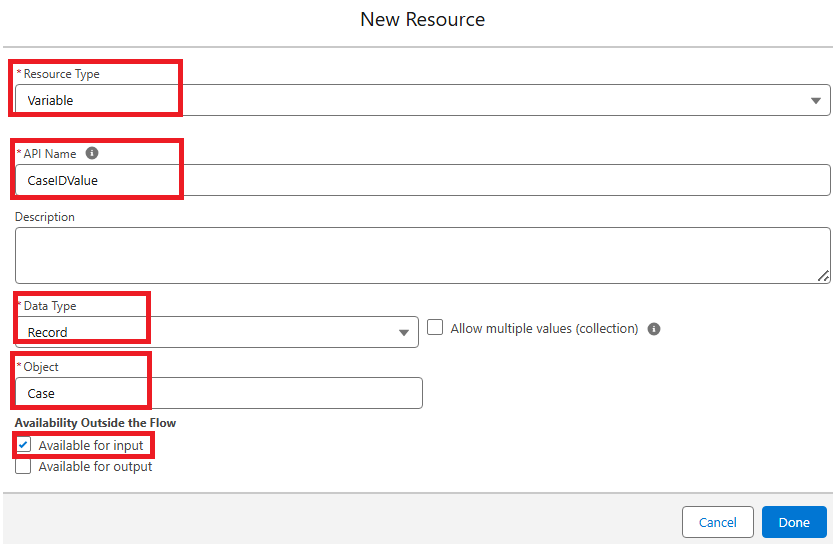
- Select Resource Type as Variable and API Name as CaseIDValue, choose Data Type as Text and set the object to Case
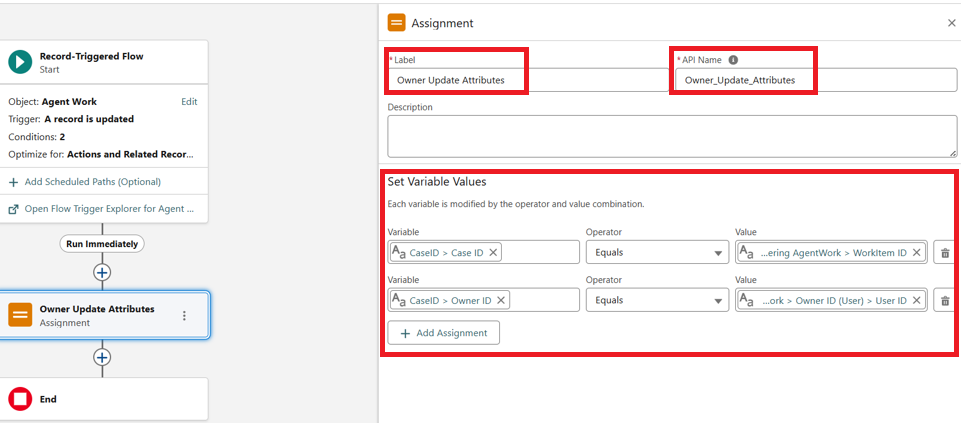
- Click on Assignment Element. The main purpose is to assign Work Items Owner, who is the Agent here as the Case Owner
- Under Set Variable Values section, assign Variable as Case ID with Value Work Item's Case ID and Record Variables as Owner with the Owner of the Work Item ID
- Save the Assignment Element
Step 3: Update Records Element
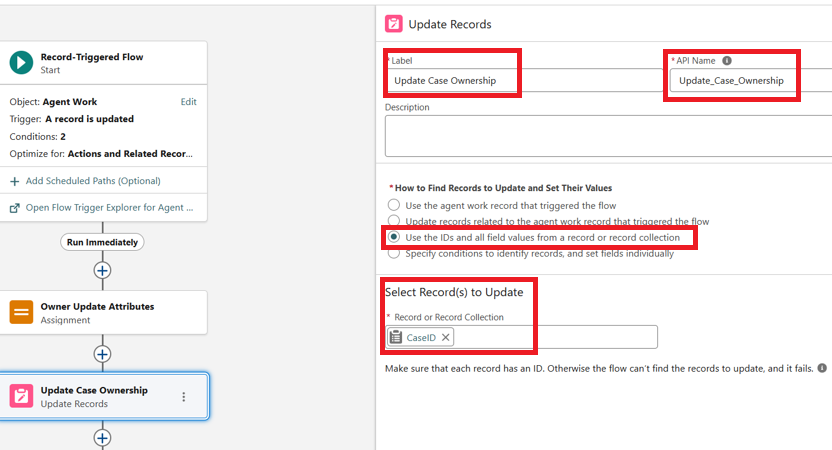
- The Final aspect of Flow is the Update Records Element, where we leverage the Assignment mappings defined in the Assignment element to perform record updates
- Please ensure that the third option is selected under the How to Find Records to Update and Set Their Values section, and then pick CaseID Record Variable element that we used earlier in Assignment element
- Save the Flow and Activate
- With the above Flow elements and leveraging the Agent Work object attributes, we can successfully update Case Ownership to the correct Agent
___________________________________________________________________________
Written by: Manoj Nambirajan | Forum Ambassador
Manoj Nambirajan is a Salesforce Enterprise Architect at Dell Technologies with more than 17 years of experience in the Salesforce ecosystem. Manoj has exceptional leadership abilities and a flair for solving issues quickly. Accredited as Salesforce MVP, Manoj has 21 Salesforce certifications and is among the Top 10 Answers leader in the Trailblazer Community.
Submissions reflect only the opinions of the user who made available the Submission and not the opinions of Salesforce, regardless of whether the user is affiliated with Salesforce, and may contain or constitute products, services, information, data, content and other materials made available by or on behalf of third parties ("Third Party Materials). Salesforce neither controls nor endorses, nor is Salesforce responsible for, any Third Party Materials, including their accuracy, validity, timeliness, completeness, reliability, integrity, quality, legality, usefulness or safety, or any applicable intellectual property rights. Any Submissions made available through any message board or forum in response to posted questions, or that otherwise purports to answer any questions, including any questions about Salesforce or Programs, are made available for your general knowledge only and should never be relied upon as answers to your specific questions (even if an answer is marked as a “best” answer or with any similar qualifications). You should always contact Salesforce support for answers to your specific questions. Salesforce has no control over Submissions, and is not responsible for any use or misuse (including any distribution) by any third party of Submissions.
If you have questions, tap into the wisdom of our entire Trailblazer Community here: https://trailhead.salesforce.com/trailblazer-community/feed
Nummer des Knowledge-Artikels
005224771
Konnten Sie Ihr Problem mithilfe dieses Artikels lösen?
Geben Sie uns Feedback, damit wir uns verbessern können.
