組織を選択
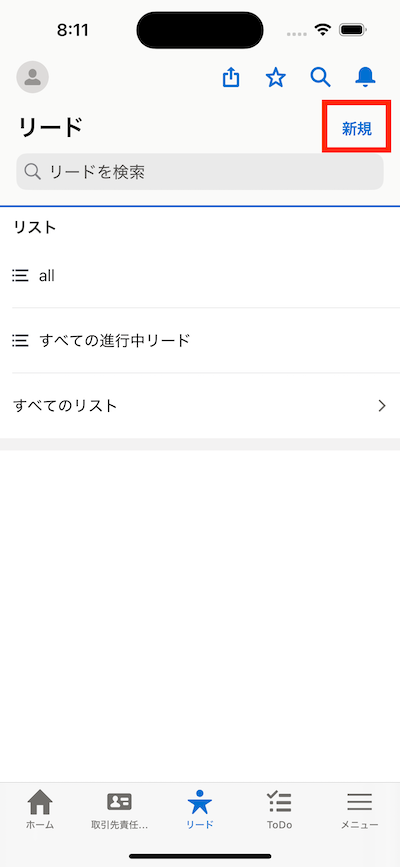
Salesforceモバイルアプリケーション:オブジェクトのタブにアクセスした際に表示される「新規」ボタンが削除できない
公開日: Oct 9, 2025
説明
本記事では、Salesforceモバイルアプリケーション上でオブジェクトのタブにアクセスした際の「新規」ボタンの削除が行えないことについて説明します。
この事象は現状のSalesforceモバイルアプリケーションで想定された動作です。
解決策
PCブラウザ(Lightning Experience)ではオブジェクトマネージャーのリストビューボタンレイアウトから「新規」ボタンを削除することで、オブジェクトのタブにアクセスした際のリストビューの「新規」ボタンを非表示とすることが可能です。
Salesforceモバイルアプリケーションでは上記の設定は反映されず、ユーザーに対象オブジェクトの作成権限が権限セットやプロファイルで与えられている場合は「新規」ボタンが表示される動作となります。
完全な代替機能ではありませんが、Lightningアプリケーションビルダーで以下の手順でアプリケーションページを作成することでレコードリストは表示し、新規ボタンを表示しないページを作成することは可能です。
なお、オブジェクトのタブにアクセスした際のユーザーインターフェースとは異なりますので実際の動作をご確認いただき、ご要望に沿う動作であるかご判断いただく必要がございます。
-作成手順
- PCブラウザより[設定] > [Lightning アプリケーションビルダー] > [新規] > [アプリケーションページ]
- リストビューコンポーネントを配置
- 任意のオブジェクトをリストビューコンポーネントに設定
- [保存] > [有効化]を実施
Lightningアプリケーションページの作成、有効化につきましては以下のリンクを参照してください。
Lightning アプリケーションビルダーを使用したモバイルアプリケーションページの作成
なお、IdeaExchangeに投稿された同様のご要望は後述のリンクを参照してください。
ナレッジ記事番号
005225183
この記事で問題は解決されましたか?
ご意見をお待ちしております。
