Välj en organisation
Some Borders Are Not Displayed When Viewing a View on Tableau Server or Tableau Cloud
Publiceringsdatum: Dec 12, 2025
Beskrivning
On Tableau Server or Tableau Cloud, when the number of marks in a view increases due to actions like filtering or drilling down, certain borders in a crosstab (especially the border between dimensions and measures, or the bottom line) may disappear.
This issue does not occur in Tableau Desktop, leading to a display inconsistency between the desktop and web browser environments.
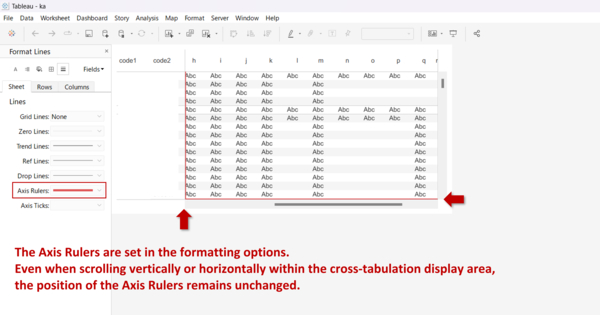
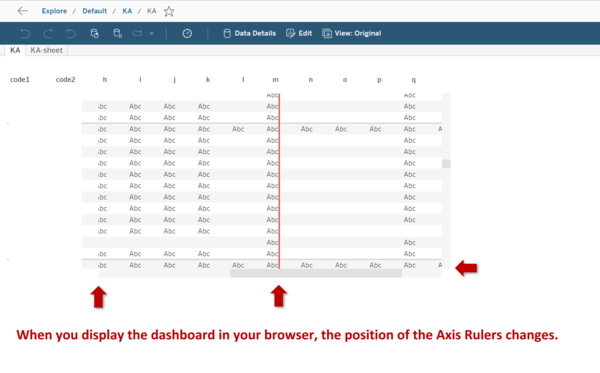
Cause:
This behavior is caused by a processing function in Tableau Server or Tableau Cloud known as server side rendering.
When opening a workbook view (dashboard), Tableau Server or Cloud automatically selects the rendering method based on its complexity.
With server side rendering, the server generates image files of the view and sends them to the browser.
-
If the view size is small: A single image file is generated, and borders are displayed correctly.
-
If the view size is large: To maintain performance, the server splits the large image into multiple smaller image files (tiles). When the browser reassembles these multiple images, the configured borders are not displayed.
Note: This issue does not occur in Tableau Desktop, as it uses a different rendering engine.
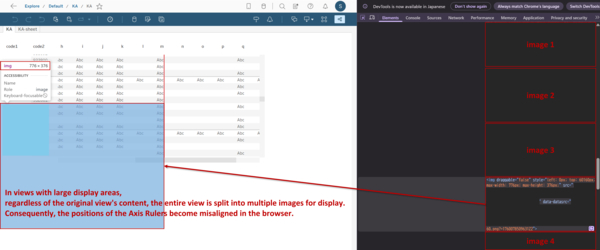
Lösning
The primary resolution is to reduce the number of marks displayed at one time, allowing the browser to render the view as a single image. Consider one of the following approaches:
Option1: Decrease the granularity of the data displayed in the dashboard (e.g., drill up or set a more aggregated view as the initial display).
Option2: Apply more specific filters in the initial view to limit the number of marks being displayed.
Knowledge-artikelnummer
005225351
Löste denna artikel ditt problem?
Berätta för oss vad vi kan förbättra!
