Select An Org
Remote Actions referencing discoveryfrmwrk.StoreResponses fail due to case-sensitive ApexClassCheck validation
Publish Date: Oct 23, 2025
Description
OmniStudio has introduced a new validation mechanism called ApexClassCheck, which enforces case-sensitive validation for Apex class references.
Due to this enhancement, Remote Actions or components referencing the Apex class discoveryfrmwrk.StoreResponses are failing with the following error message:
“User does not have permission to access ApexClass: discoveryfrmwrk.StoreResponses”
This issue occurs because the reference to the Apex class does not match the actual case-sensitive class name defined in Salesforce.
This validation has already been accounted for in code for 260+ releases. However, orgs with ApexClassCheck enabled may still encounter this issue in existing implementations, especially in sample or legacy OmniScripts that contain hardcoded references to the incorrectly cased class name.
Resolution
Resolution Steps:
- Update Class References:
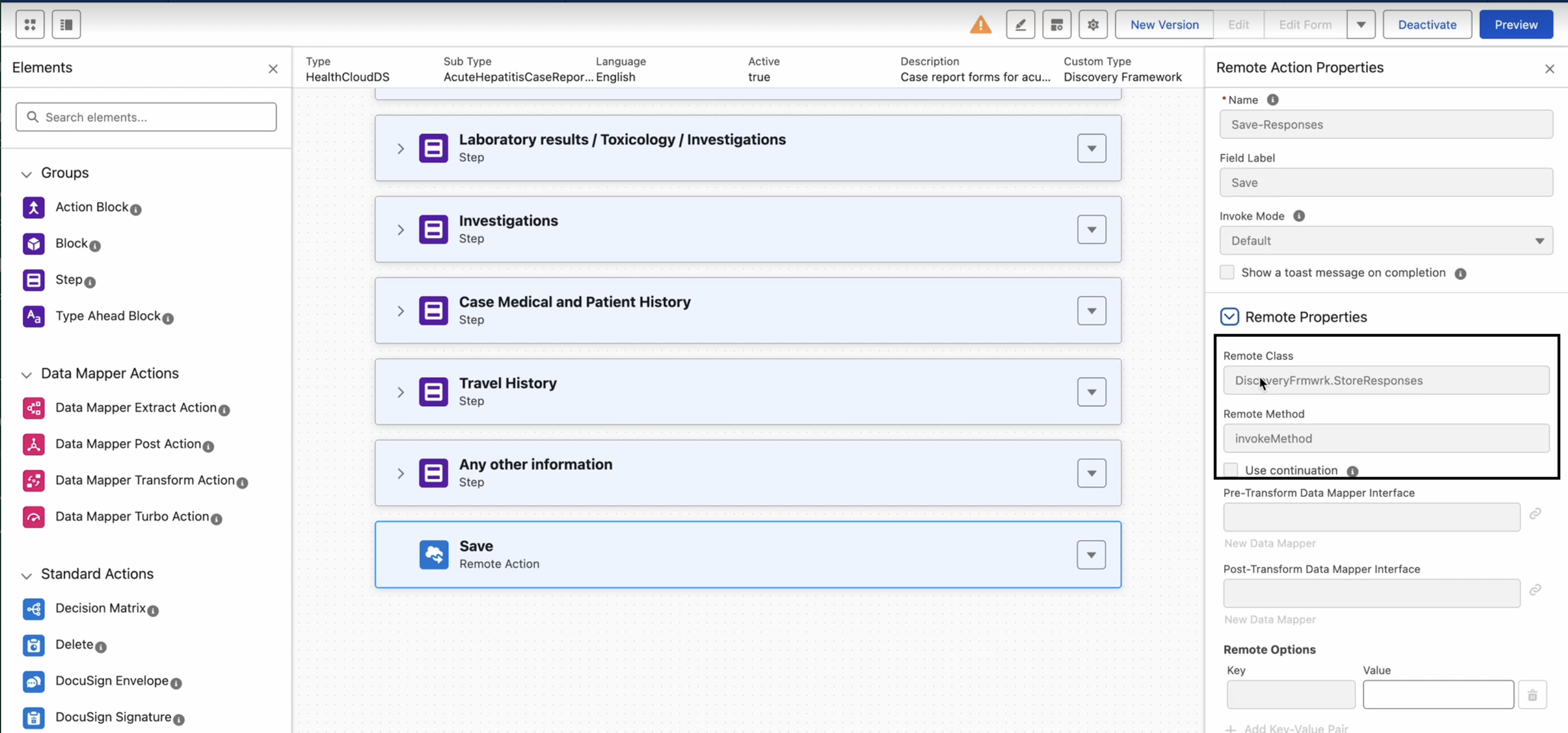
- Replace all references to discoveryfrmwrk.StoreResponses with the correctly cased DiscoveryFrmwrk.StoreResponses in all Remote Actions, OmniScripts, and components.
- For Sample Templates:
- Update the Remote Action reference directly in the OmniScript Builder to DiscoveryFrmwrk.StoreResponses.
- Verification:
- After updating, verify that the Remote Action executes successfully without ApexClass permission errors.
- After updating, verify that the Remote Action executes successfully without ApexClass permission errors.
Knowledge Article Number
005227039
Did this article solve your issue?
Let us know so we can improve!
