Organisation auswählen
SVG Image Objects Containing Executable Elements Not Displayed on Tableau Server or Cloud
Veröffentlichungsdatum: Jan 9, 2026
Beschreibung
Description
SVG image objects containing executable elements in a dashboard cannot be displayed on the following Tableau Server versions or Tableau Cloud.
- Tableau Server 2023.3.7 and later
- Tableau Server 2024.2.1 and later
- Tableau Server 2025.1.0 and later
- Tableau Cloud
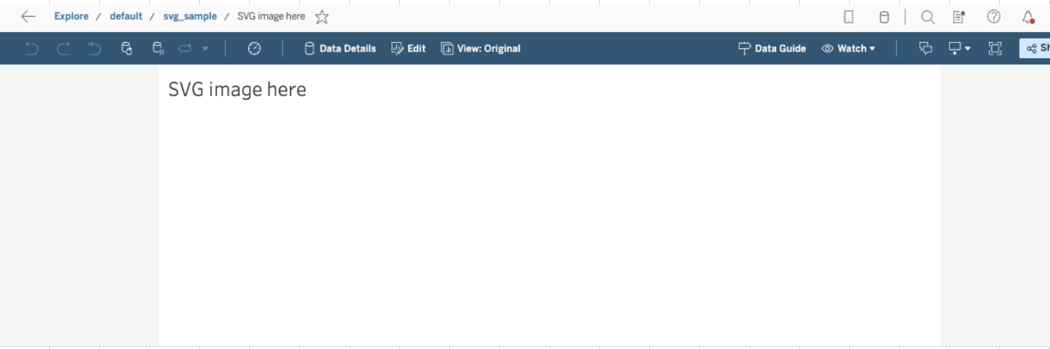
For example, embed an SVG image which has the following XML to a dashboard:
<?xml version="1.0" encoding="UTF-8"?>
<!DOCTYPE svg [
  <!ENTITY myColor "red">
]>

<svg width="200" height="100" xmlns="http://www.w3.org/2000/svg">
  <circle cx="50"  cy="50" r="40" fill="&myColor;" />
  <rect   x="120" y="10" width="70" height="80" fill="&myColor;" />
</svg>
When publishing the workbook to Tableau Server or Tableau Cloud, the SVG image cannot be displayed.
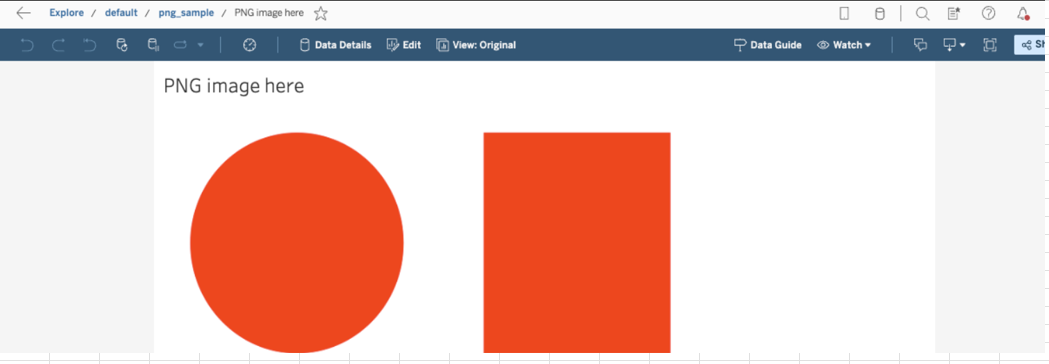
In contrast, images in PNG format can be displayed correctly.
Cause
This is an intentional change resulting from a security enhancement. This enhancement proactively blocks the rendering of SVG files that contain potentially executable elements, such as <script>, <!ENTITY>, or <foreignObject> tags or onload attributes.
Lösung
Use one of the following two options to resolve this issue:
Option 1. Modify the SVG file
Edit the SVG file to remove the blocked elements (such as <script>, onload, <!ENTITY>, and <foreignObject>). Re-add the modified file to the workbook and republish.
Option 2. Use an alternative image format
Convert the image from SVG to a different format, such as PNG or JPEG, and use that file in the dashboard instead.
Nummer des Knowledge-Artikels
005227361
Konnten Sie Ihr Problem mithilfe dieses Artikels lösen?
Geben Sie uns Feedback, damit wir uns verbessern können.
