조직 선택
Data 360: Enhance Identity Resolution with the Identity Match Feature
게시 일자: Nov 13, 2025
상세 설명
What the Feature Does
The Identity Match feature addresses the critical business need for customers to "bring their own links" to the Identity Resolution process. It gives you the ability to explicitly communicate to the system:
-
Valid Matches (Merge): Force a match between two individual records that the standard IR rules might miss.
-
Invalid Matches (Split): Prevent two individual records from merging if you know they do not represent the same person.
솔루션
How It Works
The feature introduces a new standard Data Model Object (DMO) called IdentityMatch. You can configure match rules in the user interface to select and include specific types of Identity Match DMOs.
-
Define Your Match Types: You create and load data into the IdentityMatch DMO to define the relationships you want to enforce. For example, you might define an IdentityMatchType of "Lead to Contact" for known conversions or "Device-to-Prospector" for linking anonymous and known profiles.
-
Configuration: You select the specific IdentityMatchType you want to be included in your match rules via the Identity Resolution user interface.
-
IR Integration: The selected IdentityMatch DMO is then integrated into the Identity Resolution process to influence whether profiles are merged or split.
Setup Prerequisite: Required Mappings
Fields Required to be mapped
|
Field Name |
Expected Value/Type |
|
IdentityMatchType |
The customer-defined type of identity match(String) |
|
MatchingRecordId |
Matching Id value |
|
RecordId |
Id value |
|
IsAMatch |
1 means merge (positive edge), 0 means split (negative edge). |
|
Object |
Null/Empty string/ string ending with primary dme as suffix |
|
MatchingObject |
Null/Empty string/ string ending with primary dme as suffix |
Key Fields in the IdentityMatch DMO Schema
Your custom data loaded into the IdentityMatch DMO must conform to this schema:
|
Column Name |
Data Type |
Description |
|
IsAMatch |
Boolean |
Controls the action: 1 means merge (positive edge), 0 means split (negative edge). |
|
IdentityMatchType |
String |
The customer-defined type of identity match (e.g., "Lead to Contact"). This is used to filter which links are included in a match rule. |
|
MatchWeight |
Float |
(Future Use) A weight (0 to 1) to determine priority over other match types. |
추가 자원
Example of Identity Resolution Enhancement
IdentityMatch DMO
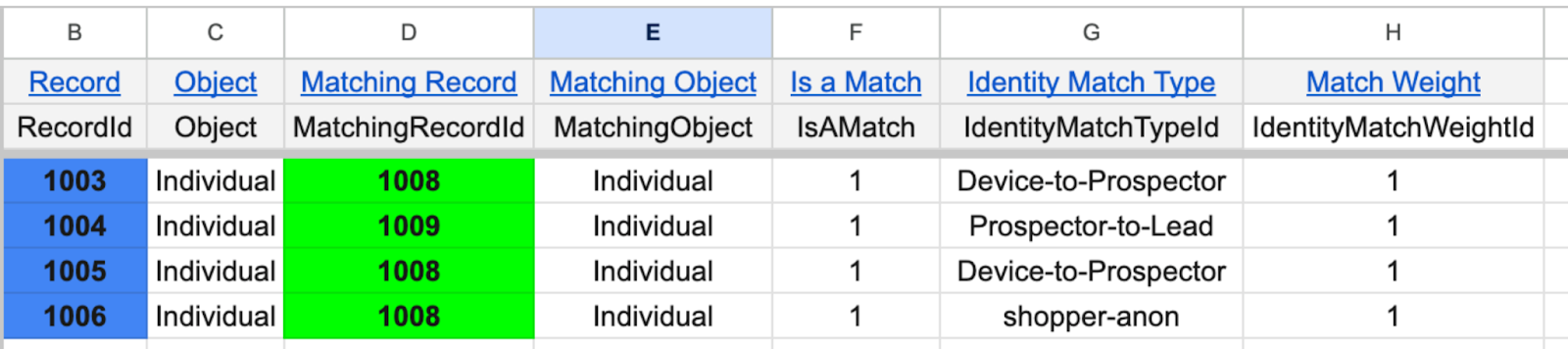
Consider three pre-existing clusters of records:
-
Cluster 1: Records 1001, 1003, 1005
-
Cluster 2: Records 1008, 1009
-
Cluster 3: Records 1004, 1012
If you introduce an Identity Match Rule that includes the types Prospector-to-Lead and Device-to-Prospector, and your IdentityMatch DMO contains the following explicit links:
-
Record 1003 is matched to Record 1008
-
Record 1005 is matched to Record 1008
-
Record 1004 is matched to Record 1009
Result: The Identity Resolution process will now forcefully link all these records into a single, comprehensive cluster:
(Cluster 1 and 2 comes together due to 1003 ->1008 and 1005 ->1008 and cluster 2 and cluster 3 matched due to 1004 -> 1009)
New Cluster 1: Records 1001, 1003, 1005, 1008, 1009, 1004, 1012
Knowledge 기사 번호
005227834
이 기사를 통해 문제를 해결했습니까?
개선을 위한 의견을 보내주세요.
