Välj en organisation
Salesforce Event Object Standard Subject Field Not Available in Screen Flow Data Table Columns
Publiceringsdatum: Mar 25, 2026
Beskrivning
When attempting to add the Subject field — a standard field on the Event object — directly to a Data Table component in a Screen Flow, the field doesn't appear in the list of available columns. However, other standard Event fields, such as Start Date/Time and End Date/Time, are available for selection.
Lösning
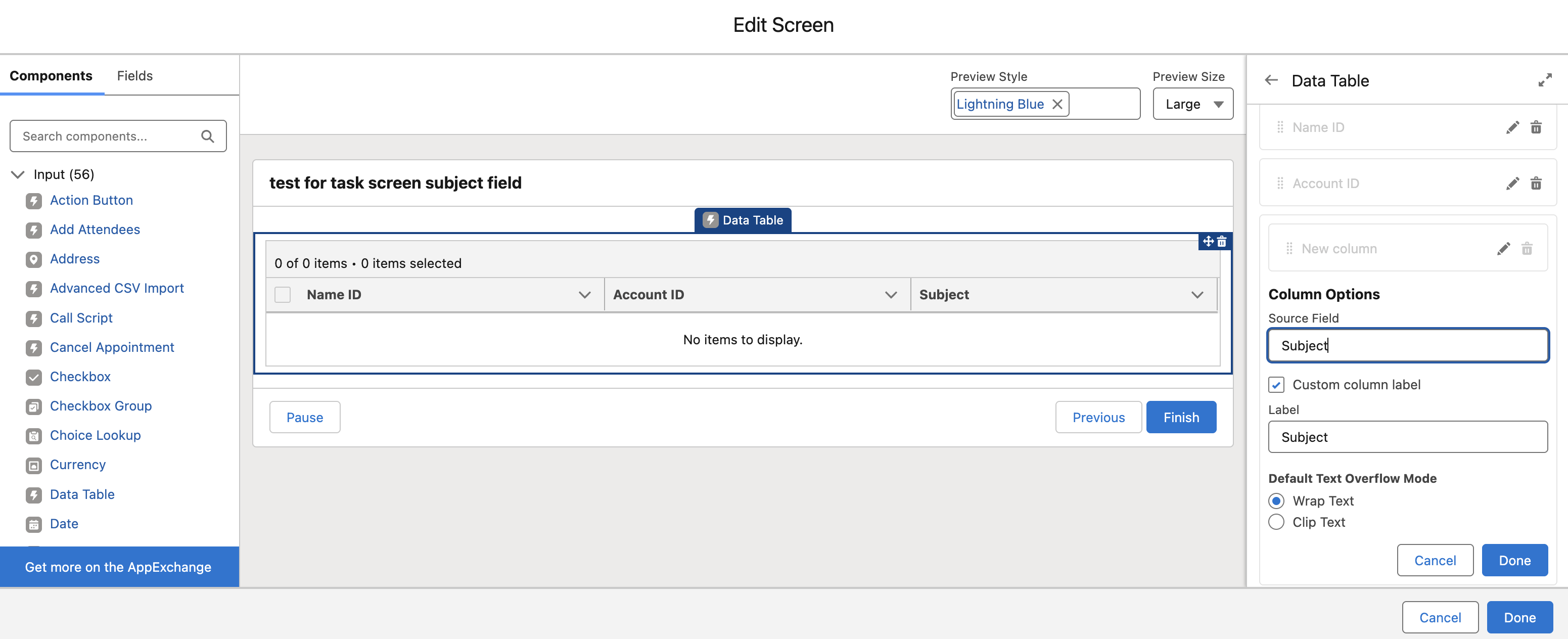
You can manually hardcode the standard 'Subject' field name in the Data Table column configuration using the exact API name: Subject
After adding the column by typing Subject directly, The Subject values display correctly in the Data Table at runtime.
Ytterligare resurser
https://developer.salesforce.com/docs/atlas.en-us.object_reference.meta/object_reference/sforce_api_objects_event.htm
https://trailhead.salesforce.com/trailblazer-community/feed/0D54V00007cmI2PSAU
Knowledge-artikelnummer
005228140
Löste denna artikel ditt problem?
Berätta för oss vad vi kan förbättra!
