Sélectionner une organisation
Salesforce Reports: Range vs. Relative Date Filters for Date Fields
Date de publication: Jun 22, 2026
Description
When adding date field filters to Salesforce reports, two types of date filtering are available depending on which field is being filtered. The primary (default) date range filter supports a 'Range' dropdown with preset values such as 'This Month', 'Last Quarter', or 'This Year'. However, for custom date fields or additional date fields added beyond the primary filter, the Range dropdown is not available. Instead, you can use the 'Use relative date' option to apply flexible, dynamic date logic.
Résolution
All reports include a standard or primary date range filter and include a "Range" option with values available for selection in a drop down.
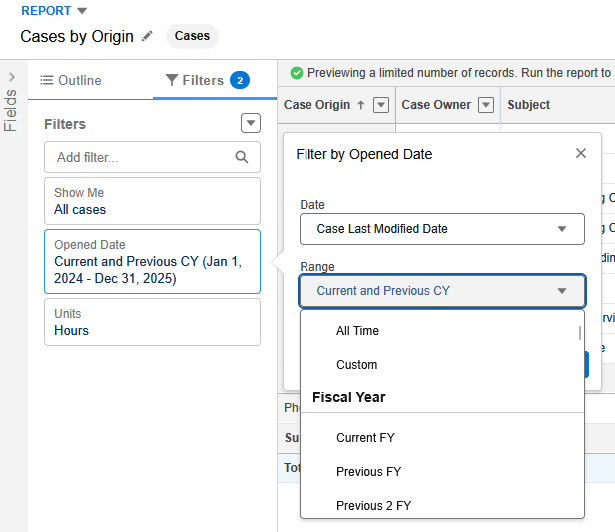
The Range selection picker is only visible for date fields available for selection in the report's primary date range filter. The date fields available in the primary date filter typically include system date fields that are hard coded in the application as date literals including "Created Date" and "Last Modified Date" fields.
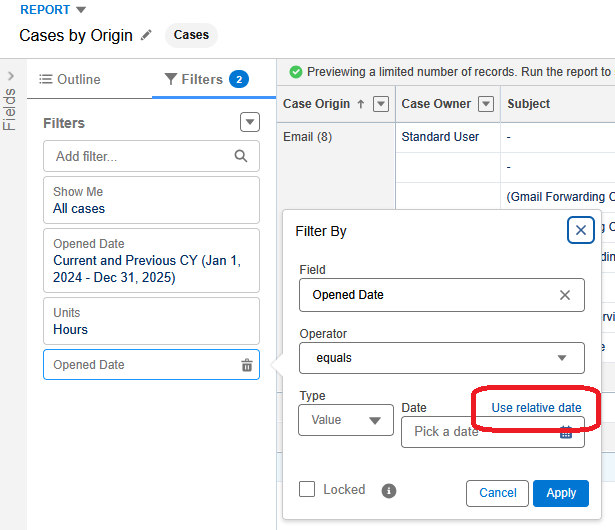
It's expected behavior and by current design for all other date fields including custom date fields or system date fields that are added to the report in addition to the primary or default date range to not show the "Range" dropdown or picklist selections.
To add a filter similar to what's available for the Range selections outside of the report's default primary date filter select "Use relative date" in the filter options and use available Relative Date Filters.
Numéro d’article de la base de connaissances
005228843
Cet article a-t-il résolu votre problème ?
Dites-nous ce que nous pouvons améliorer !
