組織を選択
Configuration of FSL Appointment Bundle Restriction Policy with scenarios addressing Allow Empty values for Bundling of Service Appointments
公開日: May 11, 2026
説明
The Field Service Lightning (FSL) bundling feature allows multiple Service Appointments (SAs) to be grouped into a single parent Bundle Service Appointment for scheduling efficiency. This grouping is governed by various related policies, the most relevant being the Appointment Bundle Restriction Policy.
A Restriction Policy defines which Service Appointments can or cannot be bundled together based on common field values.
The 'Allow Empty' Setting — Significance and Scenarios
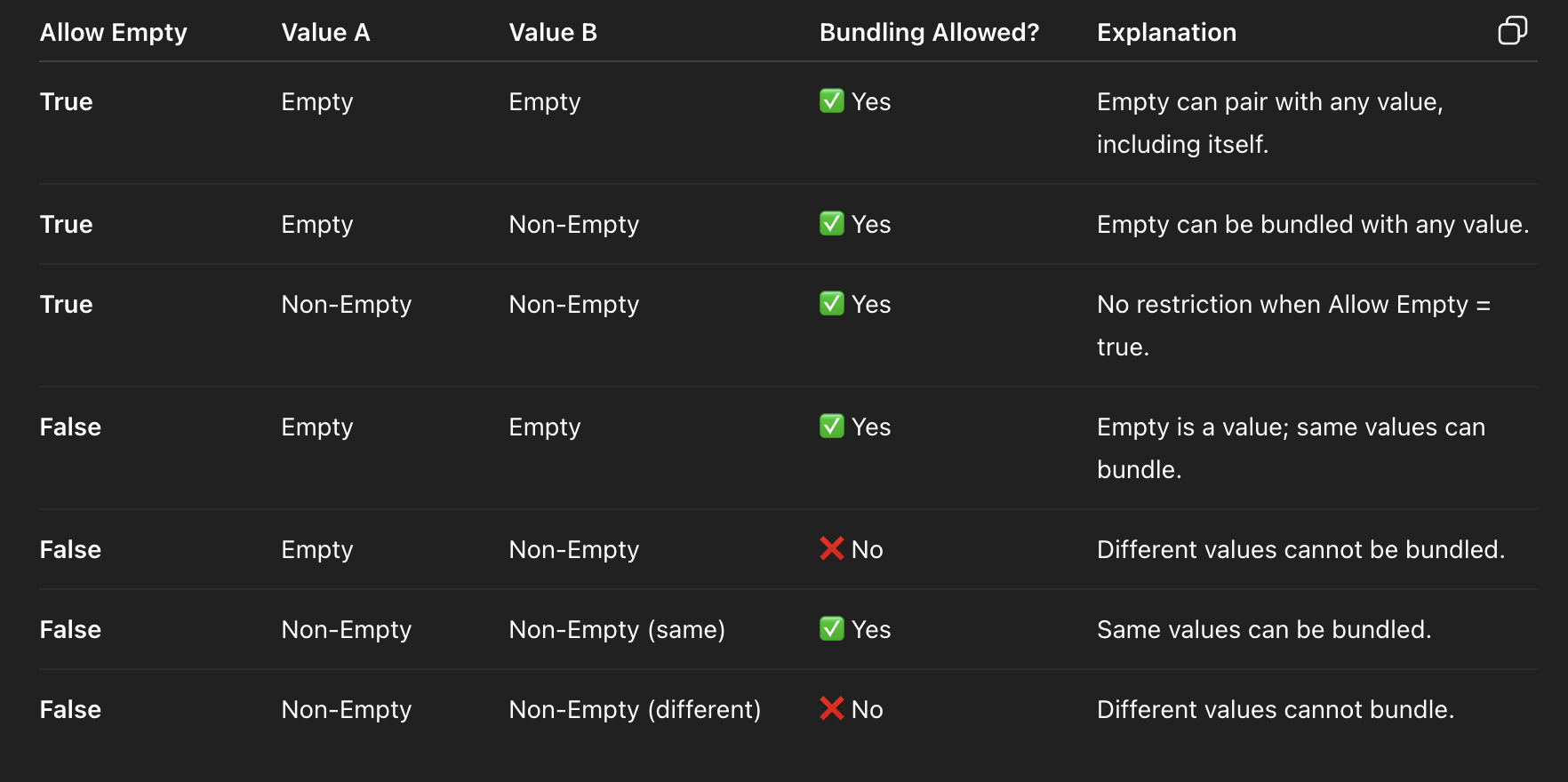
The Allow Empty checkbox on the Appointment Bundle Restriction Policy controls how Service Appointments with empty restriction field values are handled during bundling:
- When "Allow Empty" is unchecked, Service Appointments with an empty restriction value are bundled only with other SAs that also have empty values.
- When "Allow Empty" is checked, Service Appointments with an empty restriction value can be bundled together with SAs that have non-empty values.
Image description: Screenshot of the Appointment Bundle Restriction Policy configuration page in Salesforce Field Service, showing the 'Allow Empty' checkbox. The screenshot demonstrates the policy setup where restriction field values control which Service Appointments can be grouped together in a bundle.
Real-life example: If your Restriction Policy is based on the Work Type field and some Service Appointments have no Work Type assigned (empty value):
- With Allow Empty unchecked: empty Work Type SAs bundle only with other empty Work Type SAs.
- With Allow Empty checked: empty Work Type SAs can be bundled with any SA, regardless of Work Type.
Note: To fully avoid the bundling of Service Appointments with empty field values, you can use Recordset Filter Criteria for Bundling Appointments logic in the Bundler Policy. See Create Recordset Filter Criteria for Bundling Appointments.
Note: To fully avoid the bundling of empty values, you can use Recordset Filter Criteria for Bundling Appointments logic in the Bundler Policy.
Please refer below documentation: Create Recordset Filter Criteria for Bundling Appointments
解決策
The Appointment Bundle Restriction Policy in Salesforce Field Service Lightning (FSL) uses the Allow Empty setting to control how Service Appointments (SAs) with missing restriction field values are grouped during scheduling.
Summary of behavior:
- If Allow Empty = true (checked): Service Appointments with an empty restriction value can be bundled with any value, including other empty values.
- If Allow Empty = false (unchecked): Only Service Appointments sharing the same field value can be bundled together. Empty is treated as its own distinct value — so empty-value SAs bundle only with other empty-value SAs.
その他のリソース
ナレッジ記事番号
005229024
この記事で問題は解決されましたか?
ご意見をお待ちしております。
