Välj en organisation
Merge Fields in Flow Text Template Hyperlinks Become URL Encoded and Resolves to Absolute Paths in Rich Text Mode
Publiceringsdatum: May 4, 2026
Beskrivning
When working with Text Templates in Salesforce Flow Builder, users may observe that merge fields used within hyperlinks become malformed after copying and pasting content.
This issue is specific to the "View as Rich Text" mode. If a user copies a hyperlink containing a merge field variable (e.g., {!$Record.Id}) while in Rich Text mode and pastes it into another resource, the browser alters the link structure:
- URL Encoding: The curly braces (
{ }) are converted into their URL-encoded equivalents (%7B,%7D). - Relative URL Resolution: Because the merge field variable lacks a protocol (like
https://), the browser treats it as a relative path and resolves it against the current page's Base URL (the Flow Builder context).
The Flow fails to interpret the merge field correctly at runtime because the URL has been altered from a dynamic variable to a literal, resolved absolute string.
- Original Value (Resource Picker):
{!$Record.Id} Value After Pasting (Rich Text Mode):https://[my-domain].lightning.force.com/builder_platform_interaction/%7B!$Record.Id%7D
Steps to Reproduce
- Create a Flow and create a new Text Template resource.
- Ensure the dropdown is set to View as Rich Text.
- Type a text string (e.g., "View Record"), highlight it, and click the Link button.
- In the Link URL field, insert a merge field variable, such as
{!$Record.Id}. - Save the Text Template.
- Re-open the template (ensure it is still in View as Rich Text mode).
- Select the text and Copy it to the clipboard.
- Create a new Text Template (or use a different text area) and Paste the content.
- Select the pasted text and inspect the Link URL.
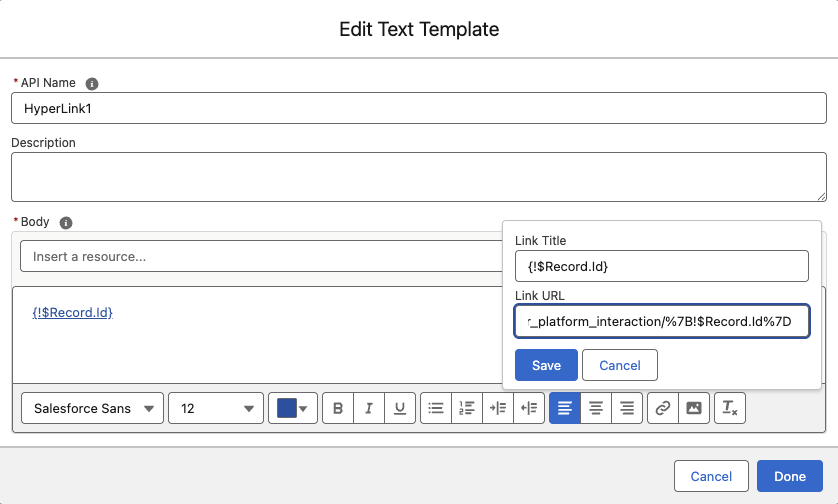
Observation: The URL now includes the resolved domain path and encoded characters.
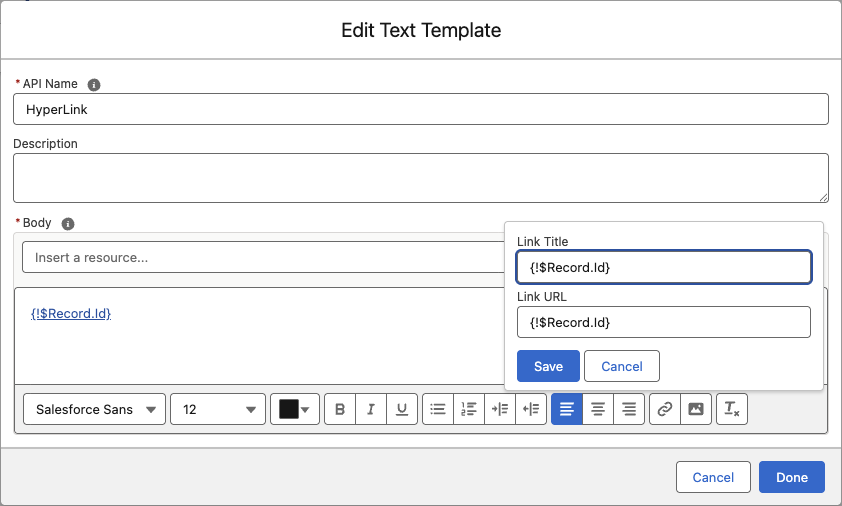
Original Value:
After Copy/Paste:
Cause
This behavior is working as designed by web browsers (e.g., Chrome, Edge) and is not a defect in Salesforce.
When copying text from the Rich Text editor, the browser processes the underlying HTML.
- Path Interpretation: The browser sees
{!$Record.Id}. Since it does not start with a schema (likehttp:), the browser interprets it as a relative path. - Resolution: To create a valid link, the browser resolves this relative path against the current Base URL of the application (Salesforce Flow Builder), resulting in a full absolute URL.
- Encoding: Simultaneously, it encodes the curly braces as
%7Band%7Dto comply with URI syntax standards.
Lösning
To avoid this issue, use one of the following methods:
Method 1: Use "View as Plain Text" (Recommended)
Before copying the content, switch the Text Template view mode.
- Open the source Text Template.
- Change the dropdown from View as Rich Text to View as Plain Text.
- Copy the raw HTML code/text.
- Paste it into the destination.
- Switch the destination back to View as Rich Text if necessary.
- Note: Copying from Plain Text prevents the browser from attempting to resolve or encode the URL.
Method 2: Manually Correct the URL
If you have already pasted the content:
- Highlight the hyperlink in the destination template.
- Click the Link button.
- Manually delete the resolved base URL (e.g.,
https://.../builder_platform_interaction/) and the encoded characters (%7B,%7D). - Restore the variable to its standard format:
{!$Record.Id}.
Method 3: Re-insert via Resource Picker
Instead of copying the link, type the text in the new template and re-select the variable using the Resource Picker.
Ytterligare resurser
Knowledge-artikelnummer
005232647
Löste denna artikel ditt problem?
Berätta för oss vad vi kan förbättra!
