Organisation auswählen
Delete Personally Identifiable Information (PII) from Sales Account Research Results
Veröffentlichungsdatum: Jan 22, 2026
Beschreibung
To comply with "right to be forgotten" laws, customers can query and delete research results from the Account Research results (AiResearchPromptResult) using the API.
Lösung
Use Salesforce Object Search Language (SOSL) and Apex queries to find and delete Account Research results containing PII.
STEP 1: Use a SOSL query to preview Account Research results containing PII.
- From the Setup menu (Gear icon), Select
Developer Console - Select
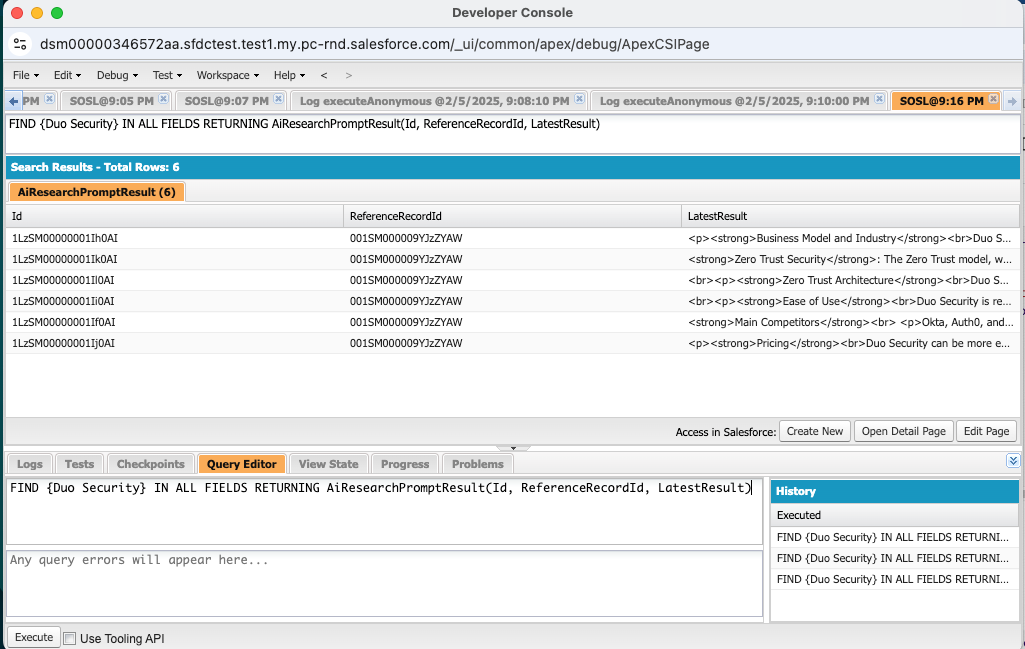
Query Editor - To collect record IDs that have PII, paste this query into the Query Editor, replacing ‘specific_keyword’ with the PII you are searching for. Then, click
Execute.FIND {specific_keyword} IN ALL FIELDS RETURNING AiResearchPromptResult(Id, ReferenceRecordId, LatestResult)- This image shows the developer console window, with the SOSL query to execute.
- Running this query allows you to preview the records that you will delete in Step 2
STEP 2: Use an Apex query to find and delete Account Research results
- From the Setup menu (Gear icon), Select
Developer Console - Select
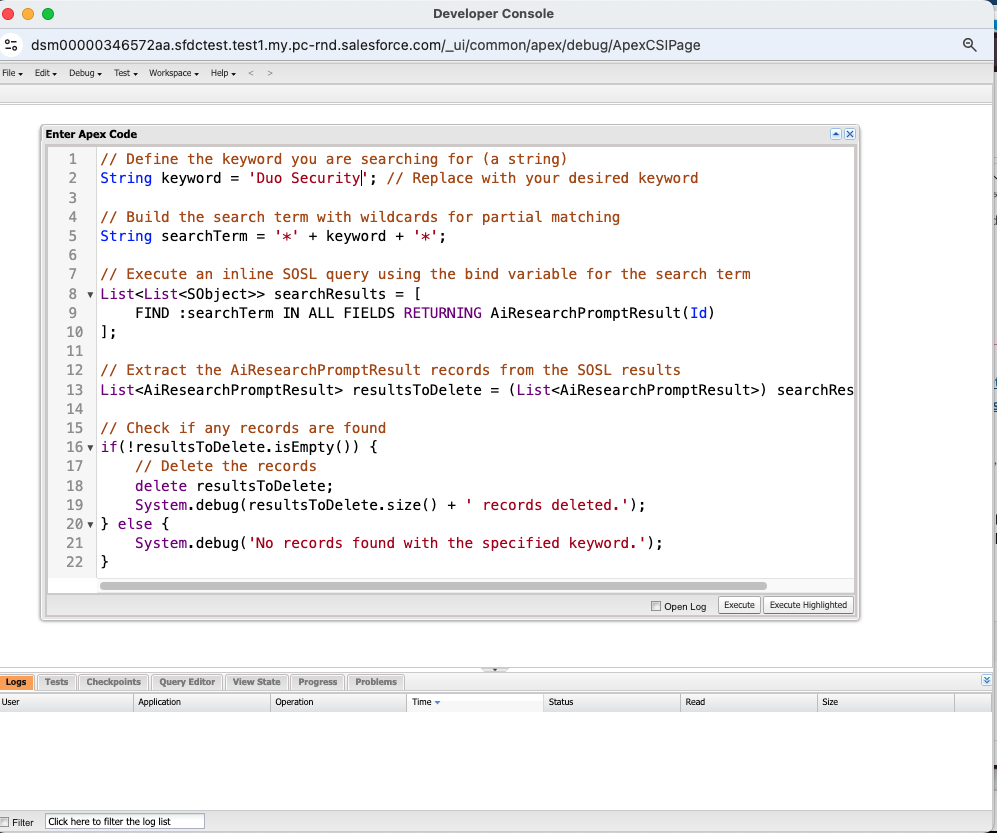
Debug>Open Execute Anonymous Window - Paste this query into the Enter Apex Code window, replacing ‘specific_keyword’ with the PII you want to delete. Then, click
Execute.-
// Define the keyword you are searching for (a string)
String keyword = 'specific_keyword'; // Replace with your desired keyword

// Build the search term with wildcards for partial matching
String searchTerm = '*' + keyword + '*';

// Execute an inline SOSL query using the bind variable for the search term
List<List<SObject>> searchResults = [
    FIND :searchTerm IN ALL FIELDS RETURNING AiResearchPromptResult(Id)
];

// Extract the AiResearchPromptResult records from the SOSL results
List<AiResearchPromptResult> resultsToDelete = (List<AiResearchPromptResult>) searchResults[0];

// Check if any records are found
if(!resultsToDelete.isEmpty()) {
    // Delete the records
    delete resultsToDelete;
    System.debug(resultsToDelete.size() + ' records deleted.');
} else {
    System.debug('No records found with the specified keyword.');
}
- This image shows the developer console window, with the Apex query to execute:
-
Nummer des Knowledge-Artikels
005232666
Konnten Sie Ihr Problem mithilfe dieses Artikels lösen?
Geben Sie uns Feedback, damit wir uns verbessern können.
