Valitse organisaatio
Changes to Device Activation for Single Sign-On (SSO) Logins
Julkaisupäivä: Sep 22, 2026
Kuvaus
Originally Published: December 16, 2025 | Last Updated: February 24, 2026
Updated -February 24, 2026
As part of our ongoing efforts to implement stronger security measures to protect our customers, Salesforce now requires Device Activation for certain Single-Sign-On (SSO) user logins. This enhancement further limits unauthorized account access and builds on earlier security updates that applied to Device Activation for Non-SSO logins (see this article for more details).
Summary of Changes Released for Device Activation for SSO Logins
On January 26, 2026 (moved from January 20, 2026), Salesforce began releasing staggered changes applied to SSO identity providers (IdP) to require Device Activation, starting with OpenID Connect (OIDC). On February 9, 2026 (moved from February 3, 2026), Salesforce began releasing changes to require Device Activation for SAML IdPs.
Changes for both OIDC and SAML SSO identity providers are now in effect.
For details, see the section below under “Release Schedule for Device Activation Changes for SSO Logins”
SSO logins will require device activation unless one of these security measures, considered as secure authentication, are in place:
|
Security Measures |
Description |
Applicable for Paid or Non-Revenue Orgs |
|
Recognized (Activated) Device |
Salesforce recognizes the user's device or browser because the user previously activated the device (a device or browser is defined as unrecognized if Salesforce cannot match it to information stored in the sfdc_lv2_platform cookie). The duration of the cookie is one year. |
Paid & Non-Revenue Orgs |
|
Narrow Trusted IP Addresses |
The IP address ranges configured at the org-level in network access settings (Set Trusted IP Ranges for Your Org) AND the profile-level login IP ranges (Restrict Login IP Addresses in Profiles) are within the defined limits:
|
Paid Orgs Only |
|
SSO Identity Provider (IdP) Secure Authentication |
The SSO IdP used a secure authentication mechanism (e.g.: MFA, biometric, security key, smartcard), and Salesforce confirmed it using the following methods as provided by the SSO IdP during the authentication process: OpenID Connect (OIDC) OR Security Assertion Markup Language (SAML) Identity Providers
Custom claims from other IdPs:
*Update: Effective February 17, 2026, 'mfa' will be accepted as a standalone AMR signal to bypass Device Activation for OIDC logins. For SAML AMR, ‘mfa’ will continue to skip Device Activation from February 9, 2026. Security Assertion Markup Language (SAML) The Authentication Context or AuthnContext element is provided must specify one of the secure authentication methods below: SAML standard values:
Custom claims from other IdPs:
For both OIDC and SAML, the specific values considered as secure authentication methods accepted by Salesforce to skip Device activation are subject to change. Note: The values "x.509", "Certificate-based", and "otp" do not qualify to skip Device Activation. These methods were previously listed in this knowledge article in error and have been removed to align with industry standards for strong authentication. If your SSO returns "x.509", "Certificate-based", or "otp" values in the AMR or AuthnContext, Salesforce will prompt for Device Activation unless other secure AMR/AuthnContext values are passed, or other security measures are present (such as Narrow Trusted IP Addresses or a previously activated device). |
Paid & Non-Revenue Orgs |
Why are we making these changes for Single-Sign-On (SSO) Logins?
We have implemented these additional changes as a proactive security measure to enhance protection against account takeover (ATO) and unauthorized access. These updates provide a more secure login experience by mandating an extra layer of identity verification. This added security step is enforced where Single-Sign-On (SSO) identity providers (IdP) lack secure authentication, or when existing security controls may not be robust enough to mitigate current threats.
What changes were implemented in Summer ‘25 release?
For broader context, in the Summer ‘25 release, the Device Activation step was implemented to prompt users to verify their identity under certain circumstances. These earlier changes specifically excluded Single-Sign-On (SSO) logins.
-
Early September 2025: Device Activation is required for non-revenue orgs, even if a user accesses Salesforce from a trusted IP range.
-
End of October 2025: Device Activation is required for some production and sandbox org users. When username and password user logins occur with an excessively broad set of IP addresses in either the org-level network access settings, or in the profile-level login IP ranges, Device Activation is forced.
Release Schedule for Device Activation Changes for SSO Logins
The scheduled changes for Device Activation for Single Sign-On (SSO) logins are now in effect. This schedule below is provided for reference to detail when the release began for each scheduled change.
Note that Salesforce supports SSO via Security Assertion Markup Language (SAML) and OpenID Connect (OIDC), as well as preconfigured providers for external systems like Facebook. Since some providers support both SAML and OIDC, please confirm the exact protocol used for your Enterprise and Salesforce Org with your IdP and team responsible for configuring the IdP.
|
Changes Reflected for SSO Identity Provider |
How will Salesforce evaluate for secure authentication methods? |
Scheduled |
|
OpenID Connect (OIDC) Identity Providers
|
Authentication Method Reference (AMR) |
January 26, 2026 (moved from January 20, 2026) |
|
SAML Identity Providers |
Authentication Context (AuthnContext) OR Authentication Method Reference (AMR) |
February 9, 2026 (moved from February 3, 2026) |
|
Additional Support for SAML & OIDC |
See details below for what changes are planned: What changes are planned for the February 17, 2026 release? |
February 17, 2026 |
What changes were made for the February 17, 2026 release?
On February 17, Salesforce updated how it processes Single Sign-On (SSO) signals to improve consistency between protocols and reduce unnecessary login challenges:
-
OIDC AMR ‘mfa’ value Support: The value "mfa" is recognized as a standalone strong signal to bypass Device Activation (FDA) when passed in OIDC AMR. OIDC logins now mirror SAML behavior.
-
OIDC Authentication Context Support: Salesforce enabled the ability to evaluate AuthnContext (or Authentication Context Class Reference (ACR)) signals for OIDC to better handle complex integration for non-standard or custom OIDC providers.
-
Salesforce as an IDP emits AMR: When Salesforce acts as the Identity Provider, it now emits the AMR signals so that the evaluation logic can determine if a secure authentication method was used.
Secure authentication values emitted by Salesforce as SAML SSO Identity Provider in order to skip Device Activation:
-
-
SalesforceAuthenticator
-
MFATOTP
-
MFAWebAuthnRoaming
-
MFAWebAuthnPlatform
-
LightningLogin
-
Passkey
-
Note: The previous plan for Salesforce as a Service Provider to emit a request for AMR from your SSO provider has been canceled. Most major providers return these signals by default, making an AuthRequest from Salesforce unnecessary.
How is Salesforce evaluating Single-Sign-On (SSO) logins to determine if they used secure authentication?
Salesforce evaluates the strength of an SSO login by inspecting the identity signals provided by your SSO Identity Provider (IdP). Salesforce uses an evaluation logic that recognizes strong authentication signals across both OIDC and SAML protocols.
The Evaluation Process: Salesforce checks the SSO response for specific authentication signals. If these signals are present and recognized as secure, the user will skip Device Activation.
-
For OIDC: Salesforce reads the Authentication Method Reference (AMR) from the identity token. Beginning February 17, 2026, Salesforce will also evaluate OIDC Authentication Context or Authentication Context Class Reference (ACR) signals.
-
For SAML: Salesforce reads the standard Authentication Context (AuthnContext) or looks for an attribute specifically named "AMR" or "authnmethodsreferences".
Interchangeability: The evaluation logic is cross-functional. Any value recognized as "strong" in OIDC (e.g.,face, pop, hwk) is also accepted if passed within a SAML AMR attribute. Likewise, standard SAML strong values (e.g. Smartcard, TimeSyncToken) are recognized across both protocols.
Substring Matching: The evaluation involves checking if the provided value contains a substring that matches Salesforce’s list of secure methods. This process is not case-sensitive for SAML. For OIDC claims, the values are case sensitive
Failure to Verify: If these values are omitted, or if the IdP sends a value such as "Unspecified," Salesforce cannot verify the strength of the login, and the user will be prompted to complete Device Activation.
What does Salesforce consider secure authentication from the Single-Sign-On (SSO) Identity Provider (IdP)?
Salesforce defines the following to be secure authentication methods as read from the Authentication Method Reference (AMR) for OIDC or SAML IdPs, and Authentication Context or AuthnContext for SAML IdPs. Device Activation will be skipped in Salesforce if these methods are used and values are returned by the SSO IdP.:
- Authentication Method Reference (AMR) (for OIDC or SAML IdPs): AMR values (referenced in RFC 8176) considered as secure authentication:
-
face (Face recognition)
-
fpt (Fingerprint)
-
hwk (Hardware-backed security key)
-
iris (Iris scan)
-
mfa (Multi-Factor Authentication) [See *Update below]
-
retina (Retina scan)
-
sc (Smart card)
-
pop (Proof-of-possession of a key)
-
swk (software backed security key)
Custom claims from other IdPs: - multipleauthn
- Okta_verify
*Update: Effective February 17, 2026, 'mfa' will be accepted as a standalone AMR signal to bypass Device Activation for OIDC logins. For SAML AMR, ‘mfa’ will continue to skip Device Activation from February 9, 2026.
-
Authentication Context or AuthnContext (for SAML IdPs) : AuthnContext values considered as secure authentication:
SAML standard values:
-
MobileTwoFactorContract
-
PublicKey
-
PGP
-
Smartcard
-
TimeSyncToken
-
PKI
Custom claims from other IdPs:
-
Mfa
-
Fido
-
multipleauthn
Note: The values "x.509", "Certificate-based", and "otp" do not qualify to skip Device Activation. These methods were previously listed in this knowledge article in error and have been removed to align with industry standards for strong authentication. If your SSO returns "x.509", "Certificate-based", or "otp" values in the AMR or AuthnContext, Salesforce will prompt for Device Activation unless other secure AMR/AuthnContext values are passed, or other security measures are present (such as Narrow Trusted IP Addresses or a previously activated device).
The table below outlines when Single-Sign-On (SSO) logins and non-SSO logins in Production and Sandbox Orgs must enter verification codes for Device Activation.
For any other combination, Device Activation will not prompt the user for a verification code.
|
UI Login Type |
Org IP Range |
User’s Profile IP Range 1 |
SSO IdP AMR/AuthnContext [NEW] |
sfdc_lv2 platform Cookie |
Salesforce MFA 2 |
Result |
|
Single-Sign-On Logins [NEW] |
Outside Limit |
Outside Limit |
Weak/Missing |
Not Present |
No |
Prompt Device Activation |
|
Outside Limit |
Inside Limit |
Weak/Missing |
Not Present |
No |
Prompt Device Activation | |
|
Inside Limit |
Outside Limit |
Weak/Missing |
Not Present |
No |
Prompt Device Activation | |
|
Non Single-Sign-On Logins |
Outside Limit |
Outside Limit | Not Applicable |
Not Present |
No |
Prompt Device Activation |
|
Outside Limit |
Inside Limit |
Not Applicable |
Not Present |
No |
Prompt Device Activation | |
|
Inside Limit |
Outside Limit |
Not Applicable |
Not Present |
No |
Prompt Device Activation |
1 Device Activation is required if the Profile IP ranges or Network Configuration ranges exceeds the limit even when the login IP address is permissible, unless other conditions such as strong authentication are present. Any login originating from an IP address that is outside the trusted range configured at the user's Profile level will continue to be blocked.
2 Device Activation will not be required for SSO logins if Salesforce MFA is used. See Use Salesforce MFA for SSO.
What is Device Activation?
Salesforce Device Activation is a security feature that requires users to verify their identity when logging in from an unrecognized browser, device, or location outside of a trusted IP range.
Email verification is the primary Identity Verification method for most users, prompting a verification code to be sent to the user's email address during login. When the user has a stronger verification method (Salesforce Authenticator, a third-party Authenticator app, Security Key, Built-in Authenticator, or SMS) registered, that stronger verification method is used instead of an email generated code.
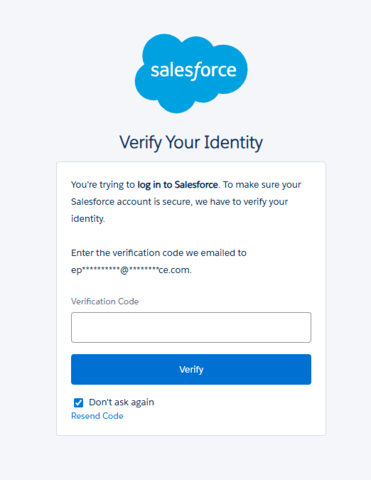
How do the “Don't ask again” and “Remember me” checkboxes work in the context of Device Activation?
When completing the Device Activation prompt that asks for a verification code, clicking the “Don’t ask again” checkbox will set the Device Activation cookie sfdc_lv2 platform cookie.
The sfdc_lv2 platform cookie stores device activation details for users. Users will not be required to complete device activation at each login as long as this cookie remains active. If the cookie is not set or it expires, users must verify their identity the next time that they log in. The cookie’s duration is one year.
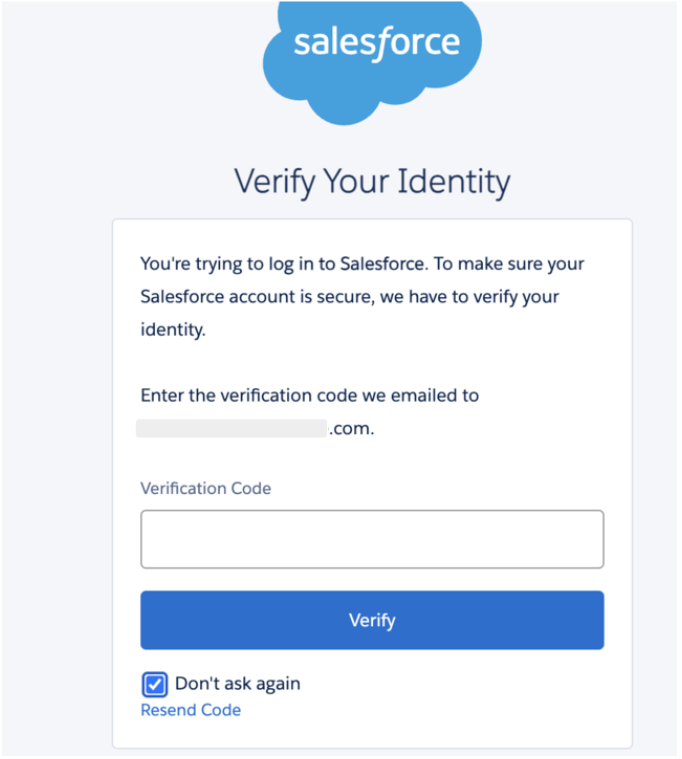
Note: Using Incognito/Private browsing modes or browser settings that automatically clear cookies upon closing will render the "Don't ask again" feature ineffective. Because these modes do not persist cookies, the user will be prompted for Device Activation every time a new session is started.
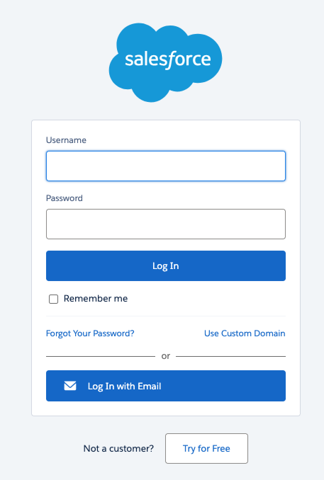
The “Remember me” check box is on the login page and it will save the username to the browser so that you don’t have to type the username at every login. This DOES NOT affect the Device Activation cookie sfdc_lv2 platform cookie.
What is the maximum limit of IP addresses Salesforce defined as part of these changes?
Customers should configure their Org-level Network Access settings (Set Trusted IP Ranges for Your Org) and Profile-level Login IP ranges (Restrict Login IP Addresses in Profiles) to be within the following limits defined by Salesforce:
-
IPv4: 2^24 IP or 16,777,216 addresses
How is the range of IP addresses calculated for this behavior change?
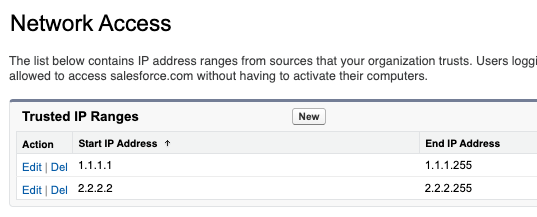
The range of IP addresses for this behavior change is calculated by adding the range in each row of defined addresses. In the following example, the first row contains 255 IP addresses, and the second row contains 254 IP addresses, for a total of 509 IP addresses in range.
Use Google search or other tools to quickly determine the number of IP addresses within your Salesforce Trusted IP Ranges.
Why am I not receiving verification code emails for Sandbox logins?
Users impacted by this issue should reach out to their Org’s System Administrator so that they can troubleshoot using the below steps.
If users are not receiving verification codes via email in sandbox orgs, System Administrators should check the following:
-
Users' email addresses are accurate and are not appended with “.invalid”. See more details here Email Addresses in Sandbox Appended With '.invalid' After Salesforce Refresh
-
Review and update your Email Deliverability settings to System email only or All email. If you cannot update this setting, contact Salesforce Support.
If System Administrators are not receiving Verification code emails, they can contact Salesforce Support.
How to address Metadata Deployment issues impacted by this change?
Metadata Deployments fail if you have IP ranges referenced in their Profile / Org-level Network access metadata which exceeds 16,777,216 IP addresses across all ranges. You will see this error message “You reached the limit of 16,777,216 IP addresses across all of your IP ranges. Reduce the size of the IP range you entered and try again."
Review trusted IP address in your org-level Network Settings and profile-level Login IP ranges. Reduce the IP address ranges to specific addresses that match your enterprise or VPN, which will ensure unidentified or non-trusted IPs are denied or challenged within the defined limit.
Why are my integration or API users locked out after this change?
Any user, including integration users, is subject to standard login requirements including Device Activation when logging in from the User Interface (UI). It's recommended that you assign the API-Only permission to your for API Integration Users as they should not be used to login from the user interface.
Refer to additional guidance outlined in Give Integration Users API Only Access and Best Practices for Configuring Your Integration User.
Are External Users Required to Complete Device Activation?
External users are not forced by default to use Device Activation. This was true before and will remain the same after these changes, as described in this help article.
What Clouds or Products do these Device Activation for SSO logins changes apply to?
This change applies to Products built on the Salesforce Platform that support MFA.
How can I verify if the Changes to Device Activation for Single Sign-On (SSO) Logins are in effect for my Org?
Given this change rollout is not following the standard major release process, Admins can’t verify if the change is in effect by checking their release version or against the Salesforce Trust site.
You can generally confirm the change is in effect if your users begin to receive more Device Activation prompts. Otherwise, please contact the Salesforce Support team for help confirming if the changes are in effect.
Does Salesforce evaluate the AuthnContext or the AMR attribute in a SAML response?
Salesforce evaluates both. To maximize compatibility with different Identity Providers (IdPs), Salesforce will check the standard SAML AuthnContextClassRef element as well as any attribute specifically named "AMR" or "authnmethodsreferences" within the XML response.
Are the values accepted by Salesforce as strong (to skip Device Activation) for OIDC and SAML interchangeable?
Yes. The strong authentication values recognized for OIDC AMR are also valid when passed in a SAML response. If the value is recognized as "strong" in either protocol, Device Activation will be skipped.
What happens if my IdP sends the MFA signal in a different attribute?
Currently, if the authentication signal is not in the AuthnContext statement or a recognized AMR attribute (like "AMR" or “authnmethodsreferences”), Salesforce will not evaluate it.
When will full SAML AMR support be available for customers?
The rollout for SAML AMR support will occur in two distinct phases:
-
Phase 1 (Inbound Recognition - February 9): Salesforce (acting as the Service Provider) will begin recognizing and evaluating AMR signals or Authentication Context strings sent by third-party SSO Identity Providers (IdPs). If your IdP is already configured to send these signals, Salesforce can use them to skip Device Activation starting on this date.
-
[Updated] Phase 2 (Salesforce emits AMR as IdP - February 17): If you use Salesforce as your Identity Provider, it will now begin sending its own AMR signals so that those signals can be evaluated during the SSO process.
The secure authentication values emitted by Salesforce as SAML SSO Identity Provider in order to skip Device Activation:
-
SalesforceAuthenticator
-
MFATOTP
-
MFAWebAuthnRoaming
-
MFAWebAuthnPlatform
-
LightningLogin
-
Passkey
Note: The previous plan for Salesforce as a Service Provider to emit a request for AMR from your SSO provider has been canceled. Most major providers return this data by default, making a formal request from Salesforce unnecessary.
For more details of changes happening on February 17, 2026, refer to to the section: What changes are planned for the February 17, 2026 release?.
-
What should we do if our SSO provider does not support passing the AuthnContext for via SAML by default?
If your Identity Provider (IdP) cannot send the standard SAML AuthnContext, you have three primary options to ensure users are not repeatedly challenged:
1: Use the "AMR" Attribute: Salesforce will recognize an attribute specifically named "AMR" or "authnmethodsreferences" within the SAML response. Salesforce is prioritizing the attribute value over strict XML formatting; as long as the value is present and recognized as "strong" (e.g. mfa, hwk), Device Activation will be skipped.
2: Trusted IP Ranges: Ensure your users are logging in from a network within your Org-Level and Profile-level Trusted IP ranges. If the login IP is recognized as trusted and the total defined range for each is within the limit set by Salesforce, Device Activation is skipped.
If no secure signal can be passed and the IP is not trusted and ranges within the limit set by Salesforce, users will be prompted to complete Device Activation. Verify via the code sent over email, and remember to click “Don’t ask again” to set a platform cookie that exempts that specific device/browser for at least one year.
How can I view the signals that my SSO Identity Provider returns?
-
For OIDC AMR, query the AuthMethodReference field in Salesforce Login History
-
For SAML, AuthnContext or AMR is not currently written to Salesforce Login History. You can inspect your SAML response using external tools or browser extensions, or working with the team who manages your SSO IdP.
To skip Device Activation, do I need to implement both secure authentication (SAML/OIDC signals) AND Trusted IP Ranges?
No, implementing either one is sufficient to skip the Device Activation prompt.
-
Secure Authentication: Providing a recognized signal via SAML AuthnContext, SAML AMR attributes, or OIDC AMR claims will bypass the prompt.
-
Trusted IP Ranges: Logging in from a defined, trusted IP address (within the 16.7 million IP limit) will also bypass the prompt.
Security Best Practice: While either method works independently, we recommend implementing both to provide a layered defense-in-depth security posture.
My Salesforce Org is an SSO Service Provider (SP) using an external Identity Provider (IdP) SAML SSO with MFA. My Salesforce Org is also an IdP for other internal Salesforce SP Orgs. Why do users need device activation in downstream SP Orgs when MFA is completed at the upstream IdP?
This occurs because Salesforce does not currently propagate specific authentication signals—such as SAML AMR or ACR—across an Identity Provider chain. Since these signals are required for the Device Activation evaluation logic, the downstream Org cannot verify the upstream MFA (or other secure authentication method) and triggers the Device Activation challenge.
Salesforce is working on future design changes to pass the AMR and ACR values across the Identity Provider chain. In the interim, we recommend using narrowly defined Trusted IP Ranges to bypass Device Activation.
Ratkaisu
The following steps help administrators prevent unexpected Device Activation prompts for SSO users. Take one or both actions depending on your org's configuration.
Respond to This Change
Avoid unexpected or more frequent Device Activation by taking one or both of the following steps for SSO logins:
- Enable secure authentication in your SSO IdP (e.g. MFA, biometric, security key, smartcard). Next, configure your IdP to provide information about the authentication method used:
- For OIDC IdPs, ensure the identity token includes the Authentication Method Reference (AMR).
- For SAML IdPs, ensure the Authentication Context or AuthnContext is included and indicates the authentication method used.
- Review trusted IP addresses in your org-level Network Settings and the login IP ranges at the profile level. Reduce IP address ranges to specific addresses that match your enterprise or VPN, ensuring unidentified or non-trusted IPs are denied or challenged within the defined limit:
If logins cannot be made more secure via the above methods, ensure every user who intends to log in has access to the email address set up on their user record. Note that sandbox user login emails may be appended with ".invalid" and may need to be adjusted manually. Having access to the email address will allow users to successfully complete Device Activation when prompted.
This behavior change applies to all users in the org at once, but the impact may be felt over the course of several weeks depending on how often users log in.
Lisäresurssit
- Changes to Device Activation for Non-SSO Logins
- Set Trusted IP Ranges for Your Org
- Restrict Login IP Addresses in Profiles
- Use Salesforce MFA for SSO
- Salesforce Platform Cookies (sfdc_lv2)
- Give Integration Users API Only Access
- Login History
- Products That Support MFA
- Email Addresses in Sandbox Appended With '.invalid' After Refresh
- Identity Verification Overview
Knowledge-artikkelin numero
005237070
Ratkaisiko tämä artikkeli ongelmasi?
Anna palautetta, jotta voimme kehittyä!
