Sélectionner une organisation
Salesforce Learning Credits FAQ and Redemption Guide
Salesforce Learning Credits and Virtual Learning Credits offer a flexible, scalable way to build Salesforce expertise across your organization. They provide access to in-depth, role-based training for every Cloud and skill level - ideal for remote teams. Purchase training in advance with a single transaction, allowing you to budget, plan, and accelerate learning without committing to specific courses.
Learning Credits can be redeemed across all Trailhead Academy offerings, including virtual courses, immersive bootcamps, and certification vouchers - reducing administrative overhead and accelerating team development. Read below to learn more about how to purchase and redeem Learning Credits.
Benefits of Learning Credits and Virtual Learning Credits Access
Learning Credits let you prepay for future education — saving time, simplifying purchasing, and giving you the flexibility to choose when and how to learn.
- Speed and Convenience: Plan and budget for future learning without committing to specific courses upfront.
- Flexibility: Redeem Learning Credits for any Trailhead Academy products and offerings over a 12-month period.
- Reduced Administrative Effort: Simplify procurement by managing your learning needs with one upfront transaction.
Please see the table below for applicable purchases.
Learning Credits and Virtual Learning Credits Access Redemption Options
*Learning Credits are only available for purchase in Australia, Canada, France, Germany, India, Ireland, Italy, Japan, Singapore, Spain, United Kingdom, and United States, and may only be utilized for in-person redemption options within the country of the “ship-to” address set forth on the Order. Example: Learning Credits purchased in the United States can only be redeemed for in-person Instructor-Led courses, Trailhead Academy Events, bulk certification exams, and private workshops delivered in the United States.
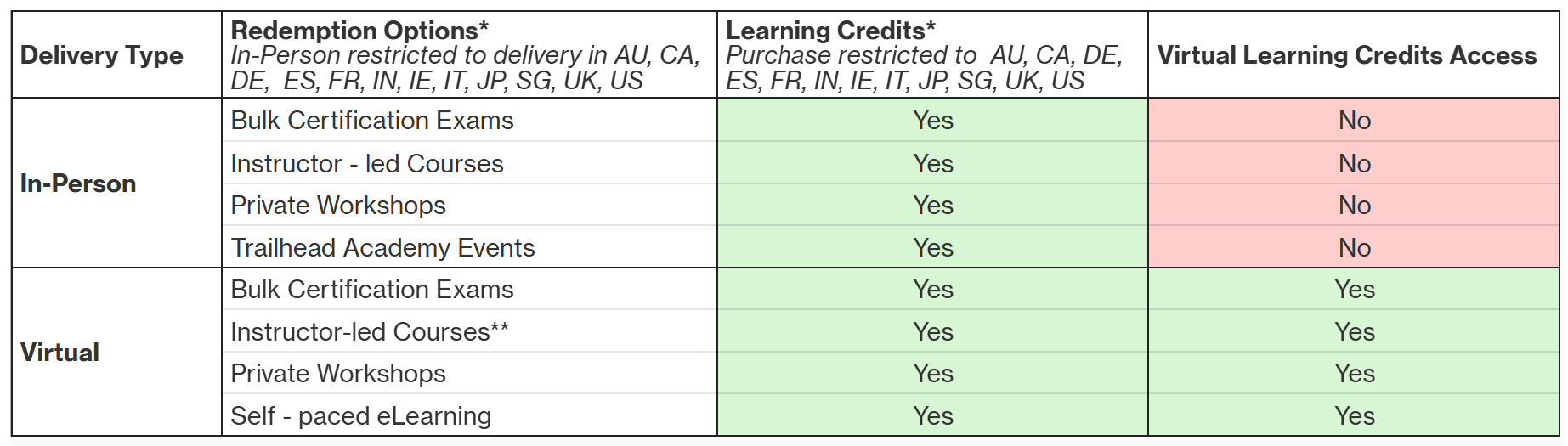
**If you are a Signature customer please note public virtual instructor-led courses are included at no cost. For more details on your Signature discount please visit this article.
How to Purchase Learning Credits and Virtual Learning Credits Access
Ready to get started? Purchasing Salesforce Learning Credits is a quick and easy way to plan ahead for your team’s learning and development goals. Follow these simple steps to get started:
- Connect with your Salesforce Account Executive
Reach out to your Salesforce representative to let them know you’d like to purchase Learning Credits. They’ll help you choose the right amount based on your training needs. - Review your quote and confirm details
Double-check the number of credits, the type of credits (in-person or virtual only) pricing, and country of use (credits can only be redeemed in the country where they’re purchased). - Complete your purchase
Once your order is confirmed and payment is processed, we’ll email you your Learning Credits redemption code. This code can then be used to purchase Trailhead Academy products. - Share your code with Authorized Users
Manage purchases or provide the code to authorized team members at your company who will use it to register for Trailhead Academy courses or certifications. - Use the Credits Within 12 Months
Redeem your Learning Credits for Trailhead Academy trainings, certification vouchers, eLearning, etc. Learning Credits are valid for one year from the order start date and are non-refundable and non-transferable. Be sure to plan your learning schedule before they expire. - Monitor Usage & Balance
To check your balance, please log a case.
*Customer is solely responsible for ensuring that the code used to redeem Salesforce Learning Credits and Salesforce Virtual Learning Credits Access is provided to and used only by authorized personnel and/or agents of Customer. All Salesforce Learning Credits and Salesforce Virtual Learning Credits Access are non-refundable, non-cancelable, and expire within twelve months of the Order Start Date, whether or not all available credits have been used. Any remaining balance at the end of twelve months may not be transferred or refunded.
FAQ
1. How Long are Learning Credits Valid?
Learning Credits and Virtual Learning Credits Access expire one year after the issue date and cannot be extended or redeemed after the expiration date. All Trailhead Academy offerings must be attended by this date whether or not all available credits have been used. Any remaining balance may not be transferred, extended, or refunded after expiration.
Please refer to the official Trailhead Academy Cancellation & Reschedule Policy for any cancellations or rescheduling related to Learning Credits redeemed on Trailhead Academy offerings.
2. How to Redeem Learning Credits for Trailhead Academy Training and Certification
Salesforce Learning Credits give you the flexibility to choose from a wide range of Trailhead Academy learning options — including public and private instructor-led courses, events, certification exams, and self-paced eLearning.
You may utilize your Learning Credits as needed, however, please ensure that any instructor-led courses are taken and completed within your 12-month Learning Credit redemption period.
Certification exam vouchers are valid for 12 months from the date the Learning Credits are redeemed (when the vouchers are issued). The exact expiration date will be included in the confirmation email you receive.
a. Redeeming Credits for Public Instructor-Led Courses
You can easily register for public Trailhead Academy courses using your Learning Credits. Follow these simple steps:
- Navigate to Trailhead Academy and login using your Trailblazer Account.
- Select your Billing Country or Region, Currency, and Language
- Hover over the Learn tab and select Instructor-led Training from the dropdown to browse available public courses.
- Explore by Product, Role or New and Trending, then click a course title to view session options.
- Choose your preferred session and click Register Now — your course will be added to your My Cart.
- On your Cart page, click Apply Promo Code, enter your Learning Credits EDU code, and click Submit. The EDU code will apply your Learning Credits and bring your total to $0.
- Signature Customers: Your 100% discount is automatically applied — no EDU code needed.
- Premier Customers: Your applicable discount will be applied automatically. If you would like to pay with Learning Credits, please enter your EDU code.
- For more details on applying your Signature or Premier discount please visit this article.
- Enter your Attendee Details, check Review Order, and agree to the Program Learning Terms.
- Click Place Order to complete your registration.
- Congratulations! Your registration is complete. A confirmation email will be sent to your inbox.
Note: You must be logged in with your Trailblazer Account to apply a promo code. Only one code can be used per cart item. If you have trouble applying your code, please log a case for assistance. Please provide as much details as possible, including your account name, email and EDU code.
b. Redeeming Credits for Private Workshops, Trailhead Academy Events, or Certification Exams
- Private Workshops and Trailhead Academy EventsTo redeem your Learning Credits for private workshops, Trailhead Academy Events, and self-paced eLearning, please log a case. Please include your account name, email, EDU code and as many details as possible about your desired training to help us process your request quickly.
2. Bulk Certification Exams
a. Please log a case to request certification voucher codes. Please include your account name, email and EDU code.
b. Once you receive your voucher codes, use them to schedule exams through Pearson VUE.
Learn more at Certification Exam Voucher Purchases.
3. How to Inquire about Learning Credits Balance
Need to know how many Learning Credits you have left? Our support team is happy to help!
To inquire about your Learning Credits balance, please log a case with the following details:
- Account name and email address
- Learning Credit EDU code
Our support team is available Monday through Friday, excluding Holidays.
Cet article a-t-il résolu votre problème ?
Dites-nous ce que nous pouvons améliorer !
