組織を選択
Trailblazer プロファイルの概要
Trailhead アカウントを作成したら、ジャーニーを始めることができます。バッジやポイントを獲得すると、自分の Trailblazer プロファイルに輝かしい成果として表示されます。では、Trailblazer プロファイルについて見ていきましょう。
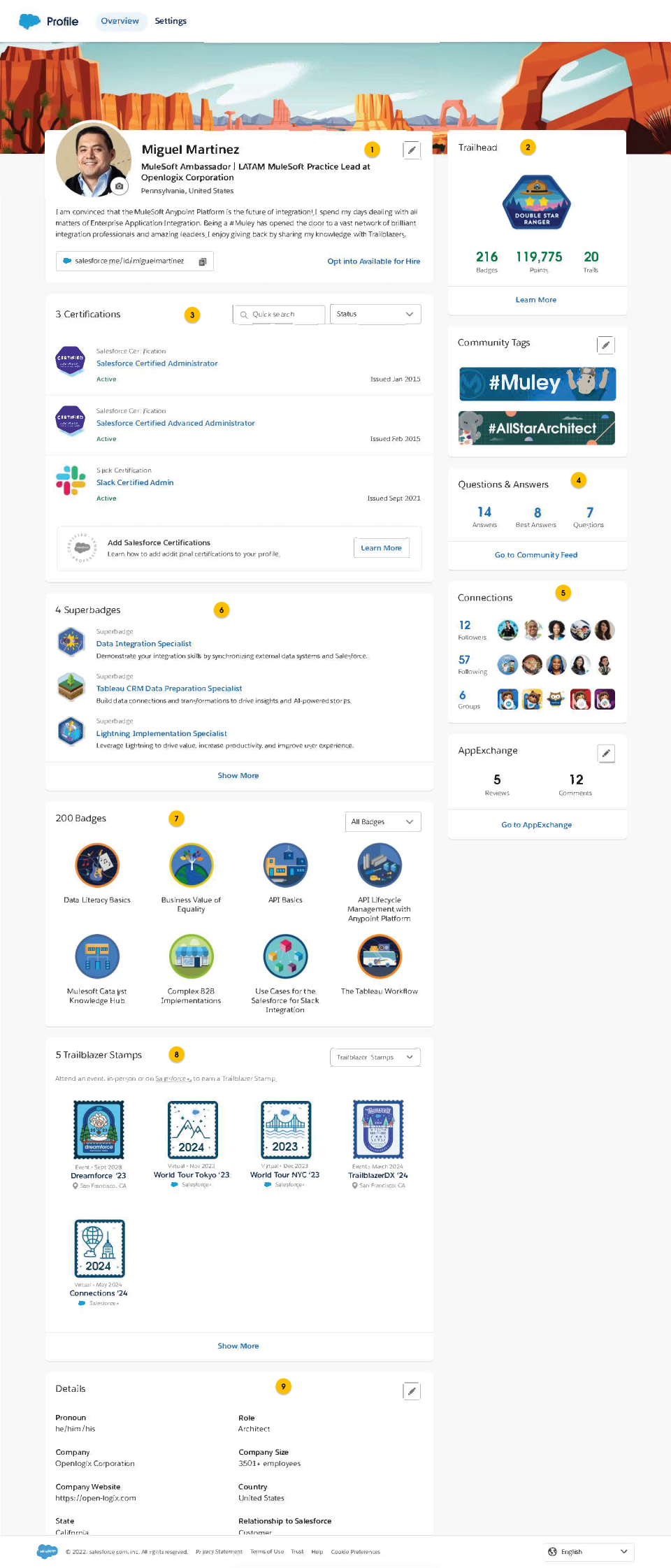
- ここでは、自分のアバターや個人情報を共有して、[連絡希望] ボタンを有効化できます。
- 新しいバッジを獲得することで Trailblazer ランクにポイントが加算され、最高ランクである Ranger を目指します。
- また、Salesforce 認定資格もプロファイルに表示されます。認定状況 ([有効] や [更新期限]) と [This information is only visible to you (この情報は本人にのみ表示されます)] の下にある詳細は本人にしか表示されません。
- Trailblazer Community で自分が投稿した質問の数と回答した数
- Trailblazer Community での繋がりのスナップショット
- 獲得した Superbadge はここに表示されます
- スキルセットをドーナツグラフで表示します。CRM のエキスパートですか? パブリックスピーキングマスターですか?
- Salesforce+ のイベントに参加して取得した Trailblazer スタンプはここに表示されます
- 他の人があなたを知ることができるように自己紹介を書きましょう
私の活動を見ることができるのは?
上で説明したように、Trailhead と Trailblazer Community での活動は自分のプロファイルに表示されます。Trailhead の設定では、プロファイルを (全世界に向けて) 公開するか、もしくは自分だけしか見られないようにするかを選択できます。
プロファイルが公開されている場合、誰でも認定資格名、日付、認定資格の説明を表示できます。認定状況 ([有効] や [更新期限]) と [This information is only visible to you (この情報は本人にのみ表示されます)] の下にある詳細は本人にしか表示されません。
雇用主やサードパーティによって管理されている Salesforce ユーザーアカウントを使用して Trailhead にログインしている場合は、Trailhead での活動に関連する情報が雇用主やサードパーティのアカウントマネージャーにも共有される場合があります。雇用主やサードパーティのアカウントマネージャーが自分の Trailhead 活動の情報にアクセスできないようにするには、いつでも非公開の Developer Edition 組織に自分のアカウントをマージできます。
メモ: このデータは、Trail Tracker アプリケーションが Salesforce 組織にインストールされている場合にのみ共有されます。
自分の Trailblazer プロファイルの公開と非公開を切り替えるには?
Trailhead にログインし、右上にある自分のアバターをクリックしてから [設定] を選択します。 [プライバシー] セクションで、[公開プロファイル] ボタンを希望する設定に切り替えます。
- [公開] に設定すると、あなたの認定資格、コミュニティ活動、バッジ、ポイント、アバター、そしてあなたが選択した自己紹介情報を、他の Trailblazer が表示できるようになります。
- [非公開] に設定すると、プロファイルは完全に非公開となり、他の Trailblazer があなたのプロファイルへのリンクをクリックすると、名前とアバター、そして「プロファイルは非公開です」というメッセージのみが表示されます。
詳細は「Your Privacy and Trailblazer Profile (プライバシーと Trailblazer プロファイル)」をご覧ください。
アバターを変更する方法は?
Trailhead にログインし、右上にある自分のアバターをクリックしてから [プロファイル] を選択します。アバターの写真の横にあるカメラアイコンを選択して、新しい写真をアップロードします。画像は、.jpg、.jpeg、.gif、または .png 形式でアップロードできます。最大サイズは 15 MB です。
プロファイル情報の更新方法は?
Trailhead にログインし、右上にある自分のアバターをクリックしてから [プロファイル] を選択します。名前とアバターの横、または [自己紹介] セクションにある鉛筆アイコンをクリックします。未入力の項目は、公開プロファイルには表示されません。
Trailblazer ランクとは?
Trailblazer ランクは、Trailhead の進捗状況を示します。ランクの目的は、トレイルのモチベーションを高め、やる気を持続させて、楽しく学べるようにすることです。頑張ってポイントやバッジを獲得すれば、次のランクへと昇格できます。各ランクに必要なポイントやバッジについては、「Trailblazer ランクとは?」をご覧ください。
この記事で問題は解決されましたか?
ご意見をお待ちしております。
