Vælg en organisation
Data Mask Managed Package End of Support
Udgivelsesdato: May 30, 2026
Beskrivelse
Original Publication Date: January 22, 2026
Updated: May 19, 2026
Salesforce will end support for the existing Data Mask managed package on December 31, 2026, as a new version of Data Mask & Seed becomes available with the Summer ‘26 release (available to all customers by July 1).
A Beta version will be available on April 9, 2026 for customers based in AMER (not on GovCloud) to begin using.
This new version, available as a Core application that requires no installation and we strongly encourage customers to transition to the new Data Mask & Seed upon its release and availability.
Salesforce is prioritizing the development of a modern user interface, extensible, low-code automation solution. This architectural shift addresses current limitations in complexity, error visibility, and scalability, while maintaining security and compliance. It also integrates the Own Accelerate and Seed functionality with Salesforce’s Data Mask into one product and interface.
What does this change mean for me?
The new Data Mask & Seed offers a significantly improved, user-friendly experience with a redesigned UI, and several new key enhancements and benefits:
-
No Installation Required: It is a Core app, eliminating the need for a managed package.
-
Proactive PII Detection - Automatically identifies policy object fields containing Personally Identifiable Information (PII) and suggests a suitable "Mask with" option for them. This provides a significant head start, dramatically reducing the manual effort required for configuration.
-
Enhanced Performance: Features improved scalability and performance.
-
Informative Error Messages - Error messages are informative and precise, providing details such as problematic record IDs and offending fields. Additionally, including a link to explanations for common errors would significantly speed up self-service troubleshooting.
-
Data Integrity: Preserves the sandbox's existing distribution of field values across object records for each field type. Ensuring applications and reports that depend on data distribution patterns will continue to work correctly with the masked data.
-
Seeding: New seeding functionality will be integrated into this new UI for a more seamless experience, including Data Cloud seeding and AI seeding (seeding fake data).
-
Innovation: New functionality, such as the enhancements mentioned above, will only be available through this new version.
What action can I take?
No action is currently required until the new version becomes GA with the Summer ‘26 release.
To use the new version once available, you will simply need to create new masking policies in the new Core app to replace your existing masking configurations as there will be some new functionality. Custom Libraries do not require migration or recreation, as they are unified between both the managed package and the Core application. We will provide detailed documentation and a video with guidance in March.
Once policies have been transitioned, you can uninstall the managed package by referring to the Uninstall a First-Generation Managed Package instructions.
On April 9, 2026, customers based in AMER (aside from GovCloud) can begin using the new Data Mask & Seed Beta version. Note: during the Beta phase, the following features will not be available:
-
Automation Management: The application will not automatically bypass Salesforce automations (Workflows, Triggers, Validation Rules). Users must manually disable these automations before running a masking job and manually re-enable them after the job is complete.
-
Object Filters: Users will not have the ability to use filters to select a subset of records for masking.
-
GovCloud Availability: Only the General Availability (GA) version will be offered in GovCloud and will have FedRAMP High certification.
Starting with the Summer ‘26 release by July 1, this version will be GA for all customers in all regions to transition to.
Løsning
What happens if I don’t take action?
You can use both the Data Mask managed package and the new Data Mask & Seed in your org concurrently following the Beta release. However, please note that the Data Mask managed package will be retired from support on December 31, 2026 and any issues which arise will not be fixed.
Its display will become also read-only starting December 31, 2026.
How do I identify affected users?
A managed package's user access is primarily controlled by Permission Set License. To identify which users have access to the Data Mask managed package, find who has the associated permission set license assigned to them in the Salesforce user interface:
-
In Salesforce, select the gear icon in the top-right corner and select Setup.
-
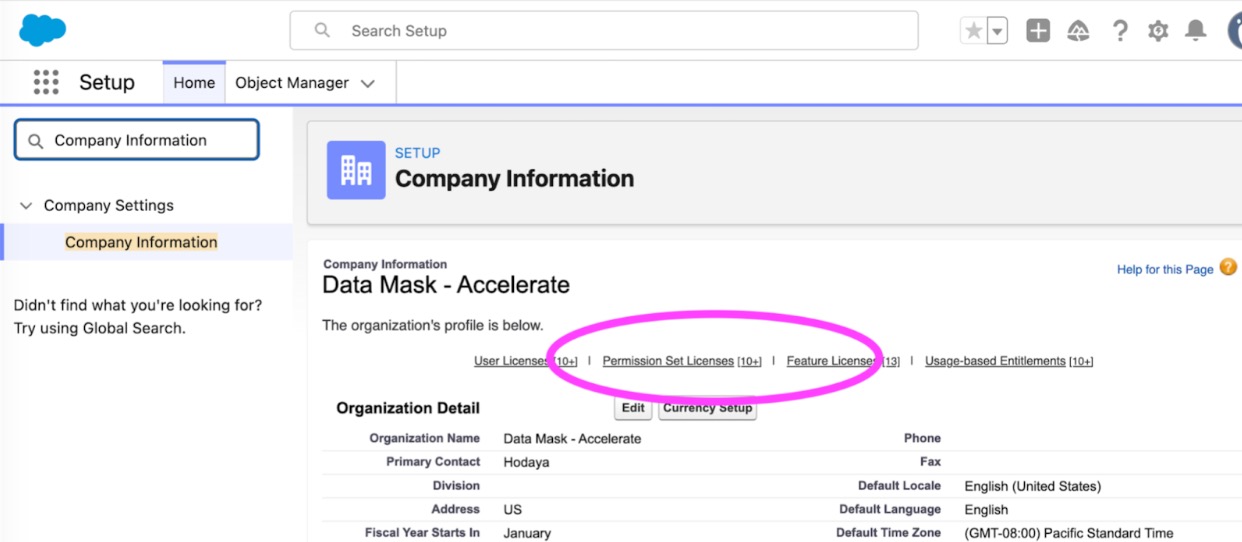
In the Quick Find box, type Company Information and select it from the menu.
-
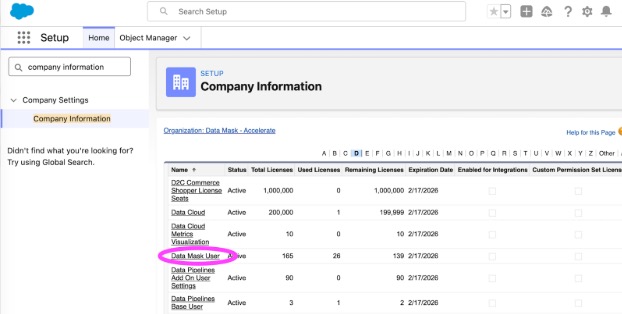
Click on “Permission Set Licenses“ link in the header and find Data Mask User.
-
Select the name of the Data Mask User permission set.
-
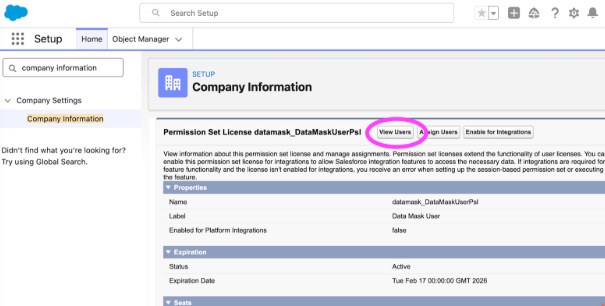
On the detail page, click on View Users button on the top
If you have any questions or need assistance, refer to Salesforce Help or contact your Salesforce account team. For more information about Salesforce’s approach to retiring products and features, read our Product & Feature Retirement Philosophy.
Vidensartikelnummer
005299299
Løste denne artikel dit problem?
Giv os besked, så vi kan forbedre os!
