Vælg en organisation
Understanding Salesforce Files - ContentDocument, ContentVersion & ContentDocumentLink
Udgivelsesdato: Apr 3, 2026
Beskrivelse
Salesforce Content Management : Data Model
Before we start with Salesforce files data model, you can refer to the link to understand the Differences Between Files, Salesforce CRM Content, Salesforce Knowledge, Documents, and Attachments 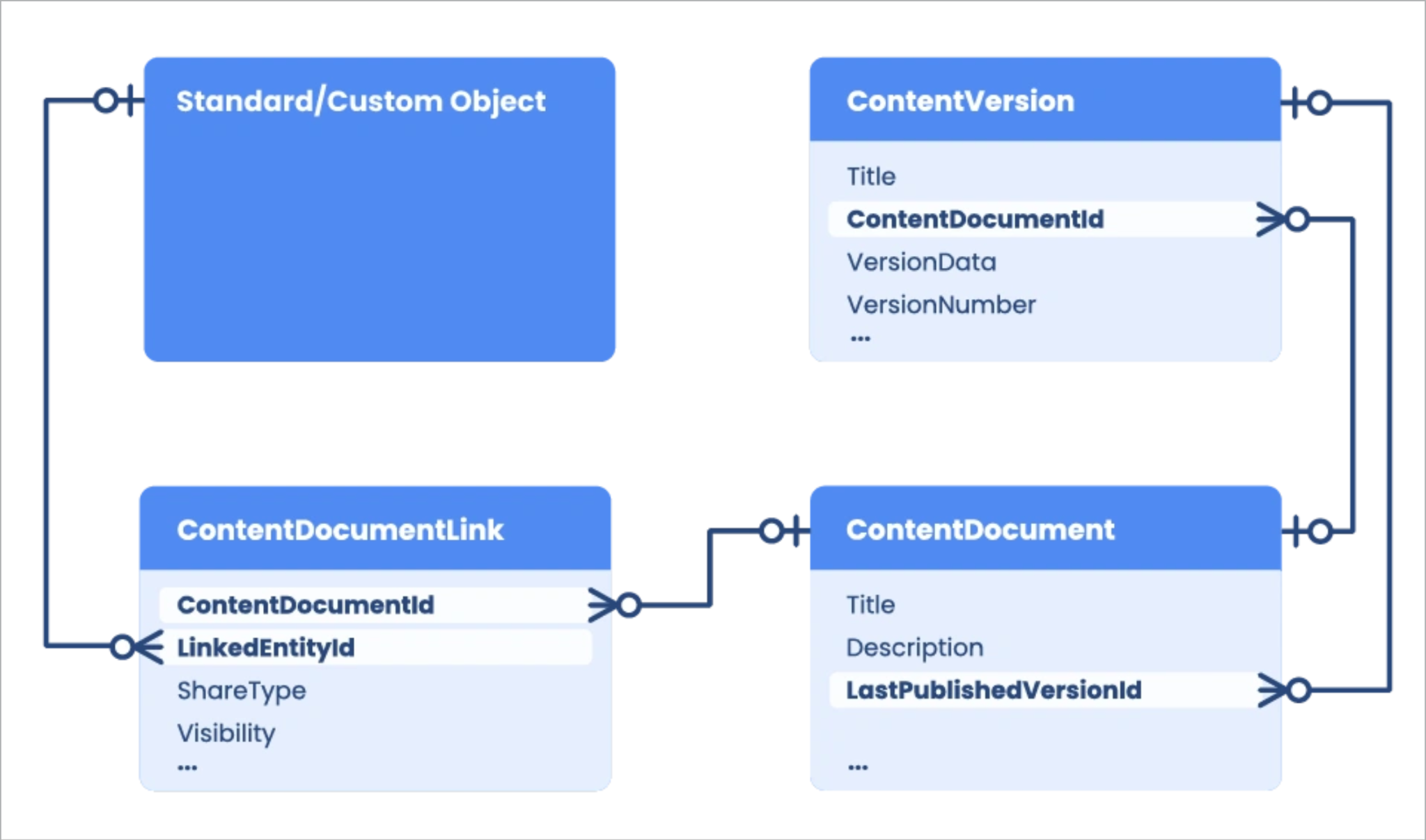
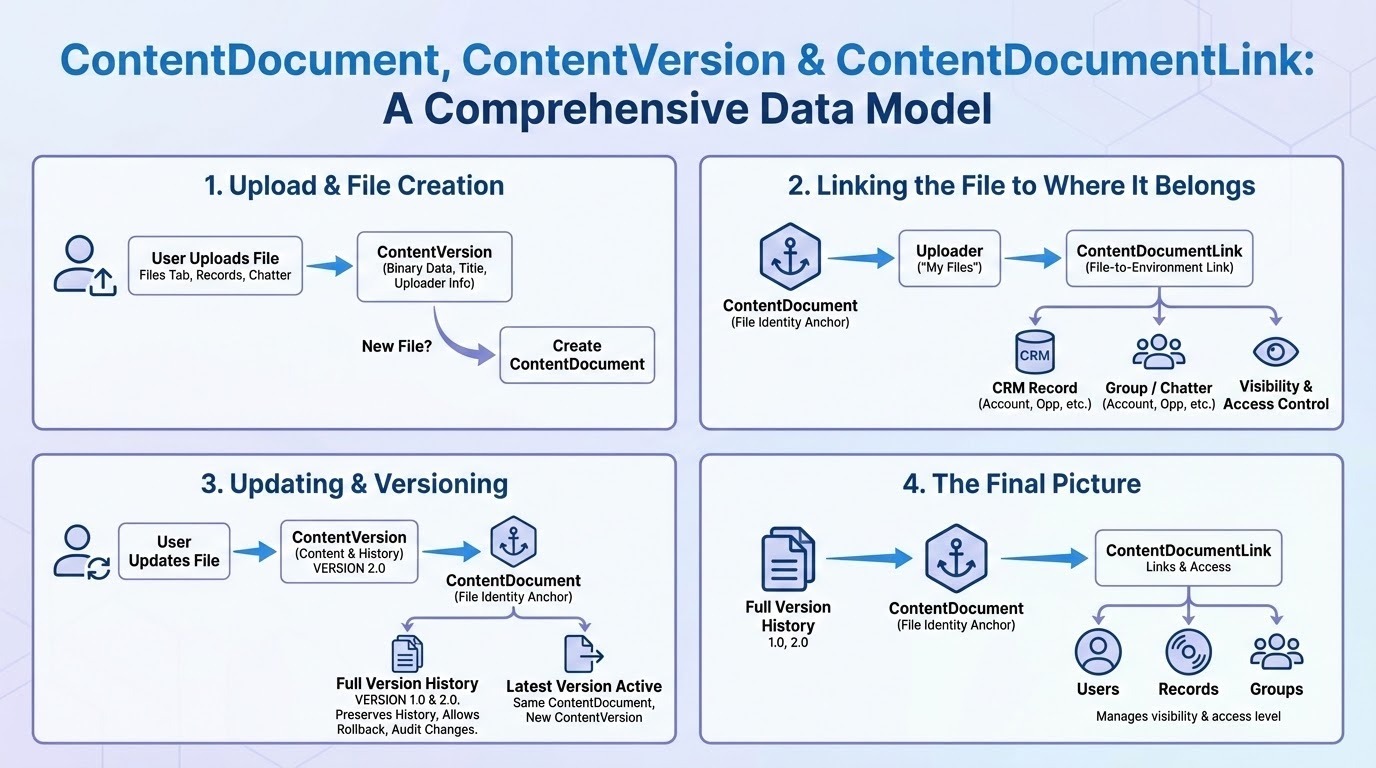
If you’re searching for a single object called “File” in Salesforce, you won’t find one. Instead, Salesforce Files are built on a data model that consists of three core objects: ContentDocument, ContentVersion, and ContentDocumentLink.
Here’s a simplified breakdown of what each one represents:
ContentDocument - the parent object of both ContentVersion and ContentDocumentLink, represents an individual file in Salesforce.
ContentVersion - records represent all the versions of that file, past and present.
ContentDocumentLink - represents the link to entities the file is shared with, whether it's users, groups, records, or libraries.
| Object | Description | Stores |
| ContentDocument | Represents the file as a whole | Metadata like name, owner, type |
| ContentVersion | Stores actual file data | Binary content, title, version number |
| ContentDocumentLink | Links the file to records/users/groups | Relationship, share type, visibility |
Now, let's look at each of these objects in detail and get a better understanding of how they work together.
Løsning
Deep Dive into ContentDocument, Content Version and ContentDocument Link Objects:
Content Document object
It represents a document that has been uploaded to a library in Salesforce CRM Content or Salesforce Files. It’s the parent object of both ContentVersion and ContentDocumentLink; when a ContentDocument record is deleted, all its child records are deleted as well. ContentDocument is automatically created when a ContentVersion without an associated ContentDocumentId is added to a Salesforce org. This can occur when a new file is uploaded via the Salesforce UI or when a ContentVersion without ContentDocumentId is created programatically.
Supported Calls
It represents a document that has been uploaded to a library in Salesforce CRM Content or Salesforce Files. It’s the parent object of both ContentVersion and ContentDocumentLink; when a ContentDocument record is deleted, all its child records are deleted as well. ContentDocument is automatically created when a ContentVersion without an associated ContentDocumentId is added to a Salesforce org. This can occur when a new file is uploaded via the Salesforce UI or when a ContentVersion without ContentDocumentId is created programatically.
Supported Calls
delete(), describeLayout(), describeSObjects(), query(), retrieve(), search(), undelete(), update()ContentDocument Key fields
- Title – This is a string used to store the title of a document.
- Description – This is a textarea that can be used to store a description of the document.
- LatestPublishedVersionId – This is a lookup field that stores the ID of the current ContentVersion of the document.
Check out Salesforce's Developer Guide for a full breakdown of the ContentDocument object, including a complete list of fields, a rundown of special access rules, usage tips, and more.
Content Version object
It represents a specific version of a document that has been uploaded to a library in Salesforce CRM Content or Salesforce Files. This is where the actual content of a file is stored. ContentVersion is created when you upload a file or document to Salesforce or add a new version of an existing one. When you create a ContentVersion that is not associated with an existing ContentDocument, Salesforce automatically creates a parent ContentDocument object and a child ContentDocumentLink that looks up to it. It may seem counterintuitive that creating ContentVersion is what sparks the creation of its parent ContentDocument and not the other way around.
Supported Calls
create(), describeLayout(), describeSObjects(), query(), retrieve(), search(), update(), upsert()ContentVersion Key fields
- Title – Again, this is the document's title.
- ContentDocumentId – This is a lookup field used to associate the ContentVersion with its parent ContentDocument object. When a ContentVersion is created without an associated ContentDocumentId, it will trigger the creation of a new ContentDocument.
- ContentUrl – This stores the URL for linked files and is used to determine their FileType.
- VersionData – This is a base64 field that contains the actual binary data of the document version.
- VersionNumber – What it says on the label: this is the document version's sequential version number.
Again, comprehensive documentation for the ContentVersion object can be found in Salesforce's Developer Guide.
Content Document Link object
It is a junction object that represents the link between a file and the entities it's shared with: other users, groups, records, and libraries. ContentDocumentLink is created when its parent ContentDocument is created. If a file is added from the Files tab, a single ContentDocumentLink record is created that looks up to its parent document via the ContentDocumentId field and to the user that uploaded it via the LinkedEntityId field. However, if a file is added in the context of another object, such as a related list on a record page, two ContentDocumentLink records will be created: one that looks up to the user that uploaded it, and one that looks up to the object it is associated with.
Supported Calls
create(), delete(), describeSObjects(), query(), retrieve(), update(), upsert()
ContentDocumentLink Key fields
- ContentDocumentId – This is a lookup field used to associate the ContentDocumentLink with its parent ContentDocument object.
- LinkedEntityId – This is a reference field that is used to associate the ContentDocumentLink with entities it is linked to, such as users and records.
- ShareType – This is a picklist field that determines the permission granted to the user of the shared file in a library. There are three available options:
V – Viewer permission: The user can explicitly view but not edit the shared file.
C – Collaborator permission: The user can explicitly view and edit the shared file.
I – Inferred permission: The user’s permission is determined by the related record. For shares with a library, this is defined by the permissions the user has in that library. - Visibility – This is a picklist field that determines whether the file is available to all users, internal users, or shared users.
As always, Salesforce's Developer Guide is your source for full documentation of the ContentDocumentLink object.
Yderligere ressourcer
ContentDocument Developer Guide
ContentVersion Developer Guide
ContentDocumentLink Developer Guide
Vidensartikelnummer
005314319
Løste denne artikel dit problem?
Giv os besked, så vi kan forbedre os!
