Select An Org
Error "cdata_jira" When Publishing Jira Data Source to Tableau Cloud
Publish Date: Mar 13, 2026
Description
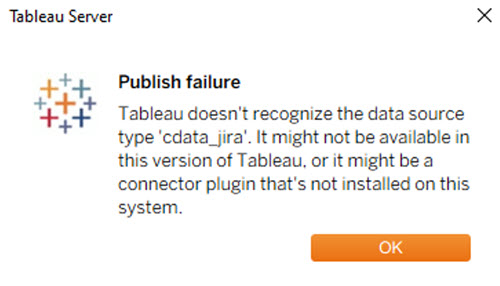
When publishing a data source or workbook created with the Jira connector from Tableau Desktop to Tableau Cloud, the following error occurs:
Tableau doesn't recognize the data source type 'cdata_jira'. It might not be available in this version of Tableau, or it might be a connector plugin that's not installed on this system.
Cause:
This limitation exists in the current product. The Jira connector with Tableau supported JDBC driver is intended for use with:
- Tableau Desktop
- Tableau Prep Builder
- On-premises Tableau Server
It does not support direct publishing to Tableau Cloud or functionality within the Tableau Cloud environment (including Tableau Bridge), even with the latest JDBC drivers.
Resolution
Direct publishing from Tableau Desktop to Tableau Cloud, with or without Tableau Bridge, is not currently supported. Please consider the following workarounds:
Workaround 1: Use Tableau Prep Builder to Publish Extracted Hyper Data
Create a flow in Tableau Prep Builder. Set the output destination to Tableau Cloud for publishing.
Note: Scheduled flow execution on Tableau Cloud is not supported. Updates must be performed manually.
Workaround 2: Use Third-Party Supported Solutions
To achieve direct refreshes on Tableau Cloud, consider using external drivers or solutions, such as ODBC driver or CData Connect AI from CData below*:
- Establish a Live Connection with Jira Data using Tableau Bridge
- Visualize Jira Data from Tableau
- Connect Atlassian Jira to Tableau
- Tableau Cloud でJira のデータを参照する3つの方法 (Japanese)
Note: These are third-party services and are not supported by Tableau/Salesforce.
*Although we make every effort to ensure links to external websites are accurate, up to date, and relevant, Tableau cannot take responsibility for the accuracy or freshness of pages maintained by external providers. Contact the external site for answers to questions regarding its content.
Additional Resources
Jira (Use Supported Connectors)
Connectors Built with the Tableau Connector SDK
Knowledge Article Number
005315881
Did this article solve your issue?
Let us know so we can improve!
