Välj en organisation
Error 'URL No Longer Exists' for Marketing Cloud Next Landing Pages
Publiceringsdatum: Mar 10, 2026
Beskrivning
If you encounter a 'URL No Longer Exists' error when trying to load a published landing page in the Marketing Cloud Next, try the below steps to attempt to resolve this issue.
Lösning
- Verify the link functionality by opening the URL in an incognito window, disabling VPN, or trying a different network.
- Remove the IP ranges for the Marketing Landing Page Profile
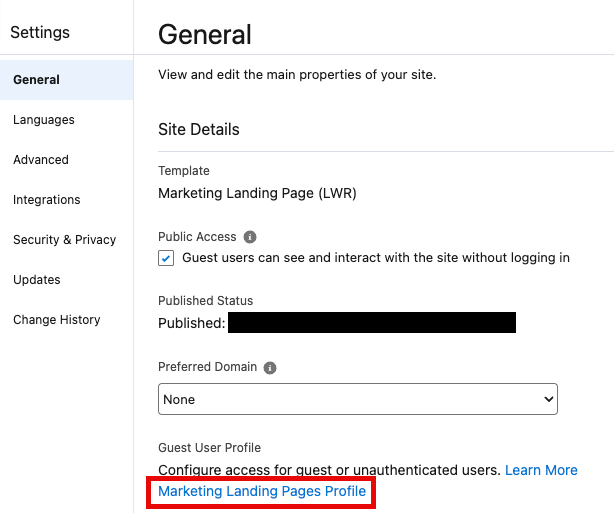
- Navigate to Salesforce Setup -> Digital Experiences > All Sites > Marketing Landing Pages > Builder > Settings > General > Marketing Landing Profile. Click on the Marketing Landing Pages Profile link (as shown below).
- Click on "Login IP Ranges" in the System section.
- Delete any existing Login IP Ranges (typically you may see a range 0.0.0.0 - 255.255.255.255). You may need to work with a user that has the appropriate permissions.
- Verify if the issue is resolved after removing the IP ranges and confirm whether the landing page is accessible.
Knowledge-artikelnummer
005315909
Löste denna artikel ditt problem?
Berätta för oss vad vi kan förbättra!
