Välj en organisation
Installing UX Studio via Local Archive (Eclipse 4.5/4.6)
Publiceringsdatum: Mar 10, 2026
Beskrivning
Goal:
This article provides the updated installation workflow for UX Studio. While the Legacy Developer Documentation provides the download links for the plugin, the internal installation steps have changed.
Lösning
1. Download the Plugin Archive
Follow the instructions in Section 1.1 through step 6 in the legacy docs, which includes downloading the tar.gz file corresponding to your Eclipse version:
-
For Eclipse 4.5 (Mars): Download v4.5 Archive
-
For Eclipse 4.6 (Neon): Download v4.6 Archive
2. Extract the Files (New Requirement)
The legacy documentation suggests using these URLs directly within Eclipse. This is no longer supported.
-
Locate the downloaded .tar.gz file on your machine.
-
Extract (unzip) the file. This will create a local folder (e.g., plugin-4.6).
-
Ensure you know the file path to this extracted folder.
3. Install via Eclipse (Updated Workflow)
-
Open Eclipse and navigate to Help > Install New Software...
-
Click Add.
-
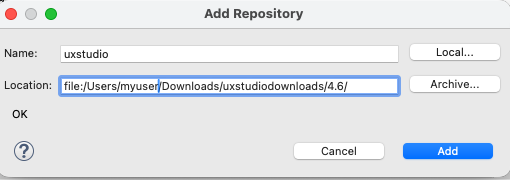
In the Name field, enter UX Studio.
-
Important: Do not paste the HTTPS URL into the Location field. Instead, click the Local... button.
-
Browse to and select the extracted folder from Step 2.
-
The Location field will now show a local path (e.g., file:/Users/name/Downloads/plugin-4.6/). Click Add.
4. Finalize Setup
-
Select the UX Studio components that appear in the list.
-
Follow the prompts to accept the license agreement and click Finish.
-
Restart Eclipse when prompted to complete the installation.
You can then proceed with step 7 in the legacy docs.
Knowledge-artikelnummer
005316612
Löste denna artikel ditt problem?
Berätta för oss vad vi kan förbättra!
