Select An Org
Force one-time-use Refresh Tokens - (RTR) Refresh Token Rotation
Publish Date: Mar 12, 2026
Description
Refresh tokens that can be reused multiple times create a security vulnerability because a single stolen token provides ongoing unauthorized access to Salesforce.
To prevent malicious users from exploiting compromised tokens, implement Refresh Token Rotation (RTR) on your connected app or external client app OAuth configuration. This setting enforces single-use refresh tokens by issuing a new token with each exchange and immediately invalidating the previous one.
This safeguards against token theft and any attempted reuse of an invalidated refresh token results in the immediate revocation of the current refresh token and all associated access tokens, requiring the client to re-authenticate via a new flow.
Resolution
Setup
Before you set up, read the “Plan your activation” section below to understand the steps needed to audit your existing connected apps and external client apps, remediate client applications, and set up the policies.
In your Org, login as an Admin user. For new Application, go to :
Settings -> External Client App Manager -> New External Client App. Check Enable OAuth in API
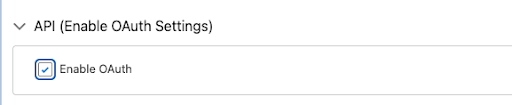
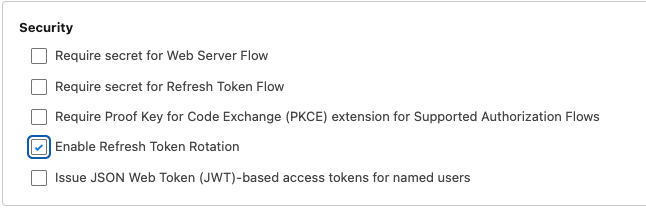
Then in the security section, Enable Refresh Token Rotation. You will be presented with additional configuration options. In the security section, check the checkbox against “Enable Refresh Token Rotation”.
Salesforce recommends using External Client Apps in all situations and migrate connected apps to External Client Apps.
Plan your Activation
Before activating this feature, Administrators and Architects must plan and fully understand the expected outcomes. To implement a Refresh Token Policy, you must sequentially audit your current OAuth scopes and client dependencies, update your application logic to securely persist and rotate tokens, and implement an error recovery mechanism to prevent lockouts.
Step #1: Audit Your Current State
Before changing settings, verify that your current flows support rotation.
-
Check Scopes: Ensure your current OAuth requests include the refresh_token or offline_access scope. Rotation only applies to flows that issue refresh tokens.
-
Identify all OAuth Clients: Catalog every external consumer such as middleware, mobile applications, or local apps associated with that specific Connected App's Consumer Key. All client apps must be updated to support Token persistence simultaneously to avoid a synchronization failure.
Step #2: Remediate your Client Apps
Your app must be rotation-aware and should implement handling of refresh tokens in the OAuth flow.
-
Modify the Token Parser: Locate the function that handles the response from /services/oauth2/token.
-
Implement the token swap: Change your logic to look for a refresh_token in the response of a refresh request.
-
Update Persistence: Write logic to overwrite the old refresh token in your secure storage with the new one provided in the response.
-
Legacy Apps: If you do not have control over the application and if the application doesn't support rotation of refresh tokens, understand and communicate the implications of enabling refresh token rotation.
Step #3: Implement Error Recovery (invalid_grant)
Error handling: The following is an example of a returned error from an OAuth 2.0 refresh token flow. Handle this error and log this error so you have a clean audit trail. Then, initiate a new authentication flow. The new flow invalidates all refresh tokens effectively safeguarding the reuse of stolen tokens. Failing to do so may result in the user being locked out.
{"error":"invalid_grant","error_description":"expired access/refresh token"}
Knowledge Article Number
005316711
Did this article solve your issue?
Let us know so we can improve!
