Organisation auswählen
Email-Sending Domain Verification FAQ
Veröffentlichungsdatum: Aug 21, 2026
Beschreibung
As part of our ongoing efforts to strengthen the security of our email services, email domain verification is required. Salesforce no longer delivers emails from unverified domains, even if the email addresses are individually verified.
With this change, delivery fails for emails sent from Salesforce if the email domain–the part after the at (@) symbol–isn’t verified via either an active DKIM key or a verified entry in the authorized email domain list.
This article provides answers to common questions about this change and the verification process.
Lösung
This article answers the most frequently asked questions about Salesforce's email-sending domain verification requirement. Use the questions below to understand the verification process, how to check your domain status, and how to handle edge cases like sandboxes, unverifiable domains, and notification emails.
Does Verification of My Root Domain (example.com) Cover All Subdomains (mail.example.com, sales.example.com)?
No. You must verify each domain and subdomain with a separate DKIM key or authorized email domain.
Do I Need to Set Up Both a DKIM Key and an Authorized Email Domain?
No. Only one of these two verification methods is required for each domain and subdomain. To meet the requirement, the DKIM key must be active or the authorized email domain must be verified.
Which Verification Method Is Recommended?
Salesforce recommends that you verify your email-sending domain with an active DKIM key.
DomainKeys Identified Mail (DKIM) provides an additional benefit. DKIM is a security standard that attaches a digital signature to your emails to prove that they came from you. With this signature, the receiving server can verify that the message content wasn't altered or faked during transit. DKIM builds trust with email providers, so your messages are more likely to land in the inbox instead of the spam folder.
Although a verified authorized email domain meets the requirement to send email from Salesforce with your domain, there's no additional benefit. Salesforce only recommends this option if you have a reason not to use DKIM keys.
When Does This Change Take Effect?
See Mandatory Sending-Email Domain Verification Timeline.
Does the Requirement Apply to Sandboxes?
Yes, email-sending domain verification is also required in all types of sandboxes. DKIM keys and Authorized Email Domains aren't copied when creating a new sandbox — new unique ones must be created for each sandbox.
What About Organization-Wide Addresses or Other Areas Where User Emails Are Already Verified?
This change affects any email with a sending domain that Salesforce doesn't own when that email is sent from your Salesforce org or related automations. Emails from verified Org Wide Addresses still need the sending domain to be verified.
Why Only Exempt gmail.com, hotmail.com, and outlook.com?
Salesforce analyzed current email patterns. Those domains represent the vast majority of users with public email addresses.
Will Other Public Email Domains Be Exempted from the Verification Requirement?
Not at this time. If users in your org have email addresses on other public email domains, enable the substitution domain option when it's available.
What Happens if an Email Fails to Send Due to an Unverified Domain? Are There Logs Available? Will the Entire Apex/Flow Transaction Also Fail?
This is dependent on the sending feature. Some features will check if the sending domain is authorized before trying to send the email. If the feature catches the error before sending, it should display an error message back to the customer. For features that may not check for an authorized domain beforehand, Salesforce will pass the email to MTA logs and show the DSN: "550 5.7.1 Delivery not authorized, message discarded." To identify any failures, check the email logs in Setup periodically for this error.
See: Use Email Logs to Monitor Emails Sent from Salesforce.
What About Users with an Email Domain That I Can't Verify?
On the Deliverability page in Setup, enable Use a substitute email address for unverified domains. With this option, Salesforce can send email for users whose email domains you can't verify, such as Experience Cloud site users, Salesforce Sites users, consultants, and users with public email addresses like yahoo.com or icloud.com. For more information, see Send Email for Users with Unverified Domains.
How Can I Tell Which Email Domains Are in Use in My Org?
Search email logs using Use Email Logs to Monitor Emails Sent from Salesforce. The Sender field in the returned data shows what domains are being sent from the org. For more information, see Email Log Reference.
How Can I Tell Which Email Domains Are Temporarily Allowlisted?
See Determine Your Temporarily Allowlisted Email-Sending Domains.
How Can I Tell Whether an Email Domain Is Verified in My Org?
- To check whether Salesforce can send email from a specific domain, see Check the Verification Status of an Email-Sending Domain in Salesforce Help.
- To find all the DKIM keys and authorized email domains configured in your org, use Developer Console. See Identify Verified Email-Sending Domains in Salesforce Help.
Why Am I Receiving an Advisory Notification Email from Salesforce with the Subject: "Contact Your Salesforce Admin to Verify Your Email Domain"?
If you received this message, it means an email was sent from a domain that Salesforce hasn't verified. This can happen when using a new domain or one that hasn't been authorized in your org's setup. Salesforce now sends this notification to any user who sends email from an unverified domain in Salesforce. These informational emails are sent even if organizations have temporary exemptions. To avoid any disruption to your email sending, reach out to your Salesforce admin to get your domain verified.
Excerpt of notification content: "You recently sent one or more emails from Salesforce with your email address, {user_email_address}..."
Why Am I Receiving a Delivery Failure Notification Email from Salesforce with the Subject: "Salesforce Messages Not Delivered"?
You're seeing this message because you sent an email from a domain that hasn't been verified in Salesforce. This may be a new domain or one listed as an unverified one in your org's setup. Salesforce now sends this notification to any user who attempts to send email from an unverified domain. Eventually, Salesforce will stop delivering emails sent from unverified domains entirely. This email is only sent to users once every release cycle, not repeatedly.
Excerpt of notification content: "Salesforce couldn't deliver one or more emails that you recently sent because your email address, {user_email_address}, uses an unverified domain."
How Do I Stop Domain Verification Notification Emails Being Sent to Users?
System administrators can turn off email notifications to users sending to temporarily allowlisted email domains. These notifications warn users that delivery can fail for future emails sent from Salesforce. If you use a substitute email address for unverified domains, those notifications don't apply. To turn off these notifications, find the setting under the "Email Domain Verification" section of Deliverability in Salesforce Setup.

Why Does the Verification Code I Put in DNS for Authorized Domains Not Verify?
When setting up a verification code as a text entry in DNS (for example, [orgId]._sfdv.sfdcedi2.com), ensure you use the 18-digit version of your Org ID. After adding to your DNS, wait for the changes to propagate across the internet. Finally, in your Salesforce Setup, edit and save the Authorized Domain again to trigger the verification callout.
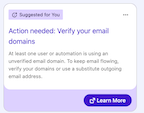
What Are the Alerts That an Admin Sees on the Setup Home Page?
Admins will see this nudge when users send emails that are dropped, or would have been dropped, by Domain Verification. The nudge clears once the admin identifies the affected domain and completes verification.
Where Can I Find Detailed Instructions for Popular Domain Registrars?
Although Salesforce can't provide guidance or instructions for the registrar's processes, here are links to the instructions published by popular registrars:
Zusätzliche Ressourcen
- Mandatory Sending-Email Domain Verification Timeline
- Send Email for Users with Unverified Domains
- Check the Verification Status of an Email-Sending Domain
- Identify Verified Email-Sending Domains
- Use Email Logs to Monitor Emails Sent from Salesforce
- Determine Your Temporarily Allowlisted Email-Sending Domains
- Set Up an Authorized Email Domain
Nummer des Knowledge-Artikels
005316911
Konnten Sie Ihr Problem mithilfe dieses Artikels lösen?
Geben Sie uns Feedback, damit wir uns verbessern können.
