Sélectionner une organisation
Outlook add-ins Authentication Failures with Continuous Access Evaluation (CAE)
Date de publication: Apr 14, 2026
Description
These failures are caused by a conflict between Microsoft Entra ID (formerly Azure AD) and the Salesforce Outlook add-in regarding Continuous Access Evaluation (CAE).
CAE is a security feature that allows Microsoft to revoke access tokens in real-time based on policy changes. Currently, Microsoft is enforcing CAE policies even when an add-in (like Salesforce) has not yet declared itself "CAE Ready." This leads to a "claims challenge" that the integration cannot currently process, resulting in a failed login or a disconnected session.
The Salesforce Outlook Integration has not declared itself as Continuous Access Evaluation (CAE)–ready. According to Microsoft’s CAE guidance in Microsoft Entra ID, CAE tokens and policies should only be applied when both the resource API supports CAE and the client application explicitly declares CAE capability.
However, in this scenario, CAE policies are being enforced even though the application has not declared CAE readiness. As a result, the integration receives CAE-triggered token invalidation and claims challenges that it is not designed to handle, leading to authentication failures.
How CAE Works:
CAE continuously evaluates user sessions and can revoke access tokens immediately when certain conditions are met.
- User termination or password change/reset: User session revocation is enforced in near real time.
- Network location change: Conditional Access location policies are enforced in near real time.
- Token export to a machine outside of a trusted network can be prevented with Conditional Access location policies.
Note:
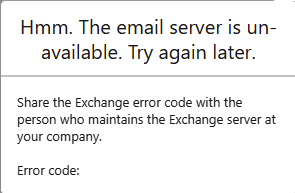
This issue has been observed in New Outlook (on Windows) and Outlook Web App (OWA) clients when Continuous Access Evaluation (CAE) is enabled. According to Microsoft guidance, CAE should not be enforced on Office add-ins that have not declared support for CAE.
Résolution
- Switch to Classic Outlook: The Classic Outlook Desktop Client remains compatible and generally maintains stable connections even under these security policies.
Ressources supplémentaires
For IT Administrators looking to understand how CAE affects third-party add-ins, please refer to the official Microsoft documentation:
- Continuous Access Evaluation in Microsoft Entra ID
- How to use Continuous Access Evaluation enabled APIs in your applications - Microsoft identity platform
Numéro d’article de la base de connaissances
005318592
Cet article a-t-il résolu votre problème ?
Dites-nous ce que nous pouvons améliorer !
