Seleziona un'organizzazione
B2C Commerce: Japanese Custom Dictionary
Data pubblicazione: May 29, 2026
Descrizione
Overview
In Japanese product searches, morphological analysis (token segmentation) is performed on search phrases and product names (strictly speaking, searchable attributes). This token segmentation is executed by the tokenizer based on a morphological dictionary built into the system. However, this built-in dictionary only contains standard Japanese morphemes.
Additionally, Japanese text processing involves converting conjugated verbs to their base forms and removing particles (てにをは). Because of this, especially on e-commerce sites with many proper nouns, you may encounter issues where a search phrase does not return a product even though it partially matches the product name. This problem tends to occur most frequently when processing Hiragana.
Let's look at a scenario where a site's catalog contains a product named "あすとろぬいぐるみ" (Astro Plush), and a user searches for the phrase "あすとろ" (Astro).
Because "あすとろ" is not a standard Japanese word, it is not recognized as a single token. As a result, the tokenizer's internal algorithm splits the product name "あすとろぬいぐるみ" into "あす", "と", "ろ", and "ぬいぐるみ" during indexing. Subsequent processing removes the particle "と", meaning the product is ultimately indexed as "あす", "ろ", "ぬいぐるみ".
Meanwhile, the search phrase "あすとろ" is also not recognized as a single token. In this case, the internal algorithm splits the phrase into "あす" and "とろ". Subsequent processing identifies "とろ" as a conjugated verb and converts it to its base form, "とる". The final generated search query becomes "あす", "とる".
For this reason, searching for "あすとろ" will fail to return the product "あすとろぬいぐるみ".
Note: The removal of the particle "と" and the conversion of "とろ" (verb) to its base form "とる" are technically correct behaviors in Japanese natural language processing.
| Product Index for "あすとろぬいぐるみ" | Search Query for "あすとろ" |
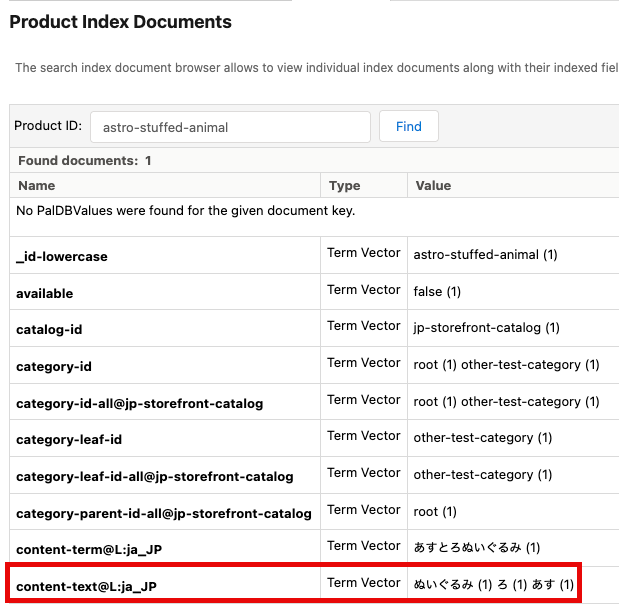 | 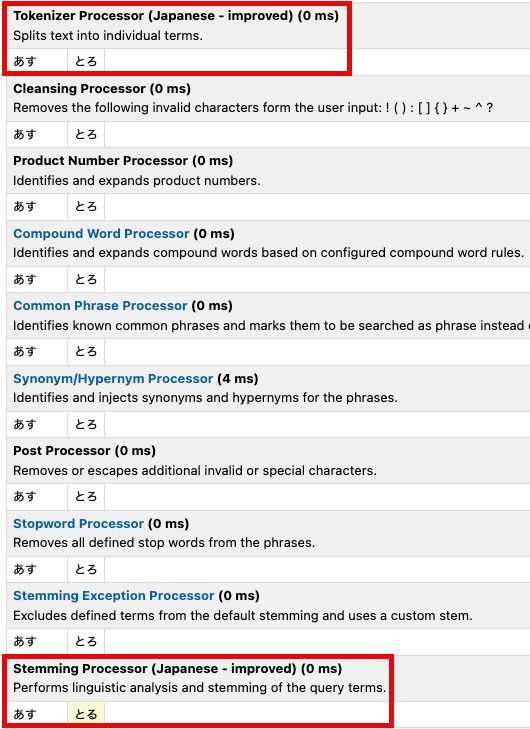 |
Risoluzione
How the Custom Dictionary Solves This
The Custom Dictionary is a feature that allows you to register words—like "あすとろ"—that you want the system to recognize as single tokens. By registering "あすとろ" in the Custom Dictionary, the product name "あすとろぬいぐるみ" will be correctly segmented into "あすとろ" and "ぬいぐるみ", with "あすとろ" recognized as a single token. Consequently, a search for "あすとろ" will successfully hit the product "あすとろぬいぐるみ".
(Note: You can also specify exactly how a word should be segmented using the segmentation field in the custom dictionary.)
| Product Index after registering "あすとろ" | Search Query after registering "あすとろ" |
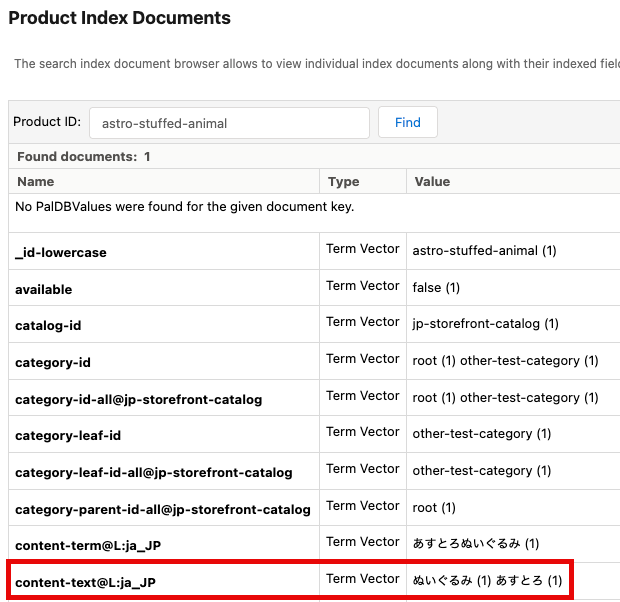 | 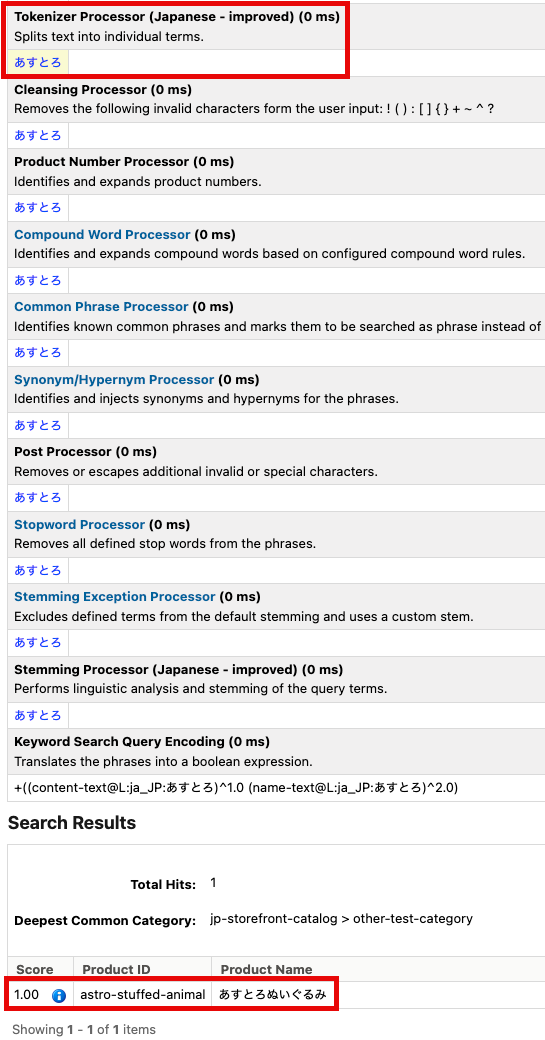 |
Important Caveats
While useful, overusing the Custom Dictionary can cause unintended side effects, so you should avoid registering unnecessary words.
For example, if you register the word プリン (pudding), the word プリント (print) will suddenly start being segmented into "プリン" and "ト". As a result, a search for "プリン" will incorrectly start returning products that contain "プリント".
| Product Index for "プリント" after registering "プリン" | Search Query for "プリン" after registering "プリン" |
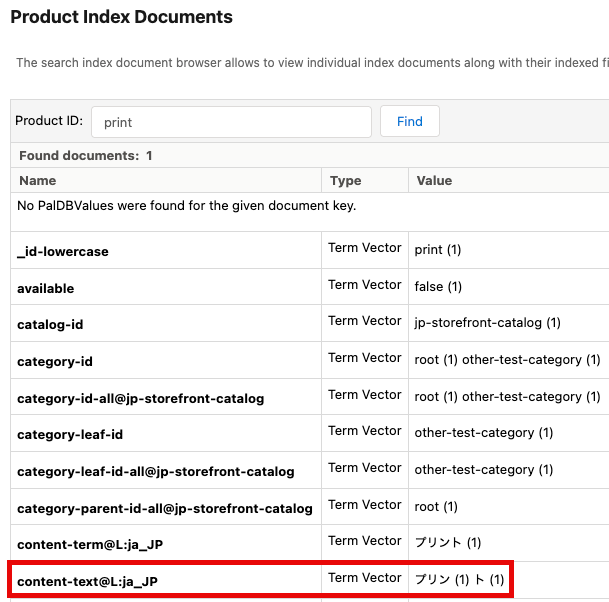 | 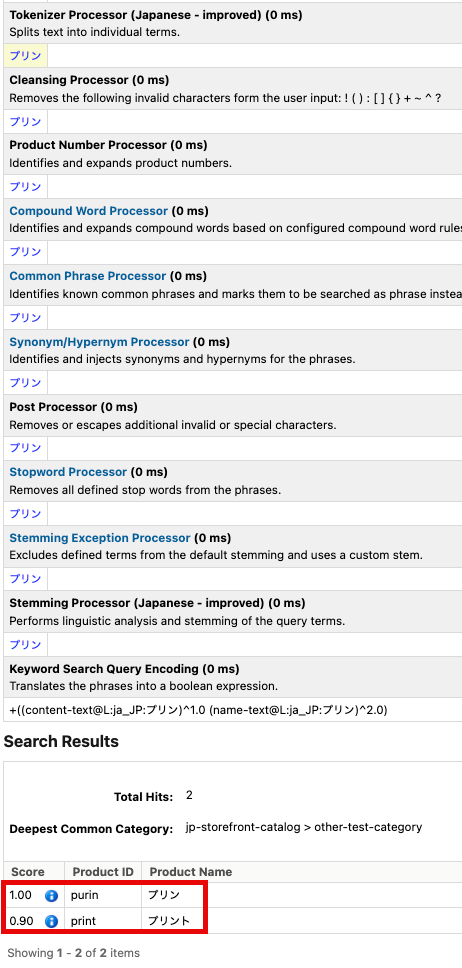 |
Because of this, the Custom Dictionary is a "double-edged sword" that directly impacts the tokenizer's behavior. Therefore, it is highly recommended to use the Custom Dictionary sparingly, and only when a problem cannot be resolved by any other means.
Configuring the Custom Dictionary
Custom dictionaries are site-level data and are managed in Business Manager in the following two locations:
- Merchant Tools > Search > Search Indexes
Click Language Options in the top-right corner. From there, you can manage your custom dictionaries.
This is only available when Stemming is set to "Japanese" or "Japanese - improved" ("Japanese - improved" is recommended). - Merchant Tools > Search > Import & Export
Under Search Settings, you can bulk import/export custom dictionaries in XML format.
Custom Dictionary Entry Fields
Surface Form
Enter the word you want to register.
Examples: あすとろ, 東京スカイツリー
Segmentation
Specify how the token should be segmented using space-separated values. If you want the word to be recognized as a single, unsegmented unit, enter the exact same string as the "Surface Form" field.
Examples: あすとろ, 東京 スカイツリー
Furigana
Enter the pronunciation of the word in Katakana. If you used spaces in the "Segmentation" field, use matching spaces here.
(Note: Furigana itself does not directly affect Japanese search behavior, but it is a required field based on system specifications.)
Examples: アストロ, トウキョウ スカイツリー
Part of Speech
Select or enter the appropriate part of speech for the word (e.g., Noun, Adverb).
Custom Dictionary XML Example
<?xml version="1.0" encoding="UTF-8"?>
<search xmlns="http://www.demandware.com/xml/impex/search2/2010-02-19">
    <user-dictionaries>
        <japanese-user-dictionary xml:lang="ja-JP">
            <user-dictionary-entry>
                <surface-form>あすとろ</surface-form>
                <segmentation>あすとろ</segmentation>
                <furigana>アストロ</furigana>
                <part-of-speech>名詞</part-of-speech>
            </user-dictionary-entry>
            <user-dictionary-entry>
                <surface-form>東京スカイツリー</surface-form>
                <segmentation>東京 スカイツリー</segmentation>
                <furigana>トウキョウ スカイツリー</furigana>
                <part-of-speech>名詞</part-of-speech>
            </user-dictionary-entry>
        </japanese-user-dictionary>
    </user-dictionaries>
</search>
Deployment Flow to Production
The custom dictionary affects both indexing and query. Additionally, custom dictionary data can be replicated via the site-level Search Indexes replication task.
The standard flow for deploying from the Staging instance to Production is as follows:
- Register and edit custom dictionary entries in the Staging instance as needed.
- Rebuild the site's search index in the Staging instance via Merchant Tools > Search > Search Indexes.
- Verify the search behavior in the Staging instance.
Detailed testing can be performed using the Search Index Query Testing available under Merchant Tools > Search. - Execute replication for the Search Indexes task at the site level to deploy the updated search indexes and custom dictionary data to the Production instance.
Supplementary: Recommended Settings for Improving Japanese Search Quality
To improve Japanese search quality, there are two key settings available in addition to the Custom Dictionary: the "Strict Matching" feature and the "Japanese - improved" stemming option . We strongly recommend configuring both as follows:
- Enable Strict Japanese Search/Index Matching: Enabled
Location: Administration > Global Preferences > Feature Switches - Stemming: Japanese - improved
Location: Merchant Tools > Search > Search Indexes > Language Options
If you encounter issues with Japanese search, we highly recommend trying these settings changes first. Only if these settings do not resolve the issue should you consider utilizing the Custom Dictionary. For more details, please refer to the knowledge article below:
Numero articolo Knowledge
005318805
Questo articolo ha risolto il problema?
Facci sapere, così possiamo migliorare!
