Valitse organisaatio
How to view the exact Email Sent from Marketing Cloud on a Sales Cloud Record Page
Julkaisupäivä: May 6, 2026
Kuvaus
When sending personalized emails from Salesforce Marketing Cloud via Journey Builder, especially those triggered by Salesforce CRM events, you may need to view the exact rendered email that was sent to a specific subscriber directly from within Sales Cloud. Standard Marketing Cloud tracking does not retain a copy of each individually rendered email. The built-in View As Web Page link provides a re-rendering but it breaks if the source Data Extension is later cleared or deleted.
This article explains how to capture the fully rendered email HTML at send time, store it in a Data Extension, and present it to Sales Cloud users on the Contact or Lead record page via a Lightning Web Component with a modal preview.
Ratkaisu
Option A: Capture HTML at Send Time via AMPscript
- Add an AMPscript block to your email that uses HTTPGet() to fetch the rendered HTML from the VAWP URL during the send
- The captured data is written to the archive DE either via InsertDE() or via send log auto-population when the variable names match the Send Log column names
Step 1: Understand open tracking pixel isolation
- The email’s open tracking pixel must only be included in the actual inbox render, not in the HTML copy fetched by HTTPGet(). If the open pixel is present in the archived HTML, every subsequent view of the stored email in Sales Cloud or elsewhere would trigger an open event, inflating open rates to 100%. To prevent this, wrap both the HTTPGet() call and the open tracking tag inside a _messagecontext == SEND conditional. This ensures the tracking pixel is only rendered once at the time of the actual send and is excluded from the VAWP copy that HTTPGet() retrieves
- The following code block should be placed in the email content:
%%[
IF _messagecontext == "SEND" THEN

    SET @VawpUrl      = view_email_url
    SET @subscriberkey = _subscriberkey
    SET @emailname    = emailname_
    SET @emailHTML    = HTTPGet(@VawpUrl)
    SET @archiveKey   = Concat(
        @subscriberkey, "_", jobid)

]%%

<!-- Open tracking pixel: ONLY rendered at
     send time, excluded from VAWP copy -->
<custom name="opencounter" type="tracking"/>

%%[
ENDIF
]%%
Step 2: Understanding how this works
- The _messagecontext system personalization string equals SEND only during the original email render. The HTTPGET() call fetches the VAWP URL, which triggers a separate render of the same email but in that VAWP render, _messagecontext is not SEND, so the entire block including the open tracking pixel is skipped. The result is a clean HTML copy with no tracking pixel embedded
- If you use Send Logging, the variables @emailHTML, @archiveKey, @subscriberkey, and @emailname will auto-populate into Send Log columns with matching names. Alternatively, add an explicit InsertDE() call before the ENDIF to write directly to your archive data extension
- In the Supermessage cost, the HTTPGET() call triggers a VAWP render on the Marketing Cloud side. This consumes one suppermessage. When combined with the original send itself, this means each email sent with HTML archiving consumes twice as many suppermessages. Factor this into your volume planning and licensing.
- Performance consideration: Each HTTPGet() call adds latency to the send. For high-volume sends, this can materially slow send throughput. For high-volume scenarios, consider Option B below
Step 3: Recommendation for high-value emails
Given the 2× supermessage cost and added send latency, it is not practical or necessary to archive the HTML of every marketing email. Instead, apply this pattern selectively to emails where CRM users, such as Sales or Service agents genuinely need to see the exact rendered content. Good candidates include:
- Transactional confirmations: Meeting booking confirmations, order confirmations, or shipping notifications where a service agent may need to verify exactly what the customer received
- Voucher or discount codes: Emails containing unique, personalized offer codes that a sales or service agent may need to reference when speaking with the customer
- Contract or policy documents: Emails with personalized terms, renewal notices, or regulatory communications where an audit trail of the exact rendered content is required
- High-touch sales emails: Journey-triggered emails in ABM or enterprise sales motions, where the account executive needs to see what the prospect received before a follow-up call
- For standard marketing newsletters or bulk promotional sends, the engagement data such as opened, clicked, bounced displayed in the LWC is typically sufficient
- There is no need to archive the full HTML. Only include the IF _messagecontext == SEND capture block in email templates where HTML archiving is required.
Option B: Capture HTML Post-Send via SSJS Script Activity
Step 1: Batch HTML Retrieval from Send LOG Using SSJS
- If send-time capture is not viable due to timing or performance constraints, use a scheduled Automation that runs shortly after the send completes. A Script Activity queries the Send Log for recent entries not yet archived and fetches the HTML in batch
Note: Rows.Retrieve() has a hard limit of 2,500 rows per call. If you have more than 2,500 unarchived Send Log rows, a single retrieval will silently return only the first 2,500. To handle this, wrap the retrieval in a loop that continues fetching until fewer than 2,500 rows are returned
<script runat="server">
Platform.Load("core", "1.1.1");

var sendLogDE = DataExtension.Init("SendLog");
var archiveDE = DataExtension.Init(
    "Aggregated_marketing_engagement");

var filter = {
    Property: "Archived",
    SimpleOperator: "equals",
    Value: "false"
};

/* Loop to handle the 2,500-row retrieval
   limit on Rows.Retrieve() */
var batchSize = 2500;
var rows;

do {
    rows = sendLogDE.Rows.Retrieve(filter);

    for (var i = 0; i < rows.length; i++) {
        var row = rows[i];
        var vawpUrl = row["VAWP_URL"];
        var subKey  = row["SubscriberKey"];
        var jobId   = row["JobID"];

        if (vawpUrl && vawpUrl.length > 0) {
            try {
                var resp = HTTP.Get(vawpUrl);
                var html = resp.Content;

                archiveDE.Rows.Add({
                    ArchiveKey:
                        subKey + "_" + jobId,
                    SubscriberKey: subKey,
                    JobID:         jobId,
                    EmailName:
                        row["EmailName"],
                    EmailHTML:     html,
                    SentDate:
                        row["SentDate"]
                });

                /* Flag as archived */
                sendLogDE.Rows.Update(
                    { Archived: "true" },
                    ["SubID", "JobID"],
                    [row["SubID"], jobId]
                );
            } catch (e) {
                /* Log error, continue */
            }
        }
    }

/* Continue if we hit the 2,500 limit,
   meaning more rows may exist */
} while (rows.length >= batchSize);
</script>
- Schedule this automation to run at an appropriate interval after your sends complete, for example 30–60 minutes. The source DE data must still exist at the time this runs, so align the timing with your DE refresh cadence. For very high-volume environments, consider running the Automation more frequently to keep each batch within manageable limits
Step 2: Engagement JSON Retrieval via Code Resource
The engagement Code Resource returns a lightweight JSON payload for a given Subscriber Key, querying the Aggregated_marketing_engagement DE. It includes the archiveKey per email so the LWC can request the HTML separately, but does not include the HTML itself
%%[
VAR @id, @rows, @rowCount, @i, @row
VAR @emailName, @opened, @clicked
VAR @bounced, @sentDate, @archiveKey
VAR @journeyName

SET @id = RequestParameter("id")

SET @rows = LookupOrderedRows(
    "Aggregated_marketing_engagement",
    50,
    "eventdate DESC",
    "SubscriberKey", @id)
SET @rowCount = RowCount(@rows)

Output(Concat("{", Char(10), ' "Emails": ['))

IF @rowCount > 0 THEN
    FOR @i = 1 TO @rowCount DO
        SET @row         = Row(@rows, @i)
        SET @emailName   = Field(@row, "emailName")
        SET @opened      = Field(@row, "opened")
        SET @clicked     = Field(@row, "clicked")
        SET @bounced     = Field(@row, "bounced")
        SET @sentDate    = Field(@row, "eventdate")
        SET @archiveKey  = Field(@row, "archiveKey")
        SET @journeyName = Field(@row, "JourneyName")

        Output(Concat(Char(10), "    {"))
        Output(Concat(
            ' "name": "', @emailName, '",'))
        Output(Concat(
            ' "archiveKey": "',
            @archiveKey, '",'))
        Output(Concat(
            ' "opened": ',
            IIF(@opened == "True",
                "true", "false"), ','))
        Output(Concat(
            ' "clicked": ',
            IIF(@clicked == "True",
                "true", "false"), ','))
        Output(Concat(
            ' "bounced": ',
            IIF(EMPTY(@bounced) OR @bounced != "True",
                "false", "true"), ','))
        Output(Concat(
            ' "sent": "', @sentDate, '",'))
        Output(Concat(
            ' "JourneyName": "',
            @journeyName, '"'))
        Output(Concat("    }",
            IIF(@i < @rowCount, ",", "")))

    NEXT @i
ENDIF

Output(Concat(Char(10), "  ]", Char(10), "}"))
]%%
- Sample response:
{
  "Emails": [
    {
      "name": "Email 3 - Weather forecast",
      "archiveKey": "00Qd2000007..._166768",
      "opened": false,
      "clicked": false,
      "bounced": false,
      "sent": "2026-04-07T00:00:00",
      "JourneyName": ""
    }
  ]
}
Step 3: HTML Rendering via Cloud Page Endpoint
- Create a second Code Resource with Content Type HTML that serves the stored email HTML for a single archive key from the Aggregated_marketing_engagement DE. This endpoint is called only when the user clicks View Email in the LWC, avoiding any unnecessary data transfer
- This Cloud Page is available at a URL like: https://cloud.e.example.com/emailpreview?key=003XX_12345
- Because it is an HTML Cloud Page, the browser renders the email exactly as it appeared to the subscriber. Calling the Cloud Page, contrary to a Code Resource, does consume supermessages
%%[
VAR @key, @html

SET @key = RequestParameter("key")

SET @html = Lookup(
    "Aggregated_marketing_engagement",
    "emailHtml",
    "archiveKey", @key)

IF NOT EMPTY(@html) THEN
    Output(@html)
ELSE
    Output("<html><body><p>Email content not found. The archive may have expired.</p></body></html>")
ENDIF
]%%
Step 4: Lightning Web Component with Email Preview
- The LWC fetches the engagement JSON and renders a Lightning-Datatable on the Lead/Contact record page. A View Email row action opens the HTML Code Resource in a modal iframe overlay. The LWC can, once installed, be easily added to the Contact/Lead record page:

- The single Row Action View Email can easily be accessed:
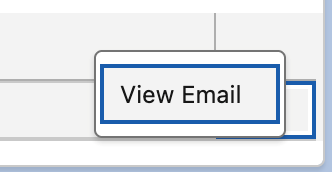
- And once clicked, it opens the overlay containing the email preview, allowing you to scroll through it to see its full length:
-
- LWC Template
<template>
    <template lwc:if={hasEmails}>
        <lightning-card
            title="Email Engagement"
            icon-name="standard:email">
            <lightning-datatable
                key-field="id"
                data={emails}
                columns={columns}
                onrowaction={handleRowAction}
                hide-checkbox-column>
            </lightning-datatable>
        </lightning-card>
    </template>

    <!-- Email preview modal -->
    <template lwc:if={showModal}>
        <section role="dialog" aria-modal="true"
            class="slds-modal slds-fade-in-open">
            <div class="slds-modal__container"
                style="max-width:960px;">
                <header
                    class="slds-modal__header">
                    <button
                        class="slds-button
                            slds-button_icon
                            slds-modal__close
                            slds-button_icon-inverse"
                        onclick={closeModal}>
                        <lightning-icon
                            icon-name="utility:close"
                            size="small"
                            variant="inverse">
                        </lightning-icon>
                    </button>
                    <h2 class="slds-modal__title
                        slds-hyphenate">
                        {previewTitle}</h2>
                </header>
                <div class="slds-modal__content
                    slds-p-around_none"
                    style="height:70vh;">
                    <iframe
                        src={previewUrl}
                        title={previewTitle}
                        style="width:100%;
                            height:100%;
                            border:none;">
                    </iframe>
                </div>
            </div>
        </section>
        <div class="slds-backdrop
            slds-backdrop_open"
            onclick={closeModal}></div>
    </template>
</template>
-
- LWC Controller (emailEngagement.js)
import { LightningElement, api }
    from 'lwc';

/* Engagement JSON endpoint */
const ENGAGEMENT_URL =
    'https://cloud.e.example.com/engagement';

/* HTML preview endpoint */
const PREVIEW_URL =
    'https://cloud.e.example.com/emailpreview';

const COLUMNS = [
    { label: 'Email Name',
      fieldName: 'name',
      type: 'text' },
    { label: 'Sent',
      fieldName: 'sent',
      type: 'date',
      typeAttributes: {
          year: 'numeric',
          month: 'short',
          day: '2-digit',
          hour: '2-digit',
          minute: '2-digit' } },
    { label: 'Opened',
      fieldName: 'opened',
      type: 'boolean' },
    { label: 'Clicked',
      fieldName: 'clicked',
      type: 'boolean' },
    { label: 'Bounced',
      fieldName: 'bounced',
      type: 'boolean' },
    { type: 'action',
      typeAttributes: {
          rowActions: [
              { label: 'View Email',
                name: 'preview' }
          ] } }
];

export default class EmailEngagement
    extends LightningElement {

    @api recordId;
    emails = [];
    columns = COLUMNS;
    hasEmails = false;

    // Modal state
    showModal = false;
    previewUrl = '';
    previewTitle = '';

    connectedCallback() {
        this.loadEngagement();
    }

    async loadEngagement() {
        try {
            const url = ENGAGEMENT_URL
                + '?id=' + this.recordId;
            const resp = await fetch(url);
            const data = await resp.json();

            if (data.Emails
                && data.Emails.length > 0) {

                this.emails = data.Emails
                    .map((e, i) => ({
                        ...e,
                        id: String(i)
                    }));
                this.hasEmails = true;
            }
        } catch (err) {
            console.error(
                'Failed to load engagement:',
                err);
        }
    }

    handleRowAction(event) {
        const action = event.detail.action;
        const row = event.detail.row;

        if (action.name === 'preview'
                && row.archiveKey) {

            this.previewUrl = PREVIEW_URL
                + '?key='
                + encodeURIComponent(
                    row.archiveKey);
            this.previewTitle = row.name;
            this.showModal = true;
        }
    }

    closeModal() {
        this.showModal = false;
        this.previewUrl = '';
    }
}
-
- LWC Metadata (emailEngagement.js-meta.xml)
<?xml version="1.0" encoding="UTF-8"?>
<LightningComponentBundle
    xmlns="http://soap.sforce.com/2006/04/metadata">
    <apiVersion>59.0</apiVersion>
    <isExposed>true</isExposed>
    <targets>
        <target>
            lightning__RecordPage
        </target>
    </targets>
    <targetConfigs>
        <targetConfig
            targets="lightning__RecordPage">
            <objects>
                <object>Contact</object>
                <object>Lead</object>
            </objects>
        </targetConfig>
    </targetConfigs>
</LightningComponentBundle>
- Important Considerations
- Storage: Email HTML can be 50–200 KB per message. For high-volume senders, the Aggregated_marketing_engagement DE will grow rapidly. Set retention policies aligned with your audit requirements, and monitor DE size
- Option A vs. Option B: Send-time capture is simplest but adds latency and consumes 2× supermessages per send. Post-send batch capture has zero impact on send throughput but still consumes one additional supermessage per VAWP fetch, and requires the source DE data to still exist when the Automation runs. Choose based on your send volume, DE refresh cadence, and supermessage budget
- Open tracking pixel: Always ensure the open tracking pixel is placed inside the IF _messagecontext == "SEND" block, as shown in the code above. If the pixel is included outside the conditional, the HTTPGet() call will fetch a copy containing the pixel, and any subsequent viewing of the archived HTML will register as an open event—inflating your open rate to 100%
- Field length for emailHtml: In Email Studio’s Data Extension configuration, set the Text field length to null and leave it empty. This removes the character limit and allows storage of arbitrarily large HTML content. This is essential for storing complete email HTML, which can range from 50–200 KB per email
- Security Considerations
- This solution does not secure the communication between the Sales Cloud LWC and the Marketing Cloud Code Resources. The Code Resources are unauthenticated HTTP endpoints. Anyone with knowledge of the URL and a valid archive key can retrieve the engagement JSON or the full rendered email HTML
- This article does not prescribe a specific authentication mechanism, but implementors must assess the security implications based on the nature of the data contained in their emails and apply integration and data security best practices accordingly
- Recommendations
- This solution is presented as a functional proof of concept. Before deploying to production, evaluate the following based on your organization's security requirements and the sensitivity of the email content:
- Whether a token-based or session-based authentication mechanism should be added to the Code Resources
- Whether the archived HTML should be sanitized to remove or deactivate tracked links and personalized deep links before storage
- Whether access to the LWC should be restricted to specific Sales Cloud profiles or permission sets
- Whether the archive DE should have data retention policies aligned with your data protection obligations. for example GDPR right to erasure
- Use this solution with care, understanding these specifics. The responsibility for securing the integration lies with the implementer
- Data Exposure Risks
- Personally identifiable information: The archived HTML is the fully rendered email as sent to the recipient. It may contain names, email addresses, account numbers, order details, voucher codes, or any other personalized content included in the email at send time. Anyone who can access the HTML Code Resource URL with a valid key can see this content
- Live tracked links: All links in the archived HTML are the original tracked links from the email. Clicking them will register click events in Marketing Cloud tracking, potentially skewing engagement metrics. Furthermore, any personalized links in the email will be fully functional. A person viewing the archived email could follow these links and potentially access the recipient’s account or data
- Engagement JSON: The JSON endpoint exposes email names, send dates, and engagement flags. While this data is less sensitive than the HTML content, it still reveals the subscriber’s email communication history and should be treated as confidential
- Other Considerations:
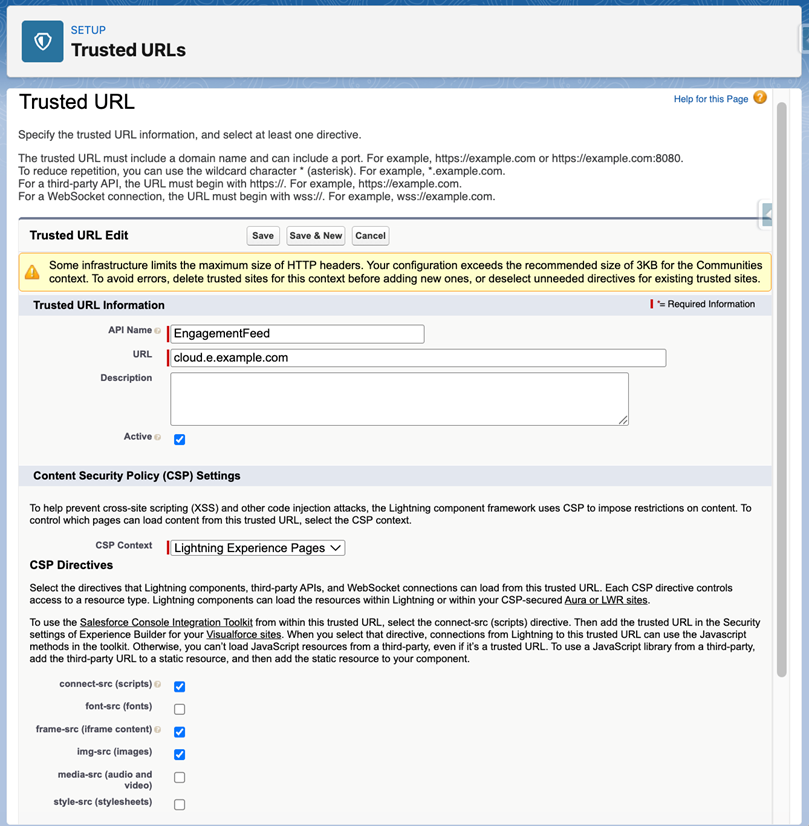
-
- Configure the Code Resource domain, for example cloud.e.example.com in your Salesforce org’s CSP Trusted Sites for the fetch() call and as a Trusted URL for Iframes to allow the modal iframe to load. Without this, the LWC will be blocked by the browser
- Supermessage cost: The Code Resources themselves are free to call and do not consume supermessages. However, the send-time HTTPGet() of the VAWP URL triggers a VAWP render, which consumes one supermessage. Therefore Option A with HTML archiving consumes two supermessages per email. Option B using post-send SSJS also incurs this cost per archived email. Factor this into your volume planning and licensing
- Enterprise 2.0 orgs: If sends originate from child Business Units, use a Shared Data Extension with ENT prefix for the archive so it is accessible from a single Code Resource on the parent BU
- Engagement data updates: The Send Log captures data at send time, when engagement flags are not yet available. The scheduled Query Activity that populates the Aggregated_marketing_engagement DE should join Send Log rows with the _Open, _Click, and _Bounce data views to set the engagement flags. Schedule this Query Activity to run at a frequency that balances data freshness with processing load, for example 1 to 4 hours
_________________________________________________________________________________
Written by: Lukas Lunow | Forum Ambassador
Lukas Lunow is a Lead Salesforce Consultant at NoA Ignite Denmark, a Salesforce Marketing Champion, and a Trailblazer Community Forum Ambassador. With 6+ years at Salesforce as a Senior Solutions Architect (EMEA), Lukas specialises in Marketing Cloud architecture, deliverability, and cross-cloud integration. He holds every available Marketing Cloud certification including the B2C Solution Architect credential.
Submissions reflect only the opinions of the user who made available the Submission and not the opinions of Salesforce, regardless of whether the user is affiliated with Salesforce, and may contain or constitute products, services, information, data, content and other materials made available by or on behalf of third parties (“Third Party Materials”). Salesforce neither controls nor endorses, nor is Salesforce responsible for, any Third Party Materials, including their accuracy, validity, timeliness, completeness, reliability, integrity, quality, legality, usefulness or safety, or any applicable intellectual property rights. Any Submissions made available through any message board or forum in response to posted questions, or that otherwise purports to answer any questions, including any questions about Salesforce or Programs, are made available for your general knowledge only and should never be relied upon as answers to your specific questions (even if an answer is marked as a “best” answer or with any similar qualifications). You should always contact Salesforce support for answers to your specific questions. Salesforce has no control over Submissions, and is not responsible for any use or misuse (including any distribution) by any third party of Submissions.
If you have questions, tap into the wisdom of our entire Trailblazer Community here: https://trailhead.salesforce.com/trailblazer-community/feed
Knowledge-artikkelin numero
005318897
Ratkaisiko tämä artikkeli ongelmasi?
Anna palautetta, jotta voimme kehittyä!
