Vælg en organisation
Some Snowflake Tables Do Not Display in the Data Pane in Tableau Desktop
Udgivelsesdato: Sep 3, 2026
Beskrivelse
When connecting to a Snowflake database schema containing a massive number of tables via Tableau Desktop, the table list in the Data Pane may be silently truncated.
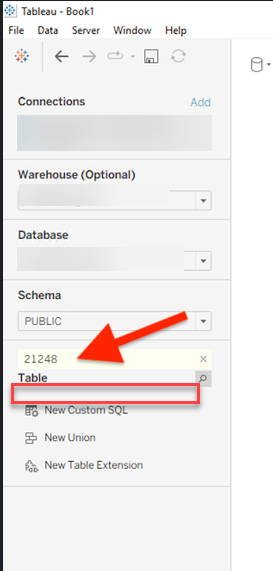
As a result, some tables become completely invisible. Searching for a specific table that falls beyond the truncation threshold yields a blank result, and no error message or warning is displayed to alert the user.
For example:
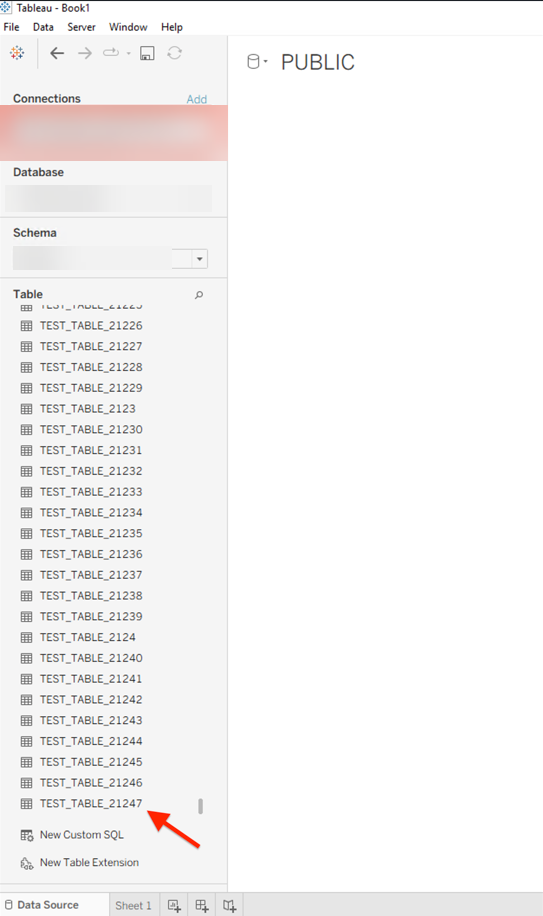
Consider a database schema containing 30,000 tables named sequentially from TEST_TABLE_1 to TEST_TABLE_30000. Due to this limitation, tables up to TEST_TABLE_21247 might be visible and searchable:
However, TABLE_21248 and all subsequent tables fall beyond the threshold and yield no results:
Løsning
To resolve this issue, use the following procedure to create a Tableau Datasource Customization (.tdc) file that disables the automatic loading of the entire table list.
- Create a Tableau Datasource Customization (.tdc) file with the
CAP_FAST_METADATAsetting set tonoto disable the automatic loading of the entire table list.e.g.// snowflake_cap_fast_metadata.tdc<?xml version='1.0' encoding='utf-8' ?> <connection-customization class='snowflake' enabled='true' version='8.10'> <vendor name='snowflake'/> <driver name='snowflake'/> <customizations> <customization name='CAP_FAST_METADATA' value='no' /> </customizations> </connection-customization> - Save the TDC file in the appropriate directory. For Windows, save it under
Restart Tableau Desktop to apply the changes and try connecting to Snowflake again.C:\Users\<user>\Documents\My Tableau Repository\Datasources.
Note: Refer to the Tableau guide on customizing and tuning connections for additional details on creating and using TDC files.
Yderligere ressourcer
Customize and Tune a Connection [Tableau Desktop and Web Authoring Help]
Vidensartikelnummer
005321512
Løste denne artikel dit problem?
Giv os besked, så vi kan forbedre os!
